
ServiceCommander
ServiceCommander: A focused, free utility for controlling local and remote Windows services. Ranked #20 of 30 in Startup Manager Software by our editors (6.8/10); pricing: Free plan; best for free local or remote service control.
At a glance
- Editor score6.8 / 10
- PricingFree plan
- Best forFree local or remote service control
- Free planYes
- Paid fromFree
- Facts checked20 Sep 2026
Where it wins
- Controls selected services individually or as groups
- Supports local and remote computer service management
- Includes imports, exports, status display, and system-tool shortcuts
Where it doesn't
- Focused on Windows services rather than conventional startup items
- Windows-only desktop utility
- Remote management is limited to configured service control
Our verdict on ServiceCommander
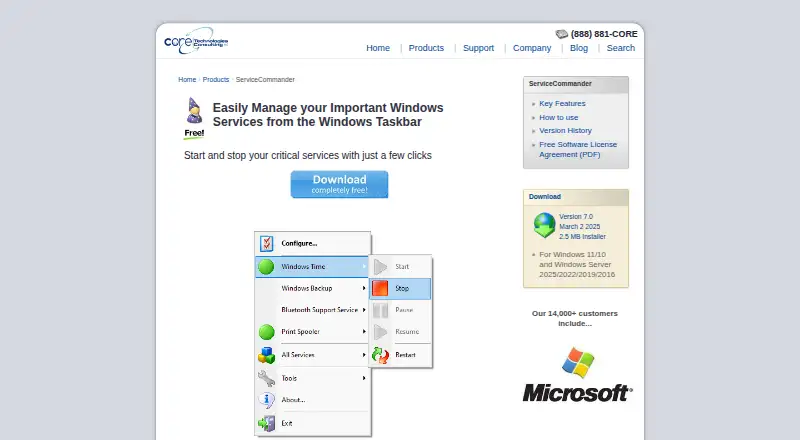
ServiceCommander is a free Windows desktop utility for managing selected services from the taskbar. It is aimed at administrators and technical users who need quick access to service controls on local or remote computers. Supported actions include starting, stopping, pausing, resuming, and restarting selected services, either individually or as a configured group. The installer supports Windows 10, Windows 11, and supported Windows Server editions.
Its strongest fit is focused service control rather than broad startup management. The taskbar menu can display whether services are running, while a configurable keyboard hotkey provides another way to open the menu. Service configurations can be imported and exported, which suits users who need to preserve or transfer selected service lists. ServiceCommander can also launch Event Viewer, Services, Task Manager, and Computer Management, keeping related Windows administration tools close at hand.
The trade-off is scope. ServiceCommander manages Windows services, so it is better suited to service operations than to a conventional startup manager centered on startup applications or entries. Its Windows-only platform focus also makes it unsuitable for users seeking cross-platform management. Choose it when free, direct control of selected local or remote services matters more than a broad startup-management feature set. Choose an alternative when you need startup-item coverage beyond Windows services or a wider operating-system ecosystem.
Your product? Our editors can test ServiceCommander in depth and publish a review, labelled as paid · from $149/mo →
ServiceCommander pricing
ServiceCommander fact sheet
| Free plan | Yes |
|---|---|
| Paid from | Free |
| Startup delay | Not verified |
| Service control | Yes |
| Startup inspection | Not verified |
| Windows support | Windows 10 and 11 |
| Portable edition | Not verified |
| Startup item limit | Not verified |
| Deployment | Desktop |
| Platforms | Windows |
| Built for | Solo, Small business, Mid-market, Enterprise (editorial estimate) |
| Pricing | Free plan |
| Website | coretechnologies.com |
| Facts checked | 20 Sep 2026 |
Alternatives to ServiceCommander
- AutorunsA free, detailed Windows tool for auditing and controlling startup activity.9.4
- Autorun OrganizerA broad, free Windows utility for controlling startup entries, delays, services, and scheduled tasks.9.2
- HiBit Startup ManagerA free Windows utility combining startup control, monitoring, delays, and system management.9.0



See all ServiceCommander alternatives →
Used ServiceCommander? Be the first to review it
The editor score above is our own research. What this page doesn't have yet is a reader's view — what you used ServiceCommander for, what worked and what didn't. No stars are seeded and no review is paid for; an editor reads every one before it appears.
Write a reviewTwo minutes · verified accounts only · read by an editor before it appears
Featured on iTechGuides

ServiceCommander is listed in our Startup Manager Software directory. Add the badge to your site — it links back to this page.
<a href="https://www.itechguides.com/products/servicecommander/"><img src="https://www.itechguides.com/best/badge/servicecommander.svg" alt="Featured on iTechGuides" width="230" height="46"></a>
Reviewed by iTechGuides Editors · Editorial team · Updated Oct 2026
Advertiser disclosure: iTechGuides is reader-supported. Vendors can pay for top positions in our rankings and for a place on other products' pages, and we may earn a commission when you click some links. Bought places stand at the number bought; this page and our disclosure say so. Paying vendors may get a fuller, more detailed review from our editors, and that review can change their score. How we rank.
Last updated · How we research and update