
Sektra AI
Sektra AI: A shared inbox for client-facing teams, with AI memory, source-linked answers and reply drafts. Ranked #9 of 30 in Shared Inbox Software by our editors (6.9/10); pricing: From $29/user/mo (annual) · 14-day trial; best for teams sharing Gmail and Outlook support.
At a glance
- Editor score6.9 / 10
- PricingFrom $29/user/mo (annual) · 14-day trial
- Best forTeams sharing Gmail and Outlook support
- Free planNo
- Paid from$29/user/mo
- Shared mailboxes2
- Facts checked19 Sep 2026
Where it wins
- Combines Gmail, Outlook and WhatsApp shared inboxes
- Collision detection, assignments and internal notes coordinate replies
- AI links answers to source threads and drafts responses
Where it doesn't
- Standard is limited to 2 shared inboxes and up to 5 seats
- Pro costs $59 per user per month billed annually
- Web-only platform; no mobile apps
Our verdict on Sektra AI
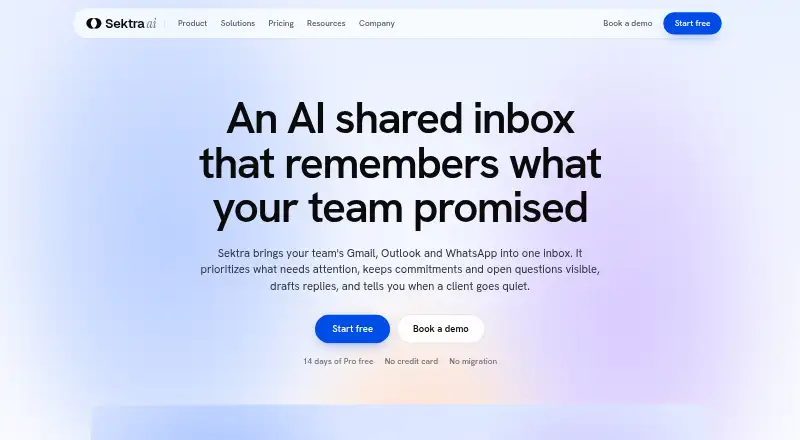
Sektra AI brings Gmail, Outlook and WhatsApp conversations into shared inboxes for client-facing teams. Agents can assign conversations, mention colleagues, add internal notes and detect when multiple people are replying at once. It is aimed at teams that want shared handling without moving their existing mail: the product description says it supports two-way email synchronization without requiring a mail migration. Shared labels, views, templates, signatures, reminders and watches help organize follow-up alongside the inbox work.
AI relationship memory extracts commitments and open questions, while source-linked answers point back to conversation threads. The product also offers reply drafts, bulk inbox actions, summaries and intent tagging. According to the vendor’s plan details, Standard includes priority inbox, summaries and intent tagging; Pro adds complete history memory, automatic drafts and advanced analytics. That distinction matters for teams evaluating AI as more than a triage aid: Pro is the tier that includes the full history memory layer and automatic drafts. Analytics cover response and resolution performance.
Published annual pricing starts with Standard at $29 per user per month, with two shared inboxes, one personal inbox per seat, up to five seats and 500 pooled AI credits per seat per month. Pro is $59 per user per month, with five shared inboxes, up to 25 seats and 2,000 pooled AI credits per seat per month. Enterprise offers unlimited seats and shared inboxes plus SAML SSO, SCIM, audit logs, custom retention, security review, a DPA and a dedicated success manager. A 14-day Pro trial is available, but there is no free plan. Integrations include Google Workspace, Microsoft 365, Slack, Microsoft Teams, Zapier, HubSpot and Salesforce. Teams wanting these email and messaging workflows in a web workspace may find a fit; teams requiring mobile apps or a free tier should look elsewhere.
Sektra AI pricing
All 3 Sektra AI plans and prices →
Sektra AI fact sheet
| Free plan | No |
|---|---|
| Paid from | $29/user/mo |
| Shared mailboxes | 2 |
| Internal comments | Yes |
| Collision detection | Yes |
| Assignment automation | Yes |
| Mail platforms | Gmail and outlook |
| Mobile apps | Not verified |
| Free trial | 14 days |
| Deployment | Cloud |
| Platforms | Web |
| Integrations | 10 integrations: Gmail, Google Workspace, Outlook, Microsoft 365, WhatsApp Business, Slack … |
| Pricing | From $29/user/mo (annual) · 14-day trial (source) |
| Website | sektra.ai |
| Facts checked | 19 Sep 2026 |
Sektra AI integrations
Sektra AI lists 10 integrations on its own site.
- Gmail
- Google Workspace
- Outlook
- Microsoft 365
- WhatsApp Business
- Slack
- Microsoft Teams
- Zapier
- HubSpot
- Salesforce
Alternatives to Sektra AI
- FrontA full-service support workspace with shared inboxes, ticketing, and omnichannel tools.9.0
- HiverHiver combines collaborative email, ticketing and helpdesk features, with a free plan and paid tiers.8.4
- Help ScoutA free-to-paid support platform with strong collaboration, automation, and help-center depth.7.9



See all Sektra AI alternatives →
Used Sektra AI? Be the first to review it
The editor score above is our own research. What this page doesn't have yet is a reader's view — what you used Sektra AI for, what worked and what didn't. No stars are seeded and no review is paid for; an editor reads every one before it appears.
Write a reviewTwo minutes · verified accounts only · read by an editor before it appears
Featured on iTechGuides

Sektra AI is listed in our Shared Inbox Software directory. Add the badge to your site — it links back to this page.
<a href="https://www.itechguides.com/products/sektra-ai/"><img src="https://www.itechguides.com/best/badge/sektra-ai.svg" alt="Featured on iTechGuides" width="230" height="46"></a>
Guides on shared inbox software
Reviewed by iTechGuides Editors · Editorial team · Updated Sep 2026
Advertiser disclosure: iTechGuides is reader-supported. We may earn a commission when you click some links. How we rank.
Last updated · How we research and update