SD Photo Rescue
SD Photo Rescue: A focused open-source choice for RAW photo recovery from SD cards on macOS and Linux. Ranked #38 of 44 in Photo Recovery Software by our editors (5.6/10); pricing: Free plan; best for free SD-card RAW recovery on macOS or Linux.
At a glance
- Editor score5.6 / 10
- PricingFree plan
- Best forFree SD-card RAW recovery on macOS or Linux
- Free planYes
- Paid fromFree
- Supported platformsMulti-platform
- Facts checked20 Sep 2026
Where it wins
- Supports CR2, CR3, NEF, ARW, RAF, ORF, RW2, DNG and PEF
- Read-only scanning protects the original SD card during recovery
- EXIF-date and megapixel filters help separate photos from thumbnails
Where it doesn't
- Limited to SD cards and raw disk-image recovery sources
- Command-line workflow may not suit users seeking a graphical interface
- No quick/deep scan modes or pre-save photo preview
Our verdict on SD Photo Rescue
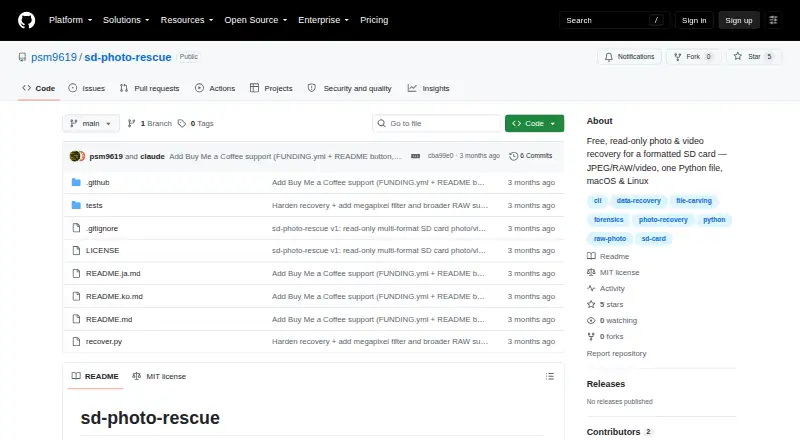
SD Photo Rescue is a free, open-source command-line tool for recovering photos and videos from formatted or corrupted SD cards. It runs locally on macOS and Linux, scans raw card bytes without writing to the card, and saves recovered files to a separate folder. The tool is aimed at photographers and technically comfortable users who need targeted recovery for JPEG, HEIC, camera RAW, MP4, or MOV files rather than a broad recovery suite for many storage types.
Its standout strength is the depth of its photo-focused carving workflow. SD Photo Rescue supports CR2, CR3, NEF, ARW, RAF, ORF, RW2, DNG, and PEF camera RAW formats alongside JPEG and HEIC. EXIF capture-date filtering can narrow results by when images were taken, while megapixel-based filtering helps separate full-size photos from thumbnails. Recovery can also work from a raw disk-image file, giving users an alternative to scanning a physical card directly.
The trade-off is a deliberately narrow scope and a command-line recovery wizard. The published feature set centers on SD cards and raw disk-image files, so it is less suitable for users who need recovery across a wider range of storage sources or prefer a visual, preview-led workflow. Choose SD Photo Rescue for free, local RAW recovery on macOS or Linux, especially when read-only scanning and photo-specific filters matter. Choose an alternative if broader device coverage, graphical navigation, or more guided scan modes are priorities.
Your product? Our editors can test SD Photo Rescue in depth and publish a review, labelled as paid · from $149/mo →
SD Photo Rescue pricing
SD Photo Rescue fact sheet
| Free plan | Yes |
|---|---|
| Paid from | Free |
| Supported platforms | Multi-platform |
| Recovery sources | SD cards; raw disk-image files |
| Scan modes | Not verified |
| Raw photo recovery | Yes |
| Disk image support | Yes |
| Photo preview | Not verified |
| Free recovery limit | Not verified |
| Deployment | Self-hosted |
| Platforms | macOS, Linux |
| Support | Community |
| Built for | Solo, Small business (editorial estimate) |
| Pricing | Free plan |
| Website | github.com |
| Facts checked | 20 Sep 2026 |
Alternatives to SD Photo Rescue
- PhotoRecA broad, free recovery tool for difficult media, with a less convenient photo-first workflow.9.3
- EaseUS Data Recovery WizardBroad recovery coverage, but the free plan is limited to two files.9.1
- RecuvaA capable free option for recovering deleted photos from Windows and camera cards.9.0



See all SD Photo Rescue alternatives →
Also Ranked In
SD Photo Rescue is ranked in 2 of our directories.
Used SD Photo Rescue? Be the first to review it
The editor score above is our own research. What this page doesn't have yet is a reader's view — what you used SD Photo Rescue for, what worked and what didn't. No stars are seeded and no review is paid for; an editor reads every one before it appears.
Write a reviewTwo minutes · verified accounts only · read by an editor before it appears
Featured on iTechGuides

SD Photo Rescue is listed in our Photo Recovery Software directory. Add the badge to your site — it links back to this page.
<a href="https://www.itechguides.com/products/sd-photo-rescue/"><img src="https://www.itechguides.com/best/badge/sd-photo-rescue.svg" alt="Featured on iTechGuides" width="230" height="46"></a>
Reviewed by iTechGuides Editors · Editorial team · Updated Oct 2026
Advertiser disclosure: iTechGuides is reader-supported. Vendors can pay for top positions in our rankings and for a place on other products' pages, and we may earn a commission when you click some links. Bought places stand at the number bought; this page and our disclosure say so. Paying vendors may get a fuller, more detailed review from our editors, and that review can change their score. How we rank.
Last updated · How we research and update