ScreenshotCore
ScreenshotCore: A hosted capture API with broad output formats and detailed rendering controls. Ranked #4 of 29 in Screenshot APIs by our editors (7.9/10); pricing: From $8/mo · 7-day trial; best for developers needing advanced capture controls and formats.
At a glance
- Editor score7.9 / 10
- PricingFrom $8/mo · 7-day trial
- Best forDevelopers needing advanced capture controls and formats
- Free planNo
- Paid from$8/mo
- PDF outputYes
- Facts checked29 Sep 2026
Where it wins
- Captures URLs, HTML, or Markdown as image, PDF, or video formats
- Supports full-page capture, wait conditions, and browser interactions
- Provides asynchronous jobs with signed webhooks and CDN caching
Where it doesn't
- There is no ongoing free plan; the free offering lasts 7 days
- Starter limits usage to 5,000 screenshots and 150 videos monthly
- Annual billing is mentioned, but its prices are not displayed
Our verdict on ScreenshotCore
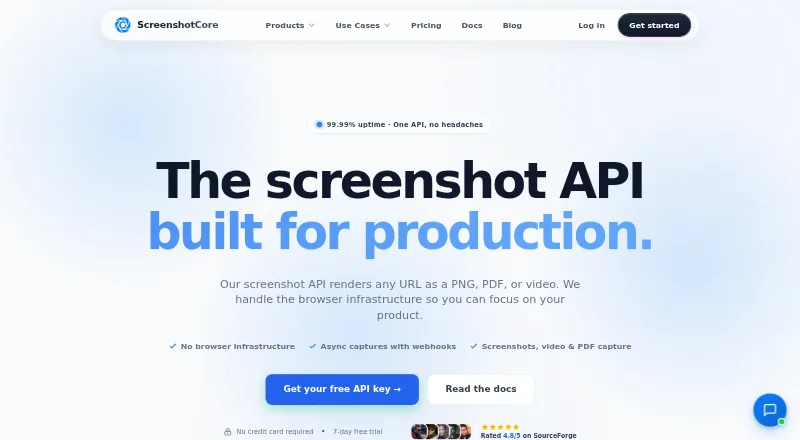
ScreenshotCore is a hosted REST API for developers who need to render public URLs, supplied HTML, or Markdown without operating browsers. It returns captures as PNG, JPEG, WebP, PDF, MP4, WebM, or GIF, with controls for full-page scrolling, viewport and device emulation, and pixel density. That combination suits teams building capture into applications or automated workflows; it is more specialized than a general-purpose browser platform.
The seven-day trial includes 300 screenshots, 50 videos, full API access, and does not require a credit card. After the trial, Starter costs $8 per month for 5,000 screenshots and 150 videos, while Pro costs $25 per month for 20,000 shared screenshots and videos. Max costs $65 per month for 60,000 shared screenshots and videos and adds priority support. Each paid tier lists HTML and Markdown input, PDF, PNG, JPEG and WebP output, full-page capture, and asynchronous webhooks. The published pricing page mentions annual billing with a 20% saving, but gives monthly prices here.
Capture controls are a notable strength: requests can wait for network idle, selectors, or fixed delays; inject JavaScript and CSS; click, hover, or scroll elements; emulate geolocation and display settings; and block ads, trackers, cookie banners, or chat. Signed requests and CDN caching complement asynchronous jobs and signed webhooks. Zapier, Make, Amazon S3, Node.js, and Python integrations provide workflow and development options. Choose ScreenshotCore when rendering flexibility and multiple output formats matter; look elsewhere if the need is an ongoing free tier or a narrower, simpler capture service.
ScreenshotCore pricing
All 4 ScreenshotCore plans and prices →
ScreenshotCore fact sheet
| Free plan | No |
|---|---|
| Paid from | $8/mo |
| HTML input | Yes |
| PDF output | Yes |
| Full-page capture | Yes |
| Custom viewport | Yes |
| Wait conditions | Yes |
| Geo-location | Yes |
| Free trial | 7 days · no card needed |
| Money-back guarantee | 7 days |
| Deployment | Cloud |
| Platforms | Web |
| Compliance & security | GDPR |
| Support | Email, Live chat, Docs |
| Built for | Solo, Small business, Mid-market, Enterprise (editorial estimate) |
| Integrations | 5 integrations: Zapier, Make, Amazon S3, Node.js, Python |
| Pricing | From $8/mo · 7-day trial (source) |
| Website | screenshotcore.com |
| Facts checked | 29 Sep 2026 |
ScreenshotCore integrations
ScreenshotCore lists 5 integrations on its own site.
- Zapier
- Make
- Amazon S3
- Node.js
- Python
Alternatives to ScreenshotCore
- UrlboxA configurable rendering API with full-page capture, varied outputs, and storage integrations.9.0
- ScrapingBeeA broad scraping API that adds screenshots to browser rendering and extraction tools.8.0
- AddScreenshotsBroad screenshot automation and delivery options with a free starting tier.7.9


See all ScreenshotCore alternatives →
ScreenshotCore vs the competition
- ScreenshotCore vs Urlbox
- ScreenshotCore vs ScrapingBee
- ScreenshotCore vs AddScreenshots
- ScreenshotCore vs Adobe PDF Services API
- ScreenshotCore vs Screenshotty
- ScreenshotCore vs WebsiteScreenshotAPI

Compare ScreenshotCore with any tool side by side →
Used ScreenshotCore? Be the first to review it
The editor score above is our own research. What this page doesn't have yet is a reader's view — what you used ScreenshotCore for, what worked and what didn't. No stars are seeded and no review is paid for; an editor reads every one before it appears.
Write a reviewTwo minutes · verified accounts only · read by an editor before it appears
Featured on iTechGuides

ScreenshotCore is listed in our Screenshot APIs directory. Add the badge to your site — it links back to this page.
<a href="https://www.itechguides.com/products/screenshotcore/"><img src="https://www.itechguides.com/best/badge/screenshotcore.svg" alt="Featured on iTechGuides" width="230" height="46"></a>
Reviewed by iTechGuides Editors · Editorial team · Updated Sep 2026
Advertiser disclosure: iTechGuides is reader-supported. We may earn a commission when you click some links. It never changes a score or a verdict. How we rank.
Last updated · How we research and update