
ScreenRecord.in
ScreenRecord.in: A focused free recorder for quick browser-based tutorials, demos, and bug reports. Ranked #88 of 131 in Screen Recording Software by our editors (3.0/10); pricing: Free plan; best for users wanting a minimal free browser recorder.
At a glance
- Editor score3.0 / 10
- PricingFree plan
- Best forUsers wanting a minimal free browser recorder
- Free planYes
- Paid fromFree
- Webcam recordingYes
- Facts checked22 Sep 2026
Where it wins
- Captures screens, windows, tabs, webcams, microphones, and system audio
- Supports multi-monitor recording with pause and resume controls
- Saves recordings locally and offers optional shareable cloud links
Where it doesn't
- Works through the web platform rather than native desktop or mobile apps
- Feature depth is limited compared with broader recording suites
- Cloud sharing is optional rather than the default recording workflow
Our verdict on ScreenRecord.in
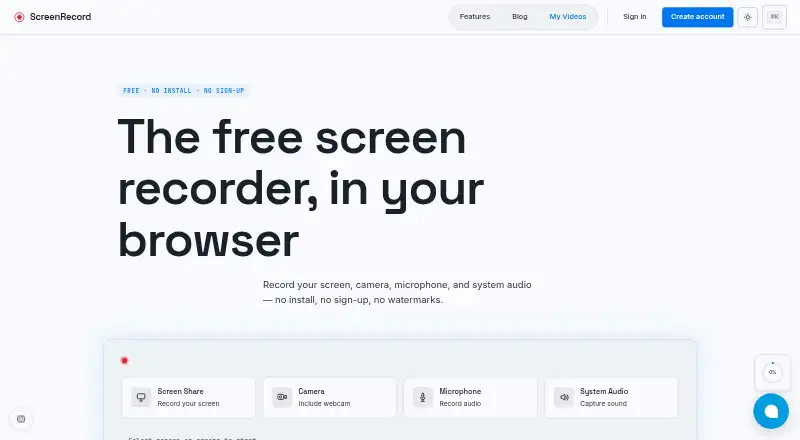
ScreenRecord.in is a free browser-based screen recorder for tutorials, product demos, bug reports, documentation, and feedback. It can capture a full screen, individual window, or browser tab, while also recording webcam video, microphone input, and system audio. Picture-in-picture webcam recording and multi-monitor support make it suitable for straightforward instructional or explanatory content. Recordings are saved on the user's device by default, and the service works in Chrome, Firefox, Safari, and Edge.
The main appeal is a low-friction free workflow. The recorder requires no installation, registration, or payment, and it does not add a watermark. Users can pause and resume recordings, then save and download the result locally. Optional cloud sharing adds shareable links when a recording needs to be sent to someone else, while local saving keeps the primary workflow centered on the user's device. This combination fits occasional recording tasks where speed and simplicity matter more than project management or editing depth.
ScreenRecord.in is a good pick for users who want essential capture controls in a browser without committing to a larger software suite. It covers the core inputs needed for demos, walkthroughs, and feedback, but its web-only platform coverage and limited feature depth make it less suitable for users seeking a broader recording environment. Choose it for focused, no-cost browser recording; consider an alternative when native applications or more extensive production features are priorities.
Your product? Our editors can test ScreenRecord.in in depth and publish a review, labelled as paid · from $149/mo →
ScreenRecord.in pricing
ScreenRecord.in fact sheet
| Free plan | Yes |
|---|---|
| Paid from | Free |
| Webcam recording | Yes |
| System audio | Yes |
| Microphone recording | Yes |
| Max recording length | Not verified |
| Maximum video quality | Not verified |
| Supported platforms | web |
| Deployment | Cloud |
| Platforms | Web |
| Built for | Solo, Small business (editorial estimate) |
| Pricing | Free plan |
| Website | screenrecord.in |
| Facts checked | 22 Sep 2026 |
Alternatives to ScreenRecord.in
- CamtasiaA deep desktop toolkit for training videos, tutorials, and structured learning content.9.3
- ScreenPalA feature-rich choice for budget-conscious creators who need more than basic recording.9.1
- LoomA broad screen recorder for teams that communicate through polished async video.9.0



See all ScreenRecord.in alternatives →
Used ScreenRecord.in? Be the first to review it
The editor score above is our own research. What this page doesn't have yet is a reader's view — what you used ScreenRecord.in for, what worked and what didn't. No stars are seeded and no review is paid for; an editor reads every one before it appears.
Write a reviewTwo minutes · verified accounts only · read by an editor before it appears
Featured on iTechGuides

ScreenRecord.in is listed in our Screen Recording Software directory. Add the badge to your site — it links back to this page.
<a href="https://www.itechguides.com/products/screenrecord-in/"><img src="https://www.itechguides.com/best/badge/screenrecord-in.svg" alt="Featured on iTechGuides" width="230" height="46"></a>
Reviewed by iTechGuides Editors · Editorial team · Updated Oct 2026
Advertiser disclosure: iTechGuides is reader-supported. Vendors can pay for top positions in our rankings and for a place on other products' pages, and we may earn a commission when you click some links. Bought places stand at the number bought; this page and our disclosure say so. Paying vendors may get a fuller, more detailed review from our editors, and that review can change their score. How we rank.
Last updated · How we research and update