
screenpipe
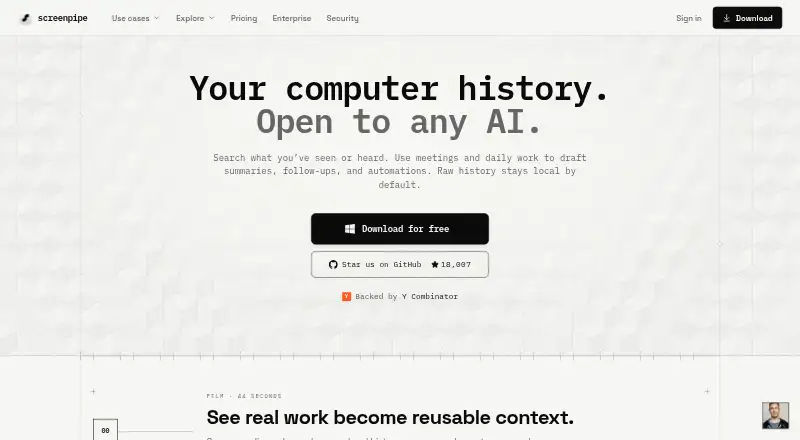
screenpipe: A searchable work-session memory layer with capture, transcription, and AI workflows. Ranked #15 of 39 in AI Screen Recorders by our editors (7.4/10); pricing: Free plan; best for continuous searchable work-session capture.
At a glance
- Editor score7.4 / 10
- PricingFree plan
- Best forContinuous searchable work-session capture
- Free planYes
- Paid from$250/yr
- AI transcriptionYes
- Founded2024
- Facts checked20 Sep 2026
Where it wins
- Continuous screen, audio, and meeting capture with OCR and local transcription
- Searchable history with summaries, action items, speaker identification, and diarization
- Local API and MCP support with integrations for major AI and work tools
Where it doesn't
- Continuous desktop capture is less suited to conventional shareable screen recording
- Business features require a paid seat-based plan
- The product is not open source
Our verdict on screenpipe
screenpipe is a desktop application for continuously capturing screen activity, app text, microphone audio, system audio, and meeting content. It is aimed at individual users, consultants, developers, and teams that need searchable work history for AI-assisted recall and automation. Audio is transcribed locally, captured information is indexed for search, and selected context can be shared with AI tools. The product supports macOS, Windows, Linux, and an API, with MP4 export for meetings containing synchronized screen and audio.
Pricing follows a freemium structure. The Free plan costs $0 per month and supports capture on one device, recent-work search across apps and conversations, and selected context sharing with AI tools. Basic is $250/year, displayed as approximately $21/month billed annually, adding full searchable history across apps, meetings, and audio, MCP context for AI tools, and unlimited scheduled workflows installed by the user. Business is $500/seat/year, displayed as approximately $42/seat/month billed annually, adding cross-device work-context sync, recurring workflows grounded in captured context, and a team workspace with managed seats. Enterprise adds managed deployment plus SSO, MDM, retention, device controls, and custom storage and deployment controls.
Its standout strength is the combination of continuous capture, local AI transcription, OCR fallback, speaker identification, searchable history, summaries, action-item extraction, and scheduled workflows. App, window, and URL exclusions, along with local redaction, provide controls for narrowing what is captured. Integrations include Claude, ChatGPT, Cursor, Claude Code, Cline, Continue, OpenCode, Gemini CLI, Ollama, Obsidian, Notion, Google Calendar, Slack, Zoom, and Microsoft Teams. Choose screenpipe when searchable work-session memory and AI context matter more than producing conventional recordings. Choose another tool if shareable screen recording is the primary requirement.
Your product? Our editors can test screenpipe in depth and publish a review, labelled as paid · from $149/mo →
screenpipe pricing
All 4 screenpipe plans and prices →
screenpipe fact sheet
| Free plan | Yes |
|---|---|
| Paid from | $250/yr |
| AI transcription | Yes |
| AI summaries | Yes |
| Documentation output | Yes |
| Speaker identification | Yes |
| Recording limit | Not verified |
| Platform support | Desktop |
| Export formats | MP4 |
| Deployment | Cloud, Desktop |
| Platforms | macOS, Windows, Linux |
| Compliance & security | SOC 2, GDPR, HIPAA |
| Support | Email, Community, Docs |
| Built for | Solo, Small business, Mid-market, Enterprise (editorial estimate) |
| Integrations | 18 integrations: Claude, ChatGPT, Cursor, Claude Code, Cline, Continue … |
| Pricing | Free plan (source) |
| Website | screenpipe.com |
| Facts checked | 20 Sep 2026 |
screenpipe integrations
screenpipe lists 18 integrations on its own site.
- Claude
- ChatGPT
- Cursor
- Claude Code
- Cline
- Continue
- OpenCode
- Gemini CLI
- Ollama
- Obsidian
- Notion
- Google Calendar
- Slack
- Zoom
- Microsoft Teams
- HubSpot
- Salesforce
- Toggl
Alternatives to screenpipe
- LoomA polished screen recorder with broad integrations, AI options, and a higher paid entry point.9.2
- ZightA broad AI capture and administration tool with a useful free tier.9.0
- ScreenPalA feature-rich freemium recorder with 4K capture, AI tools, and broad device coverage.8.8



See all screenpipe alternatives →
Also Ranked In
screenpipe is ranked in 2 of our directories.
Used screenpipe? Be the first to review it
The editor score above is our own research. What this page doesn't have yet is a reader's view — what you used screenpipe for, what worked and what didn't. No stars are seeded and no review is paid for; an editor reads every one before it appears.
Write a reviewTwo minutes · verified accounts only · read by an editor before it appears
Featured on iTechGuides

screenpipe is listed in our AI Screen Recorders directory. Add the badge to your site — it links back to this page.
<a href="https://www.itechguides.com/products/screenpipe/"><img src="https://www.itechguides.com/best/badge/screenpipe.svg" alt="Featured on iTechGuides" width="230" height="46"></a>
Reviewed by iTechGuides Editors · Editorial team · Updated Oct 2026
Advertiser disclosure: iTechGuides is reader-supported. Vendors can pay for top positions in our rankings and for a place on other products' pages, and we may earn a commission when you click some links. Bought places stand at the number bought; this page and our disclosure say so. Paying vendors may get a fuller, more detailed review from our editors, and that review can change their score. How we rank.
Last updated · How we research and update