
ScanScan
ScanScan: A multi-device OCR tool for scanning, editing, and exporting printed or handwritten text. Ranked #19 of 40 in OCR Software by our editors (6.8/10); pricing: Free plan; best for individuals scanning and proofreading across devices.
At a glance
- Editor score6.8 / 10
- PricingFree plan
- Best forIndividuals scanning and proofreading across devices
- Free planYes
- Facts checked23 Sep 2026
Where it wins
- Recognizes printed, handwritten, and vertical text
- Converts recognized tables to Excel and supports batch OCR
- Lets users proofread OCR output alongside the source image
Where it doesn't
- Membership is purchased in the app rather than through the web version
- The web version has daily usage limits
- The product focuses on document OCR and scanning rather than broader workflows
Our verdict on ScanScan
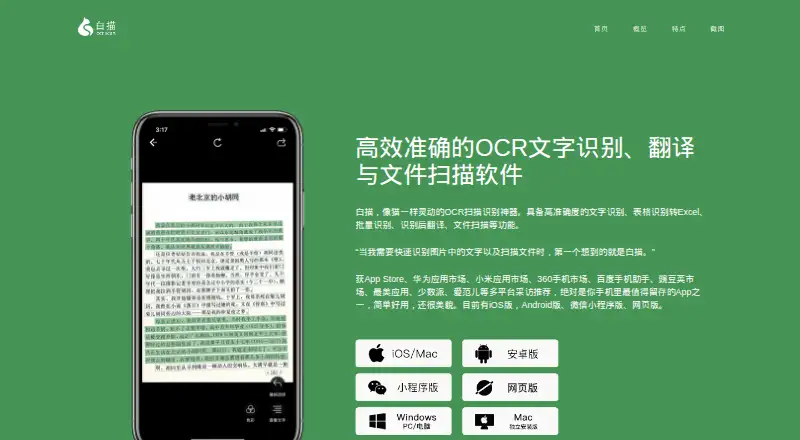
ScanScan, also known as Baimiao or 白描, extracts editable text from images and scanned documents. It is suited to individuals who scan and proofread across devices, with versions for web, Windows, macOS, iOS, and Android. Its recognition covers printed and handwritten text, including vertical text, and the product also supports scanning pages into a combined PDF. A free option makes it possible to start without a paid membership.
The product's range is geared to document conversion as well as recognition. It can process images in batches, generate PDFs in batches, recognize tables for Excel conversion, and translate recognition results. ScanScan also offers document edge detection and scan enhancement. In the web version, users can extract PDF text and export results to DOCX or TXT; image OCR and image-table conversion are also available there. Editing and proofreading output alongside the source image helps keep the original visible during correction.
Access differs by platform: the vendor says the web version can be used free with daily limits, while membership is purchased in the app. The vendor describes membership as a one-time payment, and the App Store lists in-app purchases, including a permanent VIP purchase. Those options suit occasional users who can work within web limits and people who prefer to unlock membership in the app. ScanScan is a reasonable fit for solo and small-scale document work, but less suitable for buyers who need a browser plan without daily limits or a wider document workflow beyond OCR, scanning, and conversion.
Your product? Our editors can test ScanScan in depth and publish a review, labelled as paid · from $149/mo →
ScanScan pricing
ScanScan fact sheet
| Free plan | Yes |
|---|---|
| Paid from | Not verified |
| Searchable PDF | Not verified |
| Word export | Yes |
| Handwriting OCR | Yes |
| Supported languages | Not verified |
| Monthly page limit | Not verified |
| Primary platform | Both |
| Supported inputs | Both |
| Deployment | Cloud, Desktop, Mobile |
| Platforms | Web, Windows, macOS, iOS, Android |
| Support | |
| Built for | Solo, Small business (editorial estimate) |
| Pricing | Free plan |
| Website | baimiao.uzero.cn |
| Facts checked | 23 Sep 2026 |
Alternatives to ScanScan
- PaddleOCRA developer-focused OCR toolkit with multilingual, handwriting, and document parsing workflows.9.3
- Tesseract OCRA mature, developer-focused OCR engine with broad outputs and self-hosting flexibility.9.1
- ABBYY FineReader PDFA broad desktop PDF suite for OCR, editing, conversion, forms, and document control.9.0

See all ScanScan alternatives →
Used ScanScan? Be the first to review it
The editor score above is our own research. What this page doesn't have yet is a reader's view — what you used ScanScan for, what worked and what didn't. No stars are seeded and no review is paid for; an editor reads every one before it appears.
Write a reviewTwo minutes · verified accounts only · read by an editor before it appears
Featured on iTechGuides

ScanScan is listed in our OCR Software directory. Add the badge to your site — it links back to this page.
<a href="https://www.itechguides.com/products/scanscan/"><img src="https://www.itechguides.com/best/badge/scanscan.svg" alt="Featured on iTechGuides" width="230" height="46"></a>
Reviewed by iTechGuides Editors · Editorial team · Updated Oct 2026
Advertiser disclosure: iTechGuides is reader-supported. Vendors can pay for top positions in our rankings and for a place on other products' pages, and we may earn a commission when you click some links. Bought places stand at the number bought; this page and our disclosure say so. Paying vendors may get a fuller, more detailed review from our editors, and that review can change their score. How we rank.
Last updated · How we research and update