SAWAS Dashboard
SAWAS Dashboard: A free Windows dashboard that combines monitoring, notes, favorites, and network utilities. Ranked #18 of 29 in Desktop Widget Software by our editors (7.3/10); pricing: Free plan; best for windows users wanting a practical free dashboard.
At a glance
- Editor score7.3 / 10
- PricingFree plan
- Best forWindows users wanting a practical free dashboard
- Free planYes
- Paid fromFree
- Supported platformsWindows
- Facts checked20 Sep 2026
Where it wins
- Combines CPU, RAM, network rates, charts, notes, and favorites
- Adds LAN scanning, Wi-Fi switching, and internet speed testing
- Runs locally with configurable modules and backup and restore
Where it doesn't
- Supports Windows only, with the desktop version described for Windows 11
- Browser favorites and integrations focus on Chrome, Edge, and speedtest-cli
- Native iOS and Android apps are still under development
Our verdict on SAWAS Dashboard
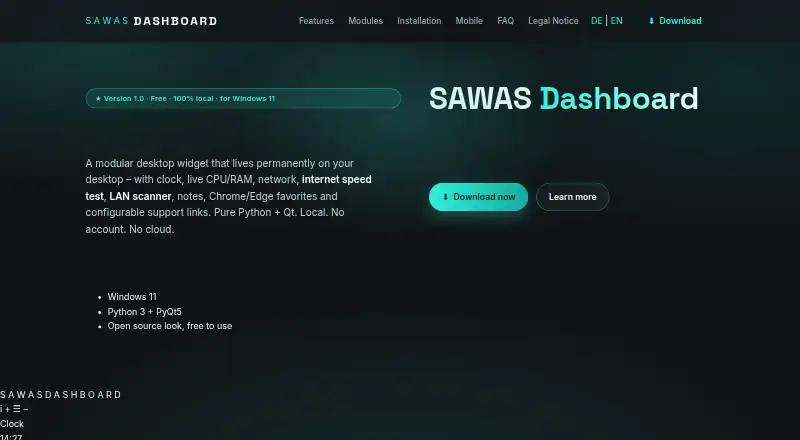
SAWAS Dashboard is a free Windows desktop widget for users who want everyday system information and network tools in one configurable workspace. It stays visible behind normal windows and combines a clock and date display with live CPU and RAM monitoring, real-time download and upload rates, local notes, browser favorites, LAN scanning, internet speed testing, and history charts. Windows users can enable or disable modules, resize and move the dashboard, and configure autostart.
Its breadth is the main reason to consider it. Alongside basic desktop widgets, SAWAS Dashboard includes Chrome and Edge favorites with search and pinning, LAN device scanning with Wi-Fi status and switching, configurable support links, and charts covering CPU, RAM, and network history. The software runs locally without an account or cloud service, while backup and restore covers settings and local data. That combination suits users who prefer a persistent utility panel rather than a single-purpose clock or system monitor.
The ecosystem is focused rather than broad. Integrations include Google Chrome, Microsoft Edge, and speedtest-cli, so the browser component is most relevant to users working within those tools. The published product details describe a Windows 11 desktop version and a separate mobile browser version; native iOS and Android apps are under development. Choose SAWAS Dashboard if you want a free, modular Windows dashboard with local monitoring and practical network utilities. Consider an alternative if you need wider platform coverage, broader browser integration, or a native mobile app today.
Your product? Our editors can test SAWAS Dashboard in depth and publish a review, labelled as paid · from $149/mo →
SAWAS Dashboard pricing
SAWAS Dashboard fact sheet
| Free plan | Yes |
|---|---|
| Paid from | Free |
| Supported platforms | Windows |
| Widget categories | Clock and date; system CPU/RAM; network rate; notes; Chrome favorites; Edge favorites; network scanner; support links |
| System monitoring | Yes |
| Custom layouts | Yes |
| Weather widgets | Not verified |
| Calendar widgets | Not verified |
| Feed widgets | Not verified |
| Deployment | Desktop |
| Platforms | Windows |
| Support | |
| Built for | Solo, Small business (editorial estimate) |
| Integrations | 3 integrations: Google Chrome, Microsoft Edge, speedtest-cli |
| Pricing | Free plan |
| Website | sawas.at |
| Facts checked | 20 Sep 2026 |
SAWAS Dashboard integrations
SAWAS Dashboard lists 3 integrations on its own site.
- Google Chrome
- Microsoft Edge
- speedtest-cli
Alternatives to SAWAS Dashboard
- Monitor FlowsA flexible Windows dashboard tool with broad integrations and multi-monitor support.9.4
- RainmeterA flexible Windows widget toolkit for system data, feeds, controls, and custom layouts.9.3
- GadgetPack (formerly 8GadgetPack)A free Windows gadget collection with monitoring, utilities, and desktop organization.9.0


See all SAWAS Dashboard alternatives →
Used SAWAS Dashboard? Be the first to review it
The editor score above is our own research. What this page doesn't have yet is a reader's view — what you used SAWAS Dashboard for, what worked and what didn't. No stars are seeded and no review is paid for; an editor reads every one before it appears.
Write a reviewTwo minutes · verified accounts only · read by an editor before it appears
Featured on iTechGuides

SAWAS Dashboard is listed in our Desktop Widget Software directory. Add the badge to your site — it links back to this page.
<a href="https://www.itechguides.com/products/sawas-dashboard/"><img src="https://www.itechguides.com/best/badge/sawas-dashboard.svg" alt="Featured on iTechGuides" width="230" height="46"></a>
Reviewed by iTechGuides Editors · Editorial team · Updated Oct 2026
Advertiser disclosure: iTechGuides is reader-supported. Vendors can pay for top positions in our rankings and for a place on other products' pages, and we may earn a commission when you click some links. Bought places stand at the number bought; this page and our disclosure say so. Paying vendors may get a fuller, more detailed review from our editors, and that review can change their score. How we rank.
Last updated · How we research and update