
Sarra
Sarra: Email-based scheduling with calendar support, booking links, and plan-based meeting limits. Ranked #19 of 25 in AI Scheduling Assistants by our editors (7.3/10); pricing: Free plan; best for users wanting free email and group scheduling.
At a glance
- Editor score7.3 / 10
- PricingFree plan
- Best forUsers wanting free email and group scheduling
- Free planYes
- Facts checked19 Sep 2026
Where it wins
- Coordinates scheduling by email and checks Google or Microsoft calendars
- Supports booking links, follow-ups, rescheduling, and calendar briefings
- Gold adds group availability polling and team scheduling
Where it doesn't
- Free is limited to 3 meetings per month per seat
- Group scheduling requires Gold or a higher plan
- Higher meeting limits and features require a paid plan
Our verdict on Sarra
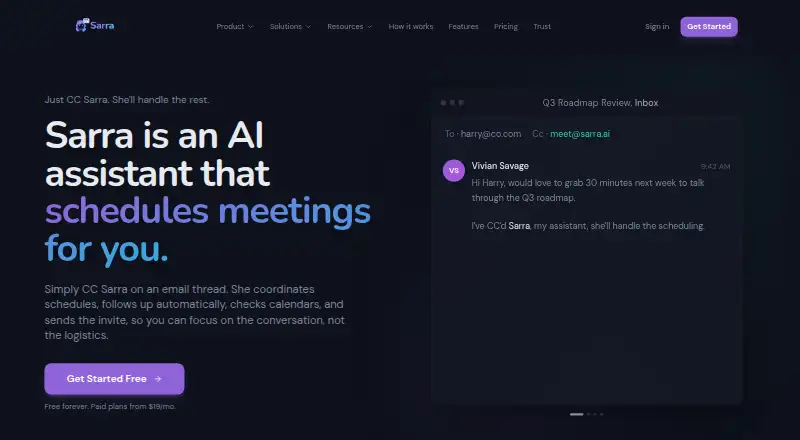
Sarra coordinates meetings from email threads: users copy it on a conversation, and it checks connected Google Calendar or Microsoft Outlook availability, proposes times, communicates with invitees, and creates or updates calendar events after agreement. It is aimed at individuals and teams who want scheduling to happen through email rather than a separate booking workflow. Invitees do not need a Sarra account or installation. Personal booking links provide another route for arranging meetings.
The plan limits make the free option a small-scale starting point, not an open-ended group scheduler. Free includes 3 meetings per month per seat, 1:1 scheduling, standard AI scheduling, and a Google Calendar or Outlook integration. Silver raises the limit to 20 meetings per month per seat and adds configurable follow-up nudges, up to 5 booking types, and custom tone and signature. Gold allows 60 meetings per month per seat, up to 20 booking types, group scheduling with availability polling, and a dedicated account manager. Platinum raises the limit to 150 meetings per month per seat, with unlimited booking types, priority support, and the highest-capability AI model on every request. According to the vendor's pricing page, paid prices vary by billing period.
Its email-first approach is the defining fit: Sarra can follow up when participants do not respond, handle direct booking at a specified time, and reschedule or cancel calendar events. Daily and weekly calendar briefings extend it beyond arranging an individual meeting. It connects with Google Calendar, Microsoft Outlook, Google Meet, Microsoft Teams, and Zoom, and is available on web and through an API. Choose Sarra if email-thread coordination and calendar automation are central to your workflow; look elsewhere if you need group polling on the free plan or regularly exceed its meeting allowance without moving to a paid tier.
Your product? Our editors can test Sarra in depth and publish a review, labelled as paid · from $149/mo →
Sarra pricing
All 4 Sarra plans and prices →
Sarra fact sheet
| Free plan | Yes |
|---|---|
| Paid from | Not verified |
| Calendar support | Not verified |
| Invitee messaging | Yes |
| Autonomous rescheduling | Yes |
| Team scheduling | Yes |
| Scheduling channels | |
| Monthly meeting limit | 20 meetings/mo |
| Deployment | Cloud |
| Platforms | Web |
| Integrations | 5 integrations: Google Calendar, Microsoft Outlook, Google Meet, Microsoft Teams, Zoom |
| Pricing | Free plan (source) |
| Website | sarra.ai |
| Facts checked | 19 Sep 2026 |
Sarra integrations
Sarra lists 5 integrations on its own site.
- Google Calendar
- Microsoft Outlook
- Google Meet
- Microsoft Teams
- Zoom
Alternatives to Sarra
- DayOtterFlexible scheduling for individuals and teams, with hosted and self-hosted options.9.4
- AriAri handles email-based scheduling, with free access capped at 10 meetings total.9.2
- CalendarBridge AI Scheduling AssistantEmail-driven scheduling across multiple calendars, with automated proposals, booking and rescheduling.9.1



Used Sarra? Be the first to review it
The editor score above is our own research. What this page doesn't have yet is a reader's view — what you used Sarra for, what worked and what didn't. No stars are seeded and no review is paid for; an editor reads every one before it appears.
Write a reviewTwo minutes · verified accounts only · read by an editor before it appears
Featured on iTechGuides

Sarra is listed in our AI Scheduling Assistants directory. Add the badge to your site — it links back to this page.
<a href="https://www.itechguides.com/products/sarra/"><img src="https://www.itechguides.com/best/badge/sarra.svg" alt="Featured on iTechGuides" width="230" height="46"></a>
Reviewed by iTechGuides Editors · Editorial team · Updated Oct 2026
Advertiser disclosure: iTechGuides is reader-supported. Vendors can pay for top positions in our rankings and for a place on other products' pages, and we may earn a commission when you click some links. Bought places stand at the number bought; this page and our disclosure say so. Paying vendors may get a fuller, more detailed review from our editors, and that review can change their score. How we rank.
Last updated · How we research and update