
Sable
Sable: A capable local-first editor for layered work without accounts or cloud processing. Ranked #23 of 98 in AI Photo Editors by our editors (7.4/10); pricing: Free plan; best for open-source desktop editing with local AI.
At a glance
- Editor score7.4 / 10
- PricingFree plan
- Best forOpen-source desktop editing with local AI
- Free planYes
- Paid fromNone
- Generative editingYes
- Facts checked22 Sep 2026
Where it wins
- Local AI includes selection, background removal, upscaling, and object removal
- Non-destructive layers, masks, filters, selections, and retouching tools
- Runs on Windows, macOS, and Linux without an account or cloud service
Where it doesn't
- Desktop-only workflow with no mobile app
- Generative Fill and text-to-image require optional local ComfyUI integration
- Support is centered on community resources and documentation
Our verdict on Sable
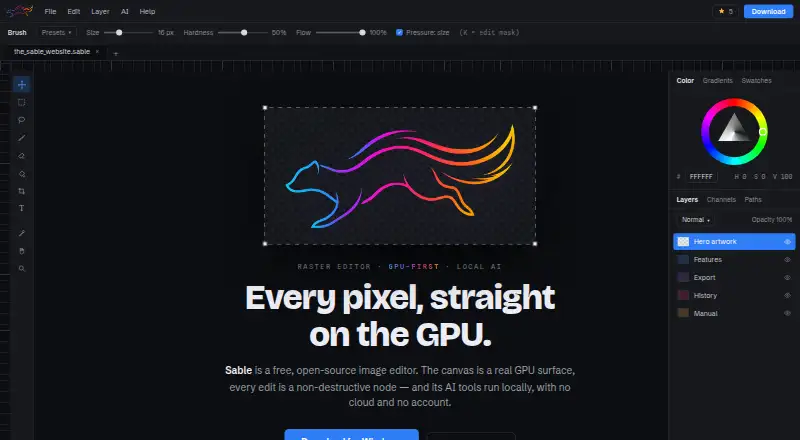
Sable is a free, MIT-licensed raster image editor for Windows, macOS, and Linux. It is aimed at solo creators, small teams, and organizations that want layered desktop editing with local AI rather than an account-based cloud service. The application combines a GPU-based canvas with a non-destructive document graph covering pixel, shape, text, vector-path, group, adjustment, and live-filter layers. Its toolset also includes masks, blend modes, selections, brush work, cloning, healing, patching, liquify, and mesh warping.
The pricing model is straightforward: Sable is free and open source. Its local AI features include smart selection, background removal, upscaling, and object removal. An optional local ComfyUI integration adds Generative Fill and text-to-image workflows. This makes the standout capability the combination of editable layered documents and locally managed AI processing, while keeping the core editor available without a subscription or cloud dependency. Native Sable documents support the editor's graph-based workflow, with PNG import and export for a common image format.
Sable fits users who want control over their editing environment and access to source-available desktop software across three major operating systems. Multi-document tabs, non-linear undo, named snapshots, per-layer effects, and GPU compositing support a detailed editing workflow. The tradeoff is that generative features introduce a separate local ComfyUI setup, and the product is desktop-only. Community support and documentation are the listed support paths. Choose Sable for local, open-source editing with layered control and AI-assisted image work; choose another option if mobile editing or a simpler, integrated generative workflow is central to your requirements.
Your product? Our editors can test Sable in depth and publish a review, labelled as paid · from $99/mo →
Sable pricing
Sable fact sheet
| Free plan | Yes |
|---|---|
| Paid from | None |
| Generative editing | Yes |
| RAW photo support | Not verified |
| Layers and masks | Yes |
| Batch editing | Not verified |
| Batch limit | Not verified |
| Supported platforms | Windows, macOS, Linux |
| Mobile app | No |
| Deployment | Desktop |
| Platforms | Windows, macOS, Linux |
| Support | Community, Docs |
| Built for | Solo, Small business, Mid-market, Enterprise (editorial estimate) |
| Integrations | 1 integrations: ComfyUI |
| Pricing | Free plan |
| Website | sable-editor.eu |
| Facts checked | 22 Sep 2026 |
Sable integrations
Sable lists 1 integrations on its own site.
- ComfyUI
Alternatives to Sable
- Adobe LightroomA broad Lightroom workflow for RAW editing, AI masking, organization, and synced photo libraries.9.4
- Adobe PhotoshopA deep compositing and generative editing suite for creative professionals.9.2
- Capture OneA deep RAW, tethered, and AI editing suite for professional photography workflows.8.9



Also Ranked In
Sable is ranked in 2 of our directories.
Used Sable? Be the first to review it
The editor score above is our own research. What this page doesn't have yet is a reader's view — what you used Sable for, what worked and what didn't. No stars are seeded and no review is paid for; an editor reads every one before it appears.
Write a reviewTwo minutes · verified accounts only · read by an editor before it appears
Featured on iTechGuides

Sable is listed in our AI Photo Editors directory. Add the badge to your site — it links back to this page.
<a href="https://www.itechguides.com/products/sable/"><img src="https://www.itechguides.com/best/badge/sable.svg" alt="Featured on iTechGuides" width="230" height="46"></a>
Guides on AI photo editors
- Best AI Photo Editors for iPhone and Android in 2026, by TaskOct 2026
- Best AI Photo Editors in 2026: Photoshop, Luminar Neo, or Topaz Photo?Aug 2026
- 16 Best AI Photo Editors in 2026Aug 2026
Reviewed by iTechGuides Editors · Editorial team · Updated Oct 2026
Advertiser disclosure: iTechGuides is reader-supported. Vendors can pay for top positions in our rankings and for a place on other products' pages, and we may earn a commission when you click some links. How we rank.
Last updated · How we research and update