
Adobe Photoshop
Adobe Photoshop: A deep, multi-platform editor for compositing, retouching, RAW work, and AI-assisted edits. Ranked #1 of 158 in Photo Editing Software by our editors (9.4/10); pricing: 7-day trial; best for professional compositing and advanced editing.
At a glance
- Editor score9.4 / 10
- Pricing7-day trial
- Best forProfessional compositing and advanced editing
- Free planNo
- PlatformMulti-platform
- Founded1990
- Facts checked20 Sep 2026
Where it wins
- Editable layers, masks, Smart Objects, and Camera Raw support
- Batch processing, automated conversion, and cloud documents
- Generative Fill, Generative Expand, and AI-powered Harmonize
Where it doesn't
- Desktop, web, and mobile versions have different feature sets
- Web and full desktop access require a plan or trial
- Cloud storage ranges from 100GB to 1TB by plan
Our verdict on Adobe Photoshop
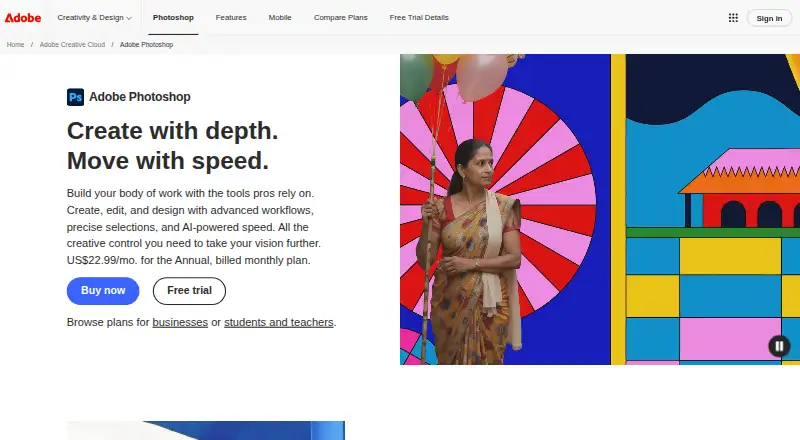
Adobe Photoshop is an image-editing application for creating, retouching, compositing, and transforming photos and graphics. It is aimed at professionals and advanced editors who need editable layers, masks, RAW adjustments, batch processing, cloud documents, and AI-assisted image changes. Photoshop is available on Windows, macOS, the web, iPhone, and Android, with support for work across devices through cloud documents. The free mobile version includes premium features, while the full desktop app and Photoshop on the web require a plan or trial.
Its editing depth is the main reason to choose it. Users can combine image, adjustment, fill, text, shape, Smart Object, and video layers; use masks to hide, reveal, or selectively adjust areas; and import RAW files through Adobe Camera Raw. Batch processing and automated multi-file conversion support repeatable workflows. Generative Fill can add, remove, or replace objects, while Generative Expand extends image boundaries. AI-powered Harmonize adjusts lighting, colors, shadows, and details. These capabilities make Photoshop a strong fit for compositing, retouching, and complex image transformations rather than simple one-off edits.
The plans also shape its ecosystem fit. Photography includes Photoshop, Lightroom, and 1TB of cloud storage across desktop, web, and mobile. The Photoshop plan adds Adobe Express Premium and includes 100GB of storage. Creative Cloud Pro combines Photoshop with 20+ apps, Adobe Firefly creative AI, and 100GB of storage. Lightroom and Adobe Camera Raw support connected photo workflows. Choose Photoshop if you need layered, non-destructive editing across supported platforms; users who need identical capabilities on every device or a narrower mobile-only workflow should consider the platform differences before selecting a plan.
Your product? Our editors can test Adobe Photoshop in depth and publish a review, labelled as paid · from $149/mo →
Adobe Photoshop pricing
All 6 Adobe Photoshop plans and prices →
Adobe Photoshop fact sheet
| Free plan | No |
|---|---|
| Paid from | Not verified |
| Platform | Multi-platform |
| RAW photo support | Yes |
| Layer editing | Yes |
| Masking tools | Yes |
| Batch editing | Yes |
| Cloud sync | Yes |
| AI retouching | Yes |
| Free trial | 7 days |
| Deployment | Cloud, Desktop, Mobile |
| Platforms | Web, Windows, macOS, iOS, Android |
| Support | Community, Docs · 24/7 |
| Built for | Solo, Small business, Mid-market, Enterprise (editorial estimate) |
| Integrations | 4 integrations: Adobe Express, Adobe Creative Cloud, Adobe Firefly, Topaz Labs AI models |
| Pricing | 7-day trial (source) |
| Website | adobe.com |
| Facts checked | 20 Sep 2026 |
Adobe Photoshop integrations
Adobe Photoshop lists 4 integrations on its own site.
- Adobe Express
- Adobe Creative Cloud
- Adobe Firefly
- Topaz Labs AI models
Alternatives to Adobe Photoshop
- Adobe LightroomA broad Lightroom workflow for RAW editing, masking, organization, and synchronized access.9.2
- Capture OneA deep choice for professional RAW and tethered workflows, without a free plan.9.0
- darktableA free, cross-platform RAW workflow with cataloging, masking, batch editing, and AI tools.8.8


See all Adobe Photoshop alternatives →
Adobe Photoshop vs the competition
- Adobe Photoshop vs Adobe Lightroom
- Adobe Photoshop vs Capture One
- Adobe Photoshop vs darktable
- Adobe Photoshop vs GIMP
- Adobe Photoshop vs ON1 Photo RAW
- Adobe Photoshop vs DxO PhotoLab


Compare Adobe Photoshop with any tool side by side →
Also Ranked In
Adobe Photoshop is ranked in 6 of our directories.
Used Adobe Photoshop? Be the first to review it
The editor score above is our own research. What this page doesn't have yet is a reader's view — what you used Adobe Photoshop for, what worked and what didn't. No stars are seeded and no review is paid for; an editor reads every one before it appears.
Write a reviewTwo minutes · verified accounts only · read by an editor before it appears
Featured on iTechGuides

Adobe Photoshop is listed in our Photo Editing Software directory. Add the badge to your site — it links back to this page.
<a href="https://www.itechguides.com/products/adobe-photoshop/"><img src="https://www.itechguides.com/best/badge/adobe-photoshop.svg" alt="Featured on iTechGuides" width="230" height="46"></a>
Reviewed by iTechGuides Editors · Editorial team · Updated Oct 2026
Advertiser disclosure: iTechGuides is reader-supported. Vendors can pay for top positions in our rankings and for a place on other products' pages, and we may earn a commission when you click some links. Bought places stand at the number bought; this page and our disclosure say so. Paying vendors may get a fuller, more detailed review from our editors, and that review can change their score. How we rank.
Last updated · How we research and update