RustConn
RustConn: A broad, free desktop connection manager for technical teams that need protocol and credential flexibility. Ranked #2 of 29 in Remote Connection Manager Software by our editors (9.0/10); pricing: Free plan; best for technical teams wanting a free open-source manager.
At a glance
- Editor score9.0 / 10
- PricingFree plan
- Best forTechnical teams wanting a free open-source manager
- Free planYes
- Paid fromFree
- Supported protocolsSSH, RDP, VNC, SPICE, MOSH, SFTP, Telnet, Serial, Kubernetes, Web, Zero Trust
- Facts checked21 Sep 2026
Where it wins
- Supports a wide range of remote protocols, including SSH, RDP, VNC, and Kubernetes
- Combines credential vaults, team sharing, imports, recording, and automation
- Adds SFTP, monitoring, and headless CLI management in one desktop application
Where it doesn't
- Windows support runs through WSL2/WSLg rather than a native Windows application
- Its broad feature set may require more configuration than a single-protocol tool
- Mobile workflows fall outside its documented desktop-platform focus
Our verdict on RustConn
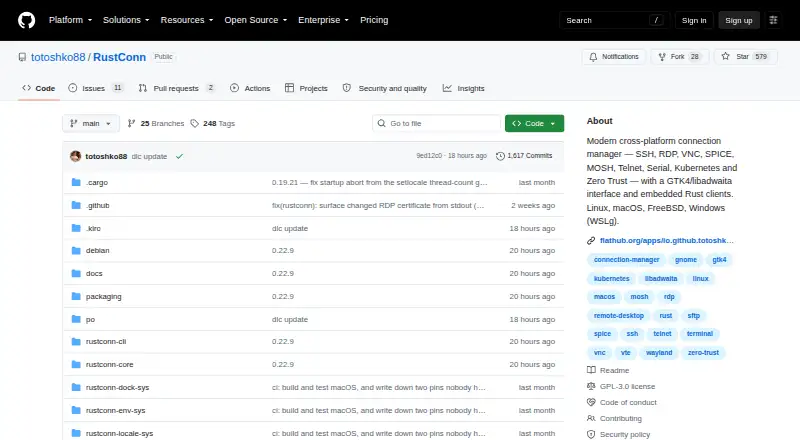
RustConn is an open-source desktop connection manager for technical teams that need to organize and launch many types of remote sessions. It supports Linux, macOS, and Windows through WSL2/WSLg, with connections for SSH, RDP, VNC, SPICE, MOSH, Telnet, Serial, Kubernetes, web, and Zero Trust environments. Embedded terminal, RDP, and VNC clients can fall back to external clients. Groups, tags, templates, custom icons, and connection history provide structure for larger connection libraries. The GPL-3.0-or-later license and free open-source distribution make it a fit for teams seeking control without a stated subscription tier.
RustConn’s breadth is its defining feature. It can import and export SSH config, Remmina, Royal TS, MobaXterm, RDP files, and other formats, while cloud-directory synchronization supports group sharing and read-only imports. Credential storage connects with system keyrings and services including KeePassXC, Bitwarden, 1Password, Passbolt, Pass, and encrypted files. The platform ecosystem also includes Google Drive, Syncthing, Nextcloud, Dropbox, AWS SSM, and GCP IAP. These options make RustConn suitable for mixed environments, especially where teams already use several credential stores or connection formats.
The standout operational depth extends beyond session launching. Session recording produces scriptreplay-compatible output with sensitive-data sanitization, while Expect rules, pre- and post-connect tasks, command snippets, broadcast, and Wake-on-LAN support repeatable administration. SFTP browsing, remote host monitoring, and rustconn-cli add file, visibility, and headless-management workflows. The trade-off is platform scope: Windows access depends on WSL2/WSLg, and the product is focused on desktop environments. Teams wanting broad protocol coverage, shared connection organization, and automation should consider RustConn; teams seeking a mobile-first or narrowly simplified remote-access tool should look elsewhere.
Your product? Our editors can test RustConn in depth and publish a review, labelled as paid · from $149/mo →
RustConn pricing
RustConn fact sheet
| Free plan | Yes |
|---|---|
| Paid from | Free |
| Supported protocols | SSH, RDP, VNC, SPICE, MOSH, SFTP, Telnet, Serial, Kubernetes, Web, Zero Trust |
| Desktop platforms | Linux, macOS, Windows via WSL2/WSLg |
| Stored connections | Not verified |
| Team connection sharing | Yes |
| Credential vault | Yes |
| Session recording | Yes |
| Mobile apps | Not verified |
| Deployment | Desktop |
| Platforms | Windows, macOS, Linux |
| Support | Community, Docs |
| Built for | Solo, Small business, Mid-market (editorial estimate) |
| Integrations | 20 integrations: KeePassXC, libsecret, GNOME Keyring, KWallet, macOS Keychain, Bitwarden … |
| Pricing | Free plan |
| Website | github.com |
| Facts checked | 21 Sep 2026 |
RustConn integrations
RustConn lists 20 integrations on its own site.
- KeePassXC
- libsecret
- GNOME Keyring
- KWallet
- macOS Keychain
- Bitwarden
- 1Password
- Passbolt
- Pass
- Google Drive
- Syncthing
- Nextcloud
- Dropbox
- AWS SSM
- GCP IAP
- Azure Bastion
- Cloudflare
- Teleport
- Tailscale
- Boundary
Alternatives to RustConn
- Devolutions Remote Desktop ManagerA broad connection manager for governed IT access across desktop and mobile platforms.9.4
- BURSU Connection ManagerA capable free manager for mixed protocols, embedded sessions, and mobile access.8.8
- Apache GuacamoleFree, open-source remote access for organizations prepared to self-host.8.6



See all RustConn alternatives →
RustConn vs the competition
- RustConn vs Devolutions Remote Desktop Manager
- RustConn vs BURSU Connection Manager
- RustConn vs Apache Guacamole
- RustConn vs Nexterm
- RustConn vs Conduit
- RustConn vs Keeper Connection Manager



Compare RustConn with any tool side by side →
Used RustConn? Be the first to review it
The editor score above is our own research. What this page doesn't have yet is a reader's view — what you used RustConn for, what worked and what didn't. No stars are seeded and no review is paid for; an editor reads every one before it appears.
Write a reviewTwo minutes · verified accounts only · read by an editor before it appears
Featured on iTechGuides

RustConn is listed in our Remote Connection Manager Software directory. Add the badge to your site — it links back to this page.
<a href="https://www.itechguides.com/products/rustconn/"><img src="https://www.itechguides.com/best/badge/rustconn.svg" alt="Featured on iTechGuides" width="230" height="46"></a>
Reviewed by iTechGuides Editors · Editorial team · Updated Oct 2026
Advertiser disclosure: iTechGuides is reader-supported. Vendors can pay for top positions in our rankings and for a place on other products' pages, and we may earn a commission when you click some links. Bought places stand at the number bought; this page and our disclosure say so. Paying vendors may get a fuller, more detailed review from our editors, and that review can change their score. How we rank.
Last updated · How we research and update