reWASD
reWASD: A paid Windows mapper with profiles, macros, virtual controllers, and mobile support. Ranked #21 of 29 in Controller Mapping Software by our editors (7.1/10); pricing: From $14.99 · 7-day trial; best for paid users needing broad controller emulation.
At a glance
- Editor score7.1 / 10
- PricingFrom $14.99 · 7-day trial
- Best forPaid users needing broad controller emulation
- Free planNo
- Paid from$14.99/device one-time
- Per-app profilesYes
- Facts checked20 Sep 2026
Where it wins
- Per-application profiles with automatic application detection
- Virtual Xbox, PlayStation, and Nintendo controller emulation
- Macros, Shift layers, combos, and rapid-fire modes
Where it doesn't
- No free plan after the seven-day trial
- Core mapping software is Windows-focused
- Simultaneous device support is limited to one
Our verdict on reWASD
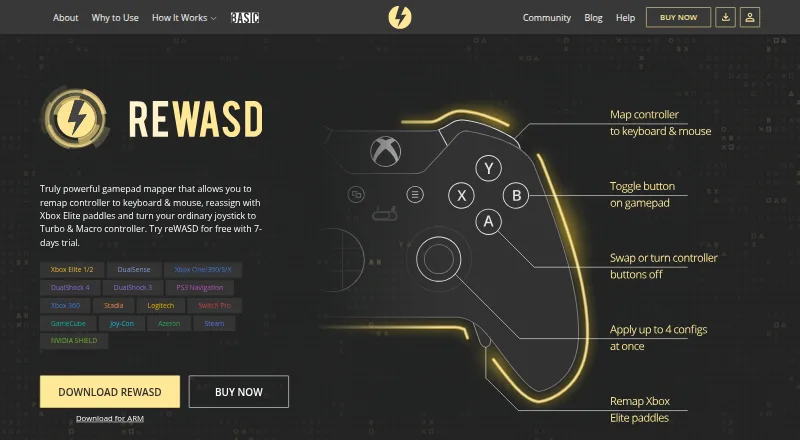
reWASD is Windows controller-mapping software for gamers who want to customize gamepad, keyboard, and mouse inputs. It combines controller-to-keyboard and mouse remapping with per-application configuration autodetection, profile switching, macros, input combos, virtual controller output, and Shift layers. Companion functionality extends to iOS and Android through reWASD Mobile. It is aimed at paid users who want detailed input customization across Xbox, PlayStation, Nintendo, Steam, and other controllers rather than a basic button-remapping tool.
Pricing is split between two separate products. Basic costs $14.99 USD as a one-time purchase billed annually and includes keyboard and mouse remapping, controller remapping, virtual controllers, up to three Shift Modes, and lifetime access and updates. Advanced costs $39.99 USD as a one-time purchase billed annually. It adds advanced mapping, keyboard, mouse, and controller combos, four slots, Radial Menu, reWASD Mobile support, and all current Advanced Features. A seven-day trial is available, but there is no free plan. Basic suits users who need core remapping and virtual controllers; Advanced is the more fitting choice for layered controls, combos, and mobile companion functionality.
Its standout strength is the combination of per-application profiles, automatic detection, configuration slots, Shift-layer switching, and multiple virtual controller types. Rapid Fire includes Turbo and Toggle modes, while macros and combos support more involved input setups. The trade-off is a Windows-centered product with simultaneous device support for one device, and the Basic and Advanced editions are separate purchases. Choose reWASD if you need extensive controller emulation and application-specific mappings and are comfortable with paid software. Choose another option if you require a free plan, broader desktop platform coverage, or simultaneous use of multiple devices.
Your product? Our editors can test reWASD in depth and publish a review, labelled as paid · from $99/mo →
reWASD pricing
All 2 reWASD plans and prices →
reWASD fact sheet
| Free plan | No |
|---|---|
| Paid from | $14.99/device one-time |
| Supported platforms | Windows, iOS, Android |
| Per-app profiles | Yes |
| Profile switching | Yes |
| Macro support | Yes |
| Keyboard and mouse remap | Yes |
| Virtual controller output | Yes |
| Simultaneous devices | 1 devices |
| Free trial | 7 days · no card needed |
| Deployment | Desktop, Mobile |
| Platforms | Windows, iOS, Android |
| Support | Community, Docs · 24/7 |
| Built for | Solo, Small business (editorial estimate) |
| Pricing | From $14.99 · 7-day trial (source) |
| Website | rewasd.com |
| Facts checked | 20 Sep 2026 |
Alternatives to reWASD
- Steam InputA free, flexible mapping system for Steam players across Windows, macOS, and Linux.9.4
- JoyShockMapperA powerful free mapper for players who want advanced gyro and layered controller configurations.9.2
- DS4WindowsA capable free mapper for Windows users who need profiles, emulation, and advanced input controls.9.0

Also Ranked In
reWASD is ranked in 3 of our directories.
Used reWASD? Be the first to review it
The editor score above is our own research. What this page doesn't have yet is a reader's view — what you used reWASD for, what worked and what didn't. No stars are seeded and no review is paid for; an editor reads every one before it appears.
Write a reviewTwo minutes · verified accounts only · read by an editor before it appears
Featured on iTechGuides

reWASD is listed in our Controller Mapping Software directory. Add the badge to your site — it links back to this page.
<a href="https://www.itechguides.com/products/rewasd/"><img src="https://www.itechguides.com/best/badge/rewasd.svg" alt="Featured on iTechGuides" width="230" height="46"></a>
Reviewed by iTechGuides Editors · Editorial team · Updated Oct 2026
Advertiser disclosure: iTechGuides is reader-supported. Vendors can pay for top positions in our rankings and for a place on other products' pages, and we may earn a commission when you click some links. How we rank.
Last updated · How we research and update