
RestageHQ
RestageHQ: A flexible AI staging tool with strong export controls and a practical pay-as-you-go option. Ranked #10 of 28 in Virtual Staging Software by our editors (6.5/10); pricing: From $29/mo; best for teams needing API-ready AI staging.
At a glance
- Editor score6.5 / 10
- PricingFrom $29/mo
- Best forTeams needing API-ready AI staging
- Free planNo
- Paid from$29/mo
- Service modeAi
- Facts checked21 Sep 2026
Where it wins
- Preserves room geometry across four design styles
- Supports MLS-compliant labels and exports up to 4096px
- Offers pay-as-you-go credits alongside monthly plans
Where it doesn't
- No perpetual $0 plan
- Live integrations beyond the API are limited
- API access requires the Team plan
Our verdict on RestageHQ
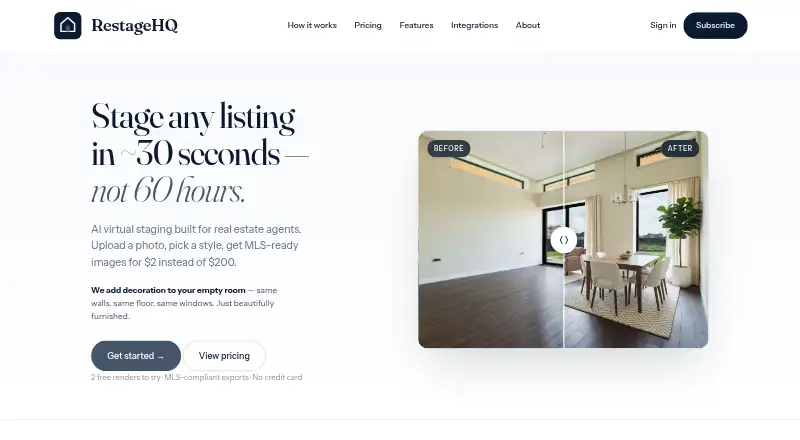
RestageHQ is an AI virtual staging tool for real estate agents, brokers, boutique teams, and new-construction sales professionals. Users upload empty-room property photos, choose Modern, Mid-century, Luxury, or Farmhouse styling, and generate furnished listing images in about 30 seconds. The product also covers exterior presentation through sky replacement, lawn enhancement, and exterior item removal, while preserving room geometry for more consistent listing visuals.
Pricing is structured for different production volumes. Starter costs $29 per month for 25 staged photos, three free re-rolls per photo, all four signature styles, sky and lawn enhancement, MLS-compliant exports, and full commercial rights. Pro costs $79 per month for 100 photos, a priority rendering queue, five free re-rolls per photo, a logo-enabled brand preset, and chat and email support. Team costs $199 per month for 500 photos, up to three seats, unlimited re-rolls, a shared brand library, a usage dashboard, a dedicated account manager, and API access. Pay-as-you-go costs $3 per staged photo, has no subscription, and uses credits that never expire.
For teams publishing across listing channels, the export and workflow features are a strong fit. RestageHQ supports MLS-compliant labeling, multiple export sizes up to 4096px, brand presets, and shared team workflows. The web app suits individual agents, while API access on Team supports more structured internal processes. The main trade-off is ecosystem breadth: broader integrations are positioned for the roadmap rather than as live connections. Solo agents with occasional needs can choose Pay-as-you-go; higher-volume teams should consider Team for collaboration and API access. Buyers seeking a perpetual free plan or established third-party integrations should look elsewhere.
RestageHQ pricing
All 4 RestageHQ plans and prices →
RestageHQ fact sheet
| Free plan | No |
|---|---|
| Paid from | $29/mo |
| Service mode | Ai |
| Exterior staging | Yes |
| Floor-plan staging | Not verified |
| Turnaround time | 0.0083 hours |
| Included revisions | 3 revisions |
| Output resolution | 4k |
| Deployment | Cloud |
| Platforms | Web |
| Support | Email, Live chat |
| Built for | Solo, Small business (editorial estimate) |
| Pricing | From $29/mo (source) |
| Website | restagehq.com |
| Facts checked | 21 Sep 2026 |
Alternatives to RestageHQ
- Apply DesignA broad web-based staging suite with coin-based pricing and 360° support.8.8
- PadStyler AIBroad property-visualization coverage with AI subscriptions and designer-led staging.8.8
- RoomoodA web-based staging tool with 4K exports, batch workflows, and a free plan.7.8


See all RestageHQ alternatives →
Used RestageHQ? Be the first to review it
The editor score above is our own research. What this page doesn't have yet is a reader's view — what you used RestageHQ for, what worked and what didn't. No stars are seeded and no review is paid for; an editor reads every one before it appears.
Write a reviewTwo minutes · verified accounts only · read by an editor before it appears
Featured on iTechGuides

RestageHQ is listed in our Virtual Staging Software directory. Add the badge to your site — it links back to this page.
<a href="https://www.itechguides.com/products/restagehq/"><img src="https://www.itechguides.com/best/badge/restagehq.svg" alt="Featured on iTechGuides" width="230" height="46"></a>
Reviewed by iTechGuides Editors · Editorial team · Updated Sep 2026
Advertiser disclosure: iTechGuides is reader-supported. We may earn a commission when you click some links. How we rank.
Last updated · How we research and update