
Apply Design
Apply Design: A focused virtual-staging toolkit with 2D, 360° and property-marketing features. Ranked #19 of 26 in AI Interior Design Generators by our editors (5.8/10); pricing: From $7; best for property professionals focused on virtual staging.
At a glance
- Editor score5.8 / 10
- PricingFrom $7
- Best forProperty professionals focused on virtual staging
- Free planNo
- Photo uploadYes
- Facts checked20 Sep 2026
Where it wins
- Supports 2D and 360° staging with multi-angle furniture consistency
- Combines AI staging, furniture removal and drag-and-drop editing
- Adds virtual tours, image enhancement, videos and property websites
Where it doesn't
- No permanent free plan
- Available on the web only
- Coin-based pricing requires estimating usage per project
Our verdict on Apply Design
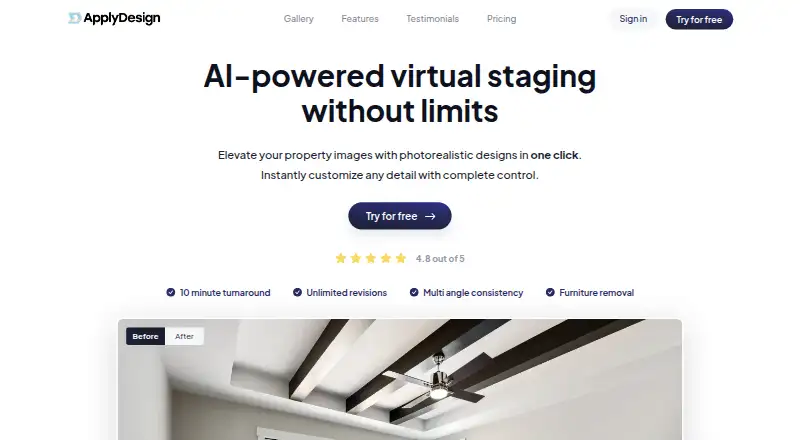
Apply Design is web-based software for real estate agents, photographers, stagers and property marketers. It supports uploads of 2D and 360° property images, AI furniture removal and decluttering, one-click virtual staging, and a drag-and-drop furniture editor. Users can create staged images in multiple room styles, maintain furniture consistency across angles, and produce related property videos and websites. Its strongest fit is property marketing work that needs both standard listing images and 360° virtual-tour staging.
Pricing is based on Apply Coins rather than monthly plans. The Up to 9 Apply Coins tier costs $10 per Apply Coin, while 10–19 Apply Coins cost $8 per coin and 20+ Apply Coins cost $7 per coin. A 2D staging image uses 1.5 coins, and 360° staging uses 2.5 coins. The first image is free and no credit card is required, giving prospective users a way to assess the workflow before purchasing coins. The published structure suits occasional projects as well as higher-volume property work, with lower per-coin pricing at larger quantities.
The standout capability is its combination of staging formats and property-focused editing. Furniture removal, AI image enhancement, unlimited revisions and consistent furnishings across multiple angles address common presentation needs, while 360° staging extends the workflow beyond single listing photos. The trade-off is a narrow platform footprint: Apply Design is available on the web only, and its paid model may be less suitable for users seeking an ongoing free plan or a general-purpose interior design tool. Choose it for virtual staging and related property promotion; consider an alternative if mobile access or broader design use matters more.
Apply Design pricing
All 3 Apply Design plans and prices →
Apply Design fact sheet
| Free plan | No |
|---|---|
| Paid from | Not verified |
| Photo upload | Yes |
| Text prompting | Not verified |
| Virtual staging | Yes |
| Room editing tools | Yes |
| Output resolution | Not verified |
| Generation limit | Not verified |
| Deployment | Cloud |
| Platforms | Web |
| Support | Email, Live chat, Docs · 24/7 |
| Built for | Small business, Mid-market, Enterprise (editorial estimate) |
| Pricing | From $7 (source) |
| Website | applydesign.io |
| Facts checked | 20 Sep 2026 |
Alternatives to Apply Design
- HomestylerA broad home-design workspace combining AI visualization, planning, rendering, and virtual tours.9.0
- Spacely AIA broad AI workspace for turning interior concepts into editable, presentation-ready visuals.8.5
- Planner 5DA cross-platform planner that combines AI layouts with detailed 2D and 3D design tools.8.4


See all Apply Design alternatives →
Also listed in
Used Apply Design? Be the first to review it
The editor score above is our own research. What this page doesn't have yet is a reader's view — what you used Apply Design for, what worked and what didn't. No stars are seeded and no review is paid for; an editor reads every one before it appears.
Write a reviewTwo minutes · verified accounts only · read by an editor before it appears
Featured on iTechGuides

Apply Design is listed in our AI Interior Design Generators directory. Add the badge to your site — it links back to this page.
<a href="https://www.itechguides.com/products/apply-design/"><img src="https://www.itechguides.com/best/badge/apply-design.svg" alt="Featured on iTechGuides" width="230" height="46"></a>
Reviewed by iTechGuides Editors · Editorial team · Updated Sep 2026
Advertiser disclosure: iTechGuides is reader-supported. We may earn a commission when you click some links. How we rank.
Last updated · How we research and update