ReplaceMagic
ReplaceMagic: Bulk link repair across Office and other files, with SharePoint integration and format-specific editions. Ranked #62 of 65 in Document Management Software by our editors (3.2/10); pricing: 30-day trial; best for teams performing bulk document-link remediation.
At a glance
- Editor score3.2 / 10
- Pricing30-day trial
- Best forTeams performing bulk document-link remediation
- Free planNo
- Paid from$199 one-time
- Facts checked24 Sep 2026
Where it wins
- Repairs links across multiple file types without opening files individually
- Scans collections and provides preview, audit reports and change history
- Integrates with SharePoint Online and SharePoint On-Premises
Where it doesn't
- Runs on Windows as desktop software
- Separate editions are needed for different file formats
- SharePoint is the only named integration
Our verdict on ReplaceMagic
ReplaceMagic is Windows desktop software for scanning document collections and repairing broken links in bulk. It is aimed at teams handling document-link remediation, particularly during migrations, rather than organizations looking for broad document repository management. It can repair hyperlinks, OLE links and external link sources across Microsoft Office, PDF, OneNote, text and Windows shortcut files. Excel support also covers Power Query, Pivot and connection references, while Word processing includes VBA paths, headers, footers, comments and field codes.
Its format-specific editions are priced as one-time purchases: ReplaceMagic.LNK is $199, ReplaceMagic.OneNote is $299, and ReplaceMagic.PDF, Excel, Word, PowerPoint, Visio and Project are each $749. The editions focus on repairs relevant to their file types; Excel includes hyperlinks, OLE, link sources, Power Queries and Pivots, while PowerPoint handles hyperlink and OLE-link repair. The published plans also describe Ultimate and SmartMapper bundles, but do not give their prices here. A 30-day free trial is listed. This structure suits teams able to select tools around their file mix, though costs can add up when several formats need attention.
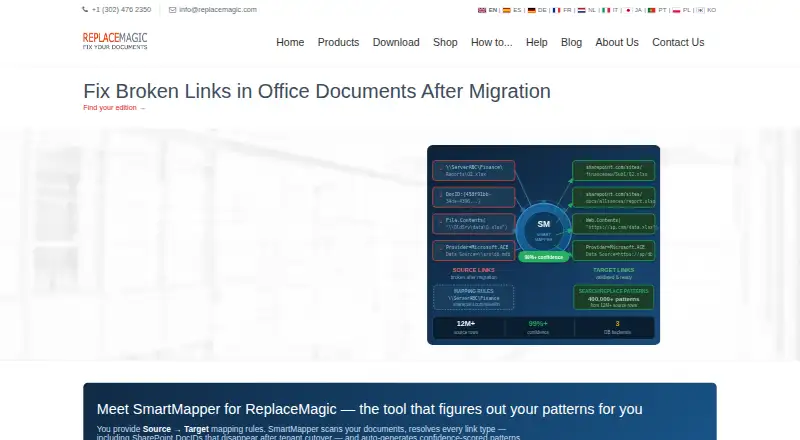
SharePoint Online and on-premises integration supports migration workflows, while SmartMapper generates and validates replacement patterns. Preview mode, audit reports and run history provide ways to review and track changes. ReplaceMagic remains a focused desktop utility: it is Windows-only, has no mobile apps, and its named integrations center on SharePoint. Teams seeking repository controls or a broader document-management environment should consider another product; teams with a defined bulk repair task across supported file types are a closer fit.
Your product? Our editors can test ReplaceMagic in depth and publish a review, labelled as paid · from $149/mo →
ReplaceMagic pricing
All 12 ReplaceMagic plans and prices →
ReplaceMagic fact sheet
| Free plan | No |
|---|---|
| Paid from | $199 one-time |
| Version history | Not verified |
| Access control level | Not verified |
| OCR | Not verified |
| Audit logs | Yes |
| Storage limit | Not verified |
| Mobile apps | None |
| Free trial | 30 days · no card needed |
| Deployment | Desktop |
| Platforms | Windows |
| Support | Email, Phone, Docs |
| Built for | Small business, Mid-market, Enterprise (editorial estimate) |
| Integrations | 2 integrations: SharePoint Online, SharePoint On-Premises See all → |
| Pricing | 30-day trial (source) |
| Website | replacemagic.com |
| Facts checked | 24 Sep 2026 |
ReplaceMagic integrations
ReplaceMagic lists 2 integrations on its own site.
- SharePoint Online
- SharePoint On-Premises
See all ReplaceMagic integrations →
Alternatives to ReplaceMagic
- Microsoft SharePointA Microsoft-integrated document management platform with granular control and workflow automation.9.3
- BoxA wide cloud content workspace for teams that need storage, workflows, and administration.9.1
- OpenText Documentum Content ManagementA governed repository for large enterprises managing complex, regulated content.9.0


See all ReplaceMagic alternatives →
Used ReplaceMagic? Be the first to review it
The editor score above is our own research. What this page doesn't have yet is a reader's view — what you used ReplaceMagic for, what worked and what didn't. No stars are seeded and no review is paid for; an editor reads every one before it appears.
Write a reviewTwo minutes · verified accounts only · read by an editor before it appears
Featured on iTechGuides

ReplaceMagic is listed in our Document Management Software directory. Add the badge to your site — it links back to this page.
<a href="https://www.itechguides.com/products/replacemagic/"><img src="https://www.itechguides.com/best/badge/replacemagic.svg" alt="Featured on iTechGuides" width="230" height="46"></a>
Reviewed by iTechGuides Editors · Editorial team · Updated Oct 2026
Advertiser disclosure: iTechGuides is reader-supported. Vendors can pay for top positions in our rankings and for a place on other products' pages, and we may earn a commission when you click some links. Bought places stand at the number bought; this page and our disclosure say so. Paying vendors may get a fuller, more detailed review from our editors, and that review can change their score. How we rank.
Last updated · How we research and update