
RenderAI
RenderAI: A focused architectural visualization tool with image, video, upscaling, and project boards. Ranked #8 of 29 in AI Sketch-to-Image Generators by our editors (8.4/10); pricing: Free plan; best for architects wanting sketch rendering with video.
At a glance
- Editor score8.4 / 10
- PricingFree plan
- Best forArchitects wanting sketch rendering with video
- Free planYes
- Paid from$13/mo
- Sketch inputYes
- Facts checked22 Sep 2026
Where it wins
- Turns sketches, models, and photos into high-resolution visualizations
- Adds 4K/6K upscaling, image-to-video, and commercial-use rights
- Connects with Revit, Rhino, SketchUp, AutoCAD, and more
Where it doesn't
- Runs only in a web browser
- Token quotas may limit higher-volume rendering
- Creation storage ranges from 1 to 90 days by plan
Our verdict on RenderAI
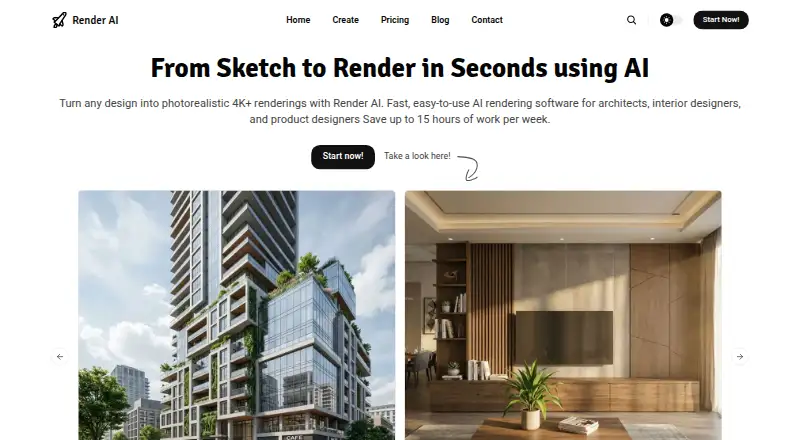
RenderAI is a browser-based AI visualization platform for architects, interior designers, product designers, engineers, and real-estate professionals. It accepts sketches, drawings, 3D models, and photos, then generates high-resolution images and videos for presentations, portfolios, marketing, and client reviews. Its core workflow combines sketch-to-image rendering with multiple rendering methods, quality modes, 4K and 6K upscaling, AI image-to-video generation, and commercial-use rights for generated content. Because it runs online, it does not require local 3D software, plugins, or GPU infrastructure.
Pricing follows a freemium model, with a free plan and paid token packages. The monthly Starter Pack costs $13 and includes 40 tokens, sketch or model uploads, no imposed watermarks, 4K and 6K upscaling, image-to-video, and 1-day creation storage. Its annual option includes 500 tokens per year with the same listed features. Creator Pro costs $39 per month for 200 tokens, 30-day storage, infinite-canvas Project Boards, and premium support; its annual option includes 2,400 tokens. Premium Pro costs $199 per month for 1,250 tokens, 90-day storage, Project Boards, and premium support; its annual option includes 15,000 tokens.
The integration set is well aligned with architectural workflows: Revit, Rhino, Vectorworks, Archicad, SketchUp, AutoCAD, Enscape, D5 Render, and Twinmotion are supported. Project Boards give higher tiers a place to organize visual iterations, while the short storage windows make long-term asset management less suitable without another archive. RenderAI is a strong fit for professionals who want to turn design inputs into presentation-ready images and motion quickly through a browser. Teams needing extensive storage, unlimited generation, or a non-token pricing model should consider an alternative.
Questions about RenderAI
Does RenderAI have a free plan? No free plan is listed; paid plans start at $13/mo (Starter Pack).
How much does RenderAI cost? RenderAI lists 3 paid plans; the lowest is Starter Pack at $13/mo.
What does RenderAI run on? Web. It runs in the cloud and as a browser extension.
What does RenderAI integrate with? 9 integrations, including Revit, Rhino, Vectorworks, Archicad and SketchUp.
Who is RenderAI built for? Solo users, small businesses and mid-market companies (our editorial estimate).
Your product? Our editors can test RenderAI in depth and publish a review, labelled as paid · from $149/mo →
RenderAI pricing
All 3 RenderAI plans and prices →
RenderAI fact sheet
| Free plan | Yes |
|---|---|
| Paid from | $13/mo |
| Sketch input | Yes |
| Wireframe input | Not verified |
| Image-to-image | Yes |
| Included image credits | 40 /mo |
| Output formats | Not verified |
| API access | Not verified |
| Deployment | Cloud, Browser extension |
| Platforms | Web |
| Support | Email, Docs |
| Built for | Solo, Small business, Mid-market (editorial estimate) |
| Integrations | 9 integrations: Revit, Rhino, Vectorworks, Archicad, SketchUp, AutoCAD … |
| Pricing | Free plan (source) |
| Website | renderai.app |
| Facts checked | 22 Sep 2026 |
RenderAI integrations
RenderAI lists 9 integrations on its own site.
- Revit
- Rhino
- Vectorworks
- Archicad
- SketchUp
- AutoCAD
- Enscape
- D5 Render
- Twinmotion
Alternatives to RenderAI
- VizcomA broad sketch-to-3D workflow with collaboration and Autodesk Fusion integration.9.4
- LookX AIA focused sketch-to-render platform with strong architecture tools and flexible paid plans.9.2
- mnml.aiA flexible AI renderer for architecture teams, in the browser and inside SketchUp, Revit and Rhino.9.0



See all RenderAI alternatives →
RenderAI vs the competition
- RenderAI vs Vizcom
- RenderAI vs LookX AI
- RenderAI vs mnml.ai
- RenderAI vs Gendo
- RenderAI vs AI Render Studio
- RenderAI vs ArchSynth


Compare RenderAI with any tool side by side →
Used RenderAI? Be the first to review it
The editor score above is our own research. What this page doesn't have yet is a reader's view — what you used RenderAI for, what worked and what didn't. No stars are seeded and no review is paid for; an editor reads every one before it appears.
Write a reviewTwo minutes · verified accounts only · read by an editor before it appears
Featured on iTechGuides

RenderAI is listed in our AI Sketch-to-Image Generators directory. Add the badge to your site — it links back to this page.
<a href="https://www.itechguides.com/products/renderai/"><img src="https://www.itechguides.com/best/badge/renderai.svg" alt="Featured on iTechGuides" width="230" height="46"></a>
Reviewed by iTechGuides Editors · Editorial team · Updated Nov 2026
Advertiser disclosure: iTechGuides is reader-supported. Vendors can pay for top positions in our rankings and for a place on other products' pages, and we may earn a commission when you click some links. Bought places stand at the number bought; this page and our disclosure say so. Paying vendors may get a fuller, more detailed review from our editors, and that review can change their score. How we rank.
Last updated · How we research and update