
Remote Process Explorer
Remote Process Explorer: A focused Windows utility for free local and remote process administration. Ranked #20 of 26 in Process Monitoring Software by our editors (7.4/10); pricing: Free plan; best for free Windows remote process administration.
At a glance
- Editor score7.4 / 10
- PricingFree plan
- Best forFree Windows remote process administration
- Free planYes
- Paid from$149.95/device one-time
- Remote monitoringYes
- Facts checked21 Sep 2026
Where it wins
- Free personal license includes local and remote process monitoring
- Remote actions include termination, priority changes, launches and shutdowns
- Process filtering, tree views and file export support administration
Where it doesn't
- Personal license is limited to non-commercial use
- Business pricing starts at $149.95 per machine
- Windows desktop focus limits platform coverage
Our verdict on Remote Process Explorer
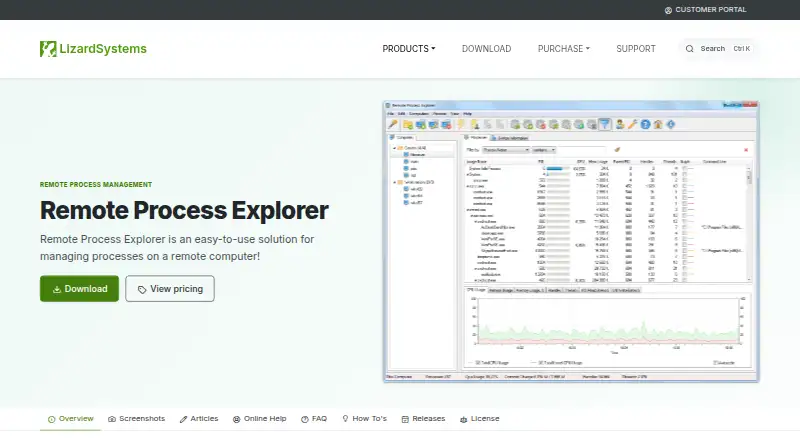
Remote Process Explorer is a Windows desktop utility for monitoring and managing processes on local or remote computers. It is aimed at administrators who need visibility into process identifiers, CPU and memory usage, ownership, paths, start time, handles and threads. The utility also supports process trees, filtering by name, user, command line, executable path or resource usage, and remote administration actions. It uses built-in Windows functions and does not require installation on each remote computer.
The published plans show a perpetual Personal License priced at $0 for non-commercial use. The Business License costs $149.95 per machine as a one-time purchase and adds one year of free updates plus email and ticket support. The Corporate License costs $2,999.95 per organization and includes unlimited installations, unlimited technicians, coverage across departments and sites, one year of free updates and priority support. That structure makes the free license the clear fit for personal administration, while organizations should evaluate the per-machine or organization-wide cost against their deployment scope.
Its strongest focus is direct process administration rather than a broad monitoring suite. Users can terminate selected processes, change process priority remotely, launch processes on remote computers, restart or shut down remote computers, and export process information to a file. The product is a good choice for Windows users who want a compact tool for inspecting and controlling processes across computers without installing the utility on every remote system. It is less suitable for teams seeking a wider platform footprint or a monitoring product centered on capabilities beyond process-level administration.
Your product? Our editors can test Remote Process Explorer in depth and publish a review, labelled as paid · from $149/mo →
Remote Process Explorer pricing
All 3 Remote Process Explorer plans and prices →
Remote Process Explorer fact sheet
| Free plan | Yes |
|---|---|
| Paid from | $149.95/device one-time |
| Supported platforms | Windows Server 2012 R2, Windows 10, Windows Server 2016, Windows Server 2019, Windows Server 2022, Windows 11, Windows Server 2025 |
| Remote monitoring | Yes |
| Service monitoring | Not verified |
| Process alerting | Not verified |
| History retention | Not verified |
| Process controls | Yes |
| Activity logs | Not verified |
| Deployment | Desktop |
| Platforms | Windows |
| Support | Email, Tickets |
| Built for | Small business, Mid-market, Enterprise (editorial estimate) |
| Pricing | Free plan (source) |
| Website | lizardsystems.com |
| Facts checked | 21 Sep 2026 |
Alternatives to Remote Process Explorer
- GlancesA broad, free monitoring toolkit for cross-platform and self-hosted infrastructure.9.4
- PM2A capable Node.js process manager with deeper monitoring in paid tiers.9.2
- MonitA focused self-hosted monitor for service health, system checks, and automatic recovery.9.1



See all Remote Process Explorer alternatives →
Used Remote Process Explorer? Be the first to review it
The editor score above is our own research. What this page doesn't have yet is a reader's view — what you used Remote Process Explorer for, what worked and what didn't. No stars are seeded and no review is paid for; an editor reads every one before it appears.
Write a reviewTwo minutes · verified accounts only · read by an editor before it appears
Featured on iTechGuides

Remote Process Explorer is listed in our Process Monitoring Software directory. Add the badge to your site — it links back to this page.
<a href="https://www.itechguides.com/products/remote-process-explorer/"><img src="https://www.itechguides.com/best/badge/remote-process-explorer.svg" alt="Featured on iTechGuides" width="230" height="46"></a>
Reviewed by iTechGuides Editors · Editorial team · Updated Oct 2026
Advertiser disclosure: iTechGuides is reader-supported. Vendors can pay for top positions in our rankings and for a place on other products' pages, and we may earn a commission when you click some links. Bought places stand at the number bought; this page and our disclosure say so. Paying vendors may get a fuller, more detailed review from our editors, and that review can change their score. How we rank.
Last updated · How we research and update