
RecordMeeting
RecordMeeting: A low-cost meeting recorder with searchable transcripts and AI notes. Ranked #52 of 111 in Meeting Notes Software by our editors (3.8/10); pricing: Free plan; best for small teams wanting a simple, low-cost recorder.
At a glance
- Editor score3.8 / 10
- PricingFree plan
- Best forSmall teams wanting a simple, low-cost recorder
- Free planYes
- Paid from$9/mo
- AI summariesYes
- Facts checked22 Sep 2026
Where it wins
- Free plan includes full transcription and downloadable recordings
- Pro adds unlimited recordings for $9 per month with annual billing
- Extracts action items with owners and due dates
Where it doesn't
- Pro's listed $9 monthly price requires annual billing
- Team management and shared billing are Enterprise features
- Listed integrations are limited to Slack, Notion, HubSpot, Salesforce, and Google Calendar
Our verdict on RecordMeeting
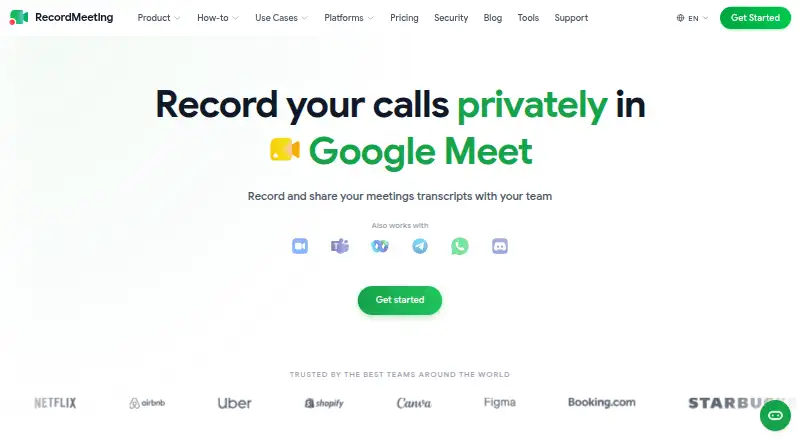
RecordMeeting records calls and turns them into searchable transcripts, AI-generated notes, summaries, and action items. It is aimed at individuals and teams that want a straightforward way to capture meeting discussions and follow up on assigned work. Speaker identification, transcript search, note templates, and exports help organize what was said and what needs doing. The product is available through the web, a Chrome extension, and an API; its description names Google Meet, Zoom, Microsoft Teams, Webex, Discord, Telegram, and WhatsApp as supported services.
The published plans show a Free tier with AI meeting notes, full transcription, recording downloads, and chat with recordings. Pro costs $9 per month with annual billing and adds unlimited recordings while retaining those listed features. Enterprise costs $15 per seat per month with annual billing and adds organizations, folder grouping, team management, shared team billing, and priority support. That makes the free option useful for evaluating the core workflow, while regular recording at scale or team administration requires a paid plan. The listed annual prices are the ones to compare when budgeting.
For collaboration, RecordMeeting lists integrations with Slack, Notion, HubSpot, Salesforce, and Google Calendar, alongside team workspaces and exports. Support channels are email and docs, and the product lists ISO 27001, GDPR, and SOC 2. Its focused feature set suits small teams that mainly need recording, notes, and action-item follow-up. Teams that depend on a broader integration or platform ecosystem should compare alternatives before choosing; those needing shared billing and team controls will need Enterprise rather than Pro.
Your product? Our editors can test RecordMeeting in depth and publish a review, labelled as paid · from $149/mo →
RecordMeeting pricing
All 3 RecordMeeting plans and prices →
RecordMeeting fact sheet
| Free plan | Yes |
|---|---|
| Paid from | $9/mo |
| Transcription | Yes |
| AI summaries | Yes |
| Action-item tracking | Yes |
| Searchable archive | Yes |
| Meeting recording | Yes |
| Speaker labels | Yes |
| Note templates | Yes |
| Money-back guarantee | 30 days |
| Deployment | Cloud, Browser extension |
| Platforms | Web, Chrome extension |
| Compliance & security | ISO 27001, GDPR, SOC 2 |
| Support | Email, Docs |
| Built for | Solo, Small business, Mid-market, Enterprise (editorial estimate) |
| Integrations | 5 integrations: Slack, Notion, HubSpot, Salesforce, Google Calendar |
| Pricing | Free plan (source) |
| Website | recordmeeting.com |
| Facts checked | 22 Sep 2026 |
RecordMeeting integrations
RecordMeeting lists 5 integrations on its own site.
- Slack
- Notion
- HubSpot
- Salesforce
- Google Calendar
Alternatives to RecordMeeting
- Otter.aiA capable meeting archive with core transcription and summaries at a low paid entry price.9.2
- Krisp AI Meeting AssistantA full-featured meeting capture and follow-up tool with affordable annual pricing.9.0
- Fireflies.aiA broad meeting capture and intelligence suite for teams handling many languages and meeting sources.8.9



See all RecordMeeting alternatives →
Used RecordMeeting? Be the first to review it
The editor score above is our own research. What this page doesn't have yet is a reader's view — what you used RecordMeeting for, what worked and what didn't. No stars are seeded and no review is paid for; an editor reads every one before it appears.
Write a reviewTwo minutes · verified accounts only · read by an editor before it appears
Featured on iTechGuides

RecordMeeting is listed in our Meeting Notes Software directory. Add the badge to your site — it links back to this page.
<a href="https://www.itechguides.com/products/recordmeeting/"><img src="https://www.itechguides.com/best/badge/recordmeeting.svg" alt="Featured on iTechGuides" width="230" height="46"></a>
Reviewed by iTechGuides Editors · Editorial team · Updated Oct 2026
Advertiser disclosure: iTechGuides is reader-supported. Vendors can pay for top positions in our rankings and for a place on other products' pages, and we may earn a commission when you click some links. Bought places stand at the number bought; this page and our disclosure say so. Paying vendors may get a fuller, more detailed review from our editors, and that review can change their score. How we rank.
Last updated · How we research and update