RecordIt
RecordIt: A focused recorder for diagnosing browser issues, with a 20-minute recording limit. Ranked #130 of 131 in Screen Recording Software by our editors (3.0/10); pricing: Free plan; best for developers diagnosing browser issues.
At a glance
- Editor score3.0 / 10
- PricingFree plan
- Best forDevelopers diagnosing browser issues
- Free planYes
- Facts checked21 Sep 2026
Where it wins
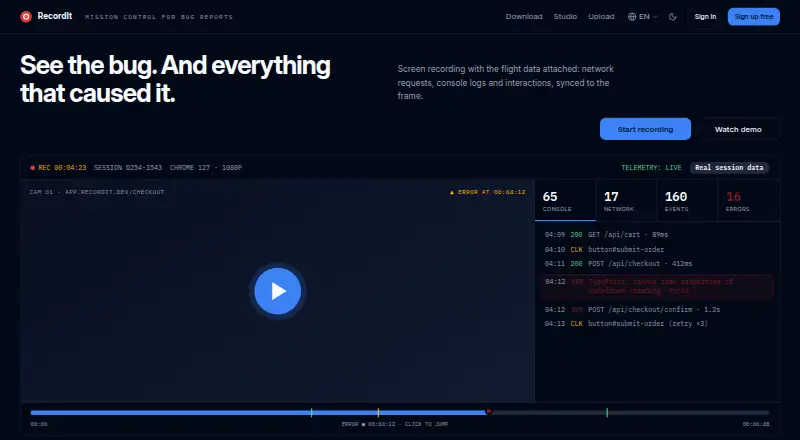
- Captures network requests, console logs, and JavaScript errors
- Synchronizes user interactions and events with recorded video
- Supports local storage, cloud sharing, transcription, and data masking
Where it doesn't
- Recordings are limited to 20 minutes
- No verified webcam or audio capture
- Paid team-plan pricing is not publicly stated
Our verdict on RecordIt
RecordIt is a browser-based screen recorder for developers, QA engineers, technical support teams, and other technical users. Its Chrome extension records full screens, windows, or browser tabs, while custom-area capture and full-page screenshots support more targeted documentation. The product is especially suited to diagnosing browser issues because it can associate recordings with network requests, console logs, JavaScript errors, and user interactions.
Its standout feature is synchronized debugging context. A recording can preserve the activity surrounding a problem rather than relying on video alone, helping technical teams review requests, errors, and interaction events alongside playback. Automatic transcription adds a searchable text layer, while password and token masking helps protect captured debug data. Recordings can remain in local storage or be uploaded for cloud playback, analysis, and link sharing.
RecordIt has broad platform coverage across the web, Windows, macOS, Linux, and Chrome. A free account supports team collaboration, and paid plans are available for teams, but the published details do not provide plan-by-plan prices or feature differences. The verified maximum recording length is 20 minutes, which fits concise bug reports and support handoffs but may constrain longer walkthroughs. RecordIt is a strong choice for technical teams that need browser diagnostics attached to visual evidence. Teams seeking longer recordings or verified webcam and audio capture should consider a different screen recorder.
Your product? Our editors can test RecordIt in depth and publish a review, labelled as paid · from $149/mo →
RecordIt pricing
RecordIt fact sheet
| Free plan | Yes |
|---|---|
| Paid from | Not verified |
| Webcam recording | Not verified |
| System audio | Not verified |
| Microphone recording | Not verified |
| Max recording length | 20 minutes |
| Maximum video quality | Not verified |
| Supported platforms | web, windows, macos, linux, chrome_extension |
| Deployment | Cloud, Browser extension |
| Platforms | Web, Windows, macOS, Linux, Chrome extension |
| Built for | Small business, Mid-market, Enterprise (editorial estimate) |
| Pricing | Free plan |
| Website | recordit.dev |
| Facts checked | 21 Sep 2026 |
Alternatives to RecordIt
- CamtasiaA deep desktop toolkit for training videos, tutorials, and structured learning content.9.3
- ScreenPalA feature-rich choice for budget-conscious creators who need more than basic recording.9.1
- LoomA broad screen recorder for teams that communicate through polished async video.9.0



See all RecordIt alternatives →
Used RecordIt? Be the first to review it
The editor score above is our own research. What this page doesn't have yet is a reader's view — what you used RecordIt for, what worked and what didn't. No stars are seeded and no review is paid for; an editor reads every one before it appears.
Write a reviewTwo minutes · verified accounts only · read by an editor before it appears
Featured on iTechGuides

RecordIt is listed in our Screen Recording Software directory. Add the badge to your site — it links back to this page.
<a href="https://www.itechguides.com/products/recordit/"><img src="https://www.itechguides.com/best/badge/recordit.svg" alt="Featured on iTechGuides" width="230" height="46"></a>
Guides on screen recording software
- The Best Screen Recording Software in 2026: Comparison and GuideAug 2026
- 16 Best Paid and Free Screen Recording Software for MacAug 2026
- Best Screen Recording Software for Product DemosOct 2026
Reviewed by iTechGuides Editors · Editorial team · Updated Oct 2026
Advertiser disclosure: iTechGuides is reader-supported. Vendors can pay for top positions in our rankings and for a place on other products' pages, and we may earn a commission when you click some links. Bought places stand at the number bought; this page and our disclosure say so. Paying vendors may get a fuller, more detailed review from our editors, and that review can change their score. How we rank.
Last updated · How we research and update