
Record Once
Record Once: A focused tool for recording, editing, translating, and maintaining web-app tutorials. Ranked #62 of 131 in Screen Recording Software by our editors (3.0/10); pricing: Free plan; best for teams documenting web applications at scale.
At a glance
- Editor score3.0 / 10
- PricingFree plan
- Best forTeams documenting web applications at scale
- Free planYes
- Paid from$49/mo
- Webcam recordingYes
- Facts checked20 Sep 2026
Where it wins
- Records web-app interactions, clicks, typed text, HTML, and CSS
- AI edits mistakes, adjusts pacing, and automates voice-over timing
- Updates published videos and embeds without replacing the original content
Where it doesn't
- Free publishing is limited to 3 videos
- Startup costs $49 per month and allows 10 published videos
- Business pricing is custom with annual billing
Our verdict on Record Once
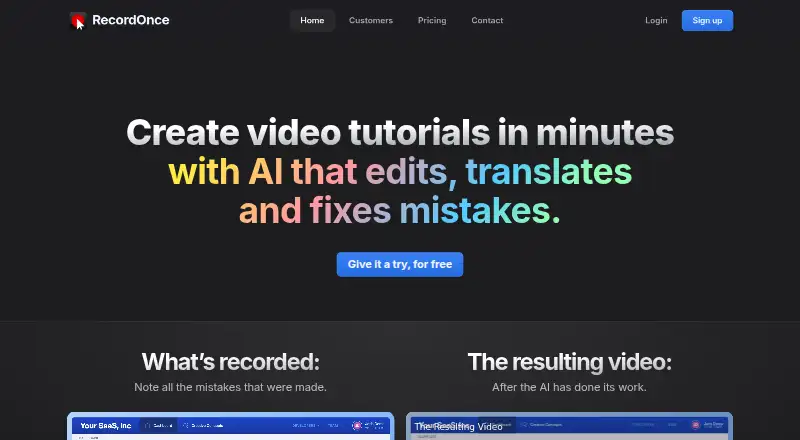
Record Once is a screen-recording and tutorial-authoring product for software teams, customer-support organizations, marketers, educators, and customer-success teams. It records interactions with web applications, including clicks and typed text, then supports editing, voice-overs, translation, text guides, and hosted sharing. Desktop recording is available on Windows, macOS, and Linux, with camera and microphone recording and video quality up to 4K.
The pricing structure separates recording volume from publishing capacity. The Free plan is available forever, allows unlimited video recording, and publishes 3 videos. Startup costs $49 per month on monthly billing, keeps unlimited recording, and raises the publishing allowance to 10 videos. Professional costs $99 per month monthly and adds video-file exports alongside 25 published videos. Business uses custom pricing with annual billing and adds video translation, watermark removal, data masking, custom AI voices, centralized branding, and SSO.
Its clearest strength is the depth of its web-application tutorial workflow. AI-assisted editing can remove mistakes and filler words, adjust pacing, align voice-over timing, and generate voice-overs. Users can reorder actions, add slides, images, videos, background music, and calls to action, then create text guides with screenshots. Published videos can be hosted, embedded, and updated after publication, which suits teams maintaining changing software documentation. Choose Record Once for repeatable web-app walkthroughs and localized tutorial content; teams seeking a broader general-purpose recording workflow or a documented integration ecosystem should compare alternatives.
Your product? Our editors can test Record Once in depth and publish a review, labelled as paid · from $149/mo →
Record Once pricing
All 5 Record Once plans and prices →
Record Once fact sheet
| Free plan | Yes |
|---|---|
| Paid from | $49/mo |
| Webcam recording | Yes |
| System audio | Not verified |
| Microphone recording | Yes |
| Max recording length | Not verified |
| Maximum video quality | 4k |
| Supported platforms | windows, macos, linux |
| Deployment | Cloud, Desktop |
| Platforms | Windows, macOS, Linux |
| Support | |
| Built for | Small business, Mid-market, Enterprise (editorial estimate) |
| Pricing | Free plan (source) |
| Website | recordonce.com |
| Facts checked | 20 Sep 2026 |
Alternatives to Record Once
- CamtasiaA deep desktop toolkit for training videos, tutorials, and structured learning content.9.3
- ScreenPalA feature-rich choice for budget-conscious creators who need more than basic recording.9.1
- LoomA broad screen recorder for teams that communicate through polished async video.9.0



See all Record Once alternatives →
Used Record Once? Be the first to review it
The editor score above is our own research. What this page doesn't have yet is a reader's view — what you used Record Once for, what worked and what didn't. No stars are seeded and no review is paid for; an editor reads every one before it appears.
Write a reviewTwo minutes · verified accounts only · read by an editor before it appears
Featured on iTechGuides

Record Once is listed in our Screen Recording Software directory. Add the badge to your site — it links back to this page.
<a href="https://www.itechguides.com/products/record-once/"><img src="https://www.itechguides.com/best/badge/record-once.svg" alt="Featured on iTechGuides" width="230" height="46"></a>
Reviewed by iTechGuides Editors · Editorial team · Updated Oct 2026
Advertiser disclosure: iTechGuides is reader-supported. Vendors can pay for top positions in our rankings and for a place on other products' pages, and we may earn a commission when you click some links. Bought places stand at the number bought; this page and our disclosure say so. Paying vendors may get a fuller, more detailed review from our editors, and that review can change their score. How we rank.
Last updated · How we research and update