
Rec
Rec: A browser-first recorder for teams that need searchable, AI-enriched video. Ranked #8 of 39 in AI Screen Recorders by our editors (7.9/10); pricing: Free plan; best for AI-first browser recording and search.
At a glance
- Editor score7.9 / 10
- PricingFree plan
- Best forAI-first browser recording and search
- Free planYes
- Paid from$10/mo
- AI transcriptionYes
- Facts checked20 Sep 2026
Where it wins
- Unlimited free recording with no watermarks
- Transcripts, summaries, chapters, speaker labels, and semantic search
- Connects with Slack, Linear, GitHub, Notion, Zapier, and Google Drive
Where it doesn't
- Platform support is limited to the web and Chrome extension
- Viewing and some AI generation use paid credits
- Usage-based pricing requires monitoring viewed minutes
Our verdict on Rec
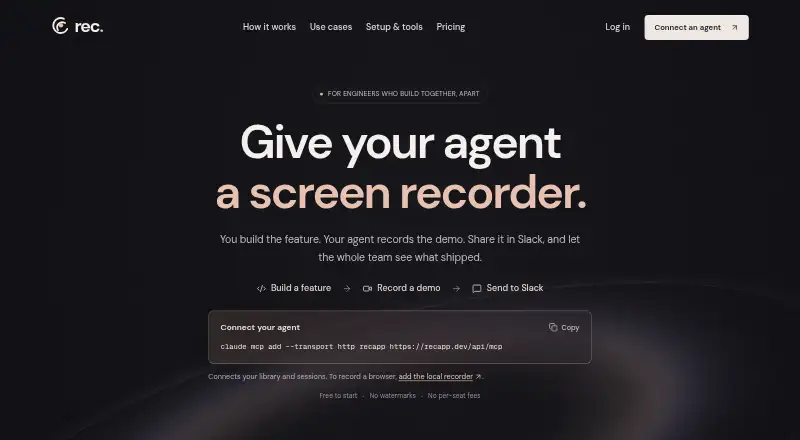
Rec is a browser-based AI screen recorder for product, engineering, marketing, sales, and support teams. It captures screens, browser tabs, cameras, microphones, and system audio, then turns recordings into transcripts, summaries, chapters, and searchable video. Teams can share recordings through links, embeds, branded pages, Slack, and connected tools. Its MCP integration also supports AI-assisted recording and search through compatible assistants.
The free plan is unusually permissive for recording: it includes unlimited recording, 30 viewed minutes per month, no watermarks, and no credit card requirement. Rec’s paid model is based on usage credits rather than conventional per-user plans. Usage credits cost $0.02 per viewed minute, paid credits roll over, and monthly budget controls are available. Fixed budgets include $10 for approximately 500 viewed minutes, $20 for approximately 1,000 viewed minutes, and $50 for approximately 2,500 viewed minutes. A custom amount is also available, with unused paid credits rolling over. This structure suits teams that can forecast viewing, but it makes consumption tracking part of ongoing administration.
Rec’s strongest distinction is the depth of its AI workflow around recorded material. Automatic transcription, speaker-labeled transcripts, summaries, chapters, semantic search, chat across recordings, voiceovers, and dubbing into five languages extend the product beyond basic capture. MP4 downloads and Google Drive delivery support reuse, while connections to Claude, Cursor, Slack, Linear, GitHub, Notion, Zapier, Google Drive, and MCP broaden its workflow fit. It is a strong choice for teams working primarily in browser-based environments and wanting recordings to become searchable documentation. Teams needing broader platform coverage or a conventional per-user pricing model should choose an alternative.
Your product? Our editors can test Rec in depth and publish a review, labelled as paid · from $149/mo →
Rec pricing
Rec fact sheet
| Free plan | Yes |
|---|---|
| Paid from | $10/mo |
| AI transcription | Yes |
| AI summaries | Yes |
| Documentation output | Yes |
| Speaker identification | Yes |
| Recording limit | Not verified |
| Platform support | Browser |
| Export formats | MP4 |
| Deployment | Cloud, Browser extension |
| Platforms | Web, Chrome extension |
| Support | Email, Docs |
| Built for | Solo, Small business, Mid-market (editorial estimate) |
| Integrations | 9 integrations: Claude, Cursor, Slack, Linear, GitHub, Notion … |
| Pricing | Free plan (source) |
| Website | recapp.dev |
| Facts checked | 20 Sep 2026 |
Rec integrations
Rec lists 9 integrations on its own site.
- Claude
- Cursor
- Slack
- Linear
- GitHub
- Notion
- Google Drive
- Zapier
- MCP
Alternatives to Rec
- LoomA polished screen recorder with broad integrations, AI options, and a higher paid entry point.9.2
- ZightA broad AI capture and administration tool with a useful free tier.9.0
- ScreenPalA feature-rich freemium recorder with 4K capture, AI tools, and broad device coverage.8.8



Rec vs the competition



Compare Rec with any tool side by side →
Used Rec? Be the first to review it
The editor score above is our own research. What this page doesn't have yet is a reader's view — what you used Rec for, what worked and what didn't. No stars are seeded and no review is paid for; an editor reads every one before it appears.
Write a reviewTwo minutes · verified accounts only · read by an editor before it appears
Featured on iTechGuides

Rec is listed in our AI Screen Recorders directory. Add the badge to your site — it links back to this page.
<a href="https://www.itechguides.com/products/rec/"><img src="https://www.itechguides.com/best/badge/rec.svg" alt="Featured on iTechGuides" width="230" height="46"></a>
Reviewed by iTechGuides Editors · Editorial team · Updated Oct 2026
Advertiser disclosure: iTechGuides is reader-supported. Vendors can pay for top positions in our rankings and for a place on other products' pages, and we may earn a commission when you click some links. Bought places stand at the number bought; this page and our disclosure say so. Paying vendors may get a fuller, more detailed review from our editors, and that review can change their score. How we rank.
Last updated · How we research and update