
Rancher Desktop
Rancher Desktop: A free, open-source GUI for cross-platform single-node k3s development clusters. Ranked #1 of 23 in Local Kubernetes Tools by our editors (9.4/10); pricing: Free plan; best for cross-platform local clusters with a GUI.
At a glance
- Editor score9.4 / 10
- PricingFree plan
- Best forCross-platform local clusters with a GUI
- Free planYes
- Paid fromFree
- Multi-node clustersNo
- Facts checked20 Sep 2026
Where it wins
- Runs local k3s clusters on macOS, Windows, and Linux
- Supports containerd or dockerd (Moby) with bundled tools
- Includes image workflows, registries, port forwarding, and a dashboard
Where it doesn't
- Provides one single-node cluster by default
- Multi-node clusters require an external tool such as k3d
- The GUI does not manage external multi-node clusters
Our verdict on Rancher Desktop
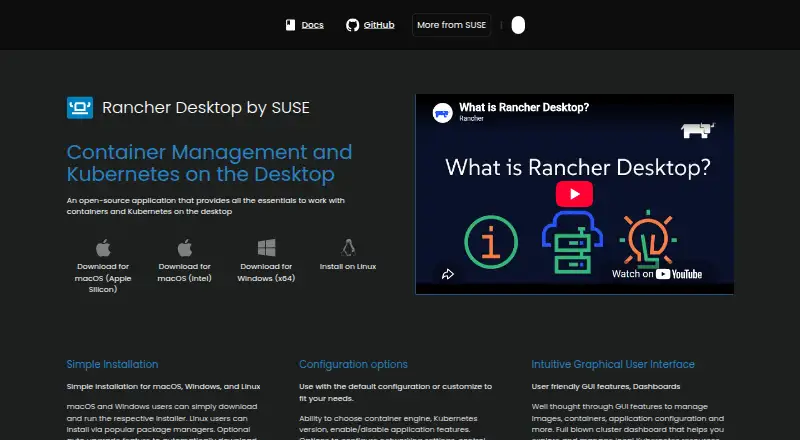
Rancher Desktop is a free, open-source desktop application for developers who need local Kubernetes and container workflows. It runs a local Kubernetes cluster using k3s and is available for macOS, Windows, and Linux. A graphical interface and Kubernetes cluster dashboard provide a visual way to manage the local environment, while selectable Kubernetes versions support projects that need a particular release. The default model is a single-node cluster, making Rancher Desktop a fit for local development, learning, and container-based workflows rather than multi-node cluster management.
Its main strength is the breadth of tools included in one desktop application. Developers can choose between containerd with nerdctl and dockerd (Moby) with the Docker CLI. Rancher Desktop supports building, pulling, pushing, scanning, and running container images, along with port forwarding for Kubernetes services. It also bundles Docker, nerdctl, kubectl, and Helm utilities. Private registry mirroring and local registry workflows extend its usefulness for projects that need to move images between local development environments and registries.
Rancher Desktop also offers selectable Traefik and Spin Operator Kubernetes options, an addon catalog, and Kubernetes version selection through Preferences > Kubernetes. These options give the local environment more flexibility without changing its focused desktop scope. The key limitation is cluster topology: multi-node clusters require an external tool such as k3d, and those clusters are not managed by the Rancher Desktop GUI. Choose Rancher Desktop for a cross-platform local k3s environment with a GUI and container tooling; choose another approach when multi-node orchestration inside the same interface is central.
Your product? Our editors can test Rancher Desktop in depth and publish a review, labelled as paid · from $149/mo →
Rancher Desktop pricing
Rancher Desktop fact sheet
| Free plan | Yes |
|---|---|
| Paid from | Free |
| Supported operating systems | macOS, Windows, Linux |
| Multi-node clusters | No |
| Graphical interface | Yes |
| Container runtime options | containerd or dockerd (Moby) |
| Kubernetes version control | Selectable from a list in Preferences > Kubernetes |
| Local registry support | Yes |
| Add-on catalog | Yes |
| Deployment | Desktop |
| Platforms | Windows, macOS, Linux |
| Support | Community, Docs |
| Built for | Solo, Small business, Mid-market (editorial estimate) |
| Pricing | Free plan |
| Website | rancherdesktop.io |
| Facts checked | 20 Sep 2026 |
Alternatives to Rancher Desktop
- MinikubeA flexible, free way to create single- or multi-node Kubernetes clusters locally.9.3
- k3dAn open-source local k3s tool for Docker-based single- and multi-node clusters.9.2
- kindAn open-source CLI for portable single- and multi-node Kubernetes clusters.9.1


See all Rancher Desktop alternatives →
Rancher Desktop vs the competition
- Rancher Desktop vs Minikube
- Rancher Desktop vs k3d
- Rancher Desktop vs kind
- Rancher Desktop vs ctlptl
- Rancher Desktop vs srelens
- Rancher Desktop vs Clusterfudge


Compare Rancher Desktop with any tool side by side →
Also Ranked In
Rancher Desktop is ranked in 3 of our directories.
Used Rancher Desktop? Be the first to review it
The editor score above is our own research. What this page doesn't have yet is a reader's view — what you used Rancher Desktop for, what worked and what didn't. No stars are seeded and no review is paid for; an editor reads every one before it appears.
Write a reviewTwo minutes · verified accounts only · read by an editor before it appears
Featured on iTechGuides

Rancher Desktop is listed in our Local Kubernetes Tools directory. Add the badge to your site — it links back to this page.
<a href="https://www.itechguides.com/products/rancher-desktop/"><img src="https://www.itechguides.com/best/badge/rancher-desktop.svg" alt="Featured on iTechGuides" width="230" height="46"></a>
Reviewed by iTechGuides Editors · Editorial team · Updated Oct 2026
Advertiser disclosure: iTechGuides is reader-supported. Vendors can pay for top positions in our rankings and for a place on other products' pages, and we may earn a commission when you click some links. Bought places stand at the number bought; this page and our disclosure say so. Paying vendors may get a fuller, more detailed review from our editors, and that review can change their score. How we rank.
Last updated · How we research and update