
Quickshot
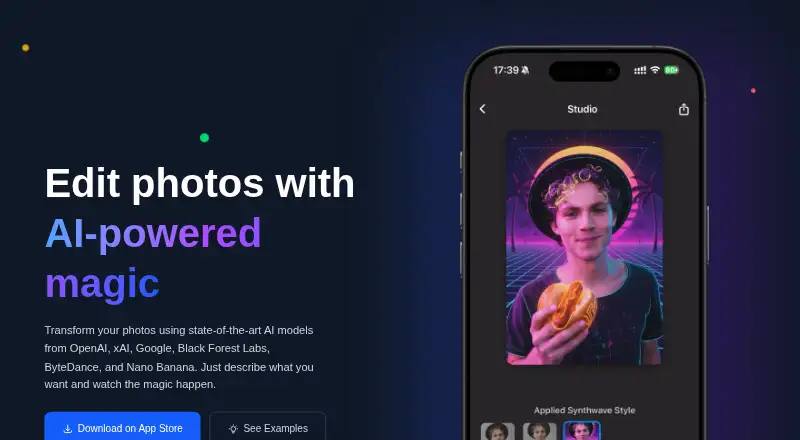
Quickshot: A focused iPhone editor for quick prompt-based changes, with useful revision controls. Ranked #61 of 97 in AI Photo Editors by our editors (6.6/10); pricing: Free plan; best for prompt-based AI edits on iPhone.
At a glance
- Editor score6.6 / 10
- PricingFree plan
- Best forPrompt-based AI edits on iPhone
- Free planYes
- Generative editingYes
- Facts checked22 Sep 2026
Where it wins
- Natural-language prompts cover additions, removals, styles, and weather.
- Edit history supports comparison, branching, retries, and rollback.
- Multiple generation models and direct sharing support creative workflows.
Where it doesn't
- The product is essentially focused on iPhone.
- There is no verified support for RAW, layers, or batch editing.
- The App Store says Mac compatibility is not verified for macOS.
Our verdict on Quickshot
Quickshot is an iPhone photo editor that turns plain-language prompts into AI-powered changes. It suits solo users, small teams, consumers, and creators who want to alter an existing photo or a newly captured image without working in a traditional layer-based editor. Prompts can describe changes such as removing a background, adding an object, or changing the weather. One-tap presets extend that workflow to additions, removals, styles, backgrounds, and weather effects.
Its strongest feature set is the combination of generation control and revision history. Users can select among multiple image-generation models, retry generations to explore alternate results, and review saved editing steps through comparison, branching, and rollback. That makes Quickshot more practical for iterative experimentation than a single-pass image generator. Finished images can be shared to Photos and social apps, keeping the workflow centered on mobile creation and publishing.
Quickshot uses a freemium model with free access and paid plans named Quickshot Membership and Quickshot Pro Annual. Both paid plans list unlimited edits and priority processing. The product is deployed through cloud and mobile workflows, with iOS as the stated platform. The App Store also lists Mac compatibility but says the app is not verified for macOS. Choose Quickshot if prompt-driven edits, object and background tools, model selection, and mobile sharing are your priorities. Choose another editor if you need verified RAW handling, layers, batch editing, or a broader desktop workflow.
Your product? Our editors can test Quickshot in depth and publish a review, labelled as paid · from $149/mo →
Quickshot pricing
All 2 Quickshot plans and prices →
Quickshot fact sheet
| Free plan | Yes |
|---|---|
| Paid from | Not verified |
| Generative editing | Yes |
| RAW photo support | Not verified |
| Layers and masks | Not verified |
| Batch editing | Not verified |
| Batch limit | Not verified |
| Supported platforms | iPhone; App Store also lists Mac compatibility, but says the app is not verified for macOS |
| Mobile app | Yes |
| Deployment | Cloud, Mobile |
| Platforms | iOS |
| Built for | Solo, Small business (editorial estimate) |
| Pricing | Free plan (source) |
| Website | quickshot.photo |
| Facts checked | 22 Sep 2026 |
Alternatives to Quickshot
- Adobe LightroomA broad Lightroom workflow for RAW editing, AI masking, organization, and synced photo libraries.9.4
- Adobe PhotoshopA deep compositing and generative editing suite for creative professionals.9.2
- Capture OneA deep RAW, tethered, and AI editing suite for professional photography workflows.8.9



See all Quickshot alternatives →
Used Quickshot? Be the first to review it
The editor score above is our own research. What this page doesn't have yet is a reader's view — what you used Quickshot for, what worked and what didn't. No stars are seeded and no review is paid for; an editor reads every one before it appears.
Write a reviewTwo minutes · verified accounts only · read by an editor before it appears
Featured on iTechGuides

Quickshot is listed in our AI Photo Editors directory. Add the badge to your site — it links back to this page.
<a href="https://www.itechguides.com/products/quickshot/"><img src="https://www.itechguides.com/best/badge/quickshot.svg" alt="Featured on iTechGuides" width="230" height="46"></a>
Reviewed by iTechGuides Editors · Editorial team · Updated Oct 2026
Advertiser disclosure: iTechGuides is reader-supported. Vendors can pay for top positions in our rankings and for a place on other products' pages, and we may earn a commission when you click some links. Bought places stand at the number bought; this page and our disclosure say so. Paying vendors may get a fuller, more detailed review from our editors, and that review can change their score. How we rank.
Last updated · How we research and update