QuickDup
QuickDup: An open-source candidate finder for reviewing likely code duplicates in pull requests. Ranked #7 of 23 in Code Clone Detection Tools by our editors (8.5/10); pricing: Open source; best for teams reviewing clones in GitHub pull requests.
At a glance
- Editor score8.5 / 10
- PricingOpen source
- Best forTeams reviewing clones in GitHub pull requests
- Paid fromFree
- Clone detection methodHybrid
- Facts checked20 Sep 2026
Where it wins
- Combines structural fingerprints with token-similarity scoring
- Adds Git diff, commit-range, caching, and threshold controls
- Publishes findings as GitHub Actions pull-request annotations
Where it doesn't
- No IDE integration
- Findings are candidates, not definitive semantic classifications
- Requires self-hosted command-line and CI setup
Our verdict on QuickDup
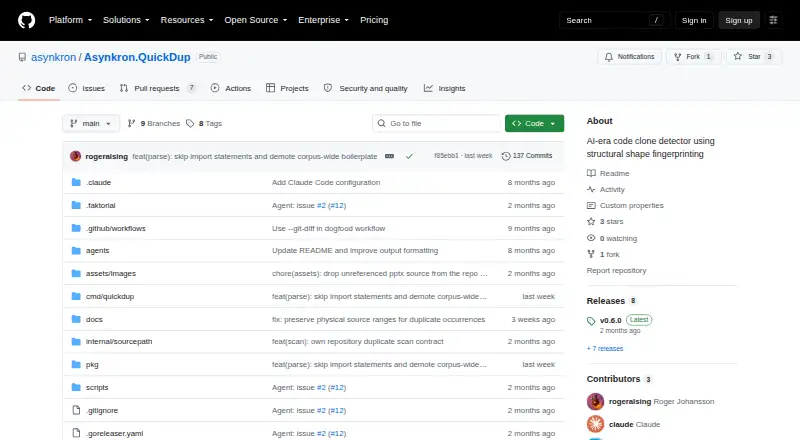
QuickDup is an open-source command-line tool for detecting likely code clones in source directories or individual files. It is aimed at developers and engineering teams that review duplication across repositories, particularly teams using GitHub pull requests and GitHub Actions. The tool runs on Windows, macOS, and Linux, and its repository is available under the MIT license. Its role is candidate discovery: findings are intended for review by people or AI features rather than treated as definitive semantic clone classifications.
Its detection approach combines indent-delta structural fingerprinting with first-token fingerprints and token-similarity scoring. Multiple detection strategies let teams examine duplication from different angles, while configurable similarity, occurrence, size, and ranking thresholds help narrow results. QuickDup can scan recursively or target a single file, ignore known patterns, and compare Git diffs or commit ranges. Incremental parsing cache is also included, which fits repeated repository checks and pull-request workflows. Together, these controls make the product more focused on configurable candidate generation than on a single fixed clone-detection method.
GitHub Actions is the central ecosystem connection: QuickDup can annotate pull requests, making findings available during code review and CI workflows. The published feature set does not include IDE integration, so teams wanting clone feedback directly inside an editor should consider a tool with that connection. QuickDup suits organizations comfortable with self-hosted, command-line workflows and human or AI review of candidates. It is less suitable for buyers seeking a hosted interface, built-in IDE support, or a semantic classifier that independently determines whether two code sections have the same meaning.
Your product? Our editors can test QuickDup in depth and publish a review, labelled as paid · from $149/mo →
QuickDup pricing
QuickDup fact sheet
| Free plan | Not verified |
|---|---|
| Paid from | Free |
| Clone detection method | Hybrid |
| Scan scope | Repository |
| CI integration | Yes |
| IDE integration | No |
| Self-hosted option | Yes |
| Supported languages | Not verified |
| Deployment | Self-hosted |
| Platforms | Windows, macOS, Linux |
| Support | Docs |
| Built for | Solo, Small business, Mid-market (editorial estimate) |
| Integrations | 1 integrations: GitHub Actions |
| Pricing | Open source |
| Website | github.com |
| Facts checked | 20 Sep 2026 |
QuickDup integrations
QuickDup lists 1 integrations on its own site.
- GitHub Actions
Alternatives to QuickDup
- jscpdA broad, self-hosted clone detector with strong CI, reporting, and history analysis.9.4
- art-duplA focused, self-hosted clone analyzer for Go teams building duplication checks into CI.9.2
- PMDA strong open-source choice for teams pairing clone detection with broad static analysis.9.0


See all QuickDup alternatives →
QuickDup vs the competition
- QuickDup vs jscpd
- QuickDup vs art-dupl
- QuickDup vs PMD
- QuickDup vs NiCad
- QuickDup vs Amimica
- QuickDup vs @kongyo2/similarity-ts
Compare QuickDup with any tool side by side →
Used QuickDup? Be the first to review it
The editor score above is our own research. What this page doesn't have yet is a reader's view — what you used QuickDup for, what worked and what didn't. No stars are seeded and no review is paid for; an editor reads every one before it appears.
Write a reviewTwo minutes · verified accounts only · read by an editor before it appears
Featured on iTechGuides

QuickDup is listed in our Code Clone Detection Tools directory. Add the badge to your site — it links back to this page.
<a href="https://www.itechguides.com/products/quickdup/"><img src="https://www.itechguides.com/best/badge/quickdup.svg" alt="Featured on iTechGuides" width="230" height="46"></a>
Reviewed by iTechGuides Editors · Editorial team · Updated Oct 2026
Advertiser disclosure: iTechGuides is reader-supported. Vendors can pay for top positions in our rankings and for a place on other products' pages, and we may earn a commission when you click some links. Bought places stand at the number bought; this page and our disclosure say so. Paying vendors may get a fuller, more detailed review from our editors, and that review can change their score. How we rank.
Last updated · How we research and update