
QtCAM
QtCAM: A focused Linux tool for capturing, viewing, and monitoring up to six cameras. Ranked #26 of 41 in Webcam Software by our editors (5.7/10); pricing: Open source; best for linux multi-camera capture and monitoring.
At a glance
- Editor score5.7 / 10
- PricingOpen source
- Best forLinux multi-camera capture and monitoring
- Paid fromFree
- Founded2003 · Chennai, India
- Facts checked20 Sep 2026
Where it wins
- Supports simultaneous streaming from up to six Linux cameras
- Offers camera controls, frame counts, FPS, and preview settings
- Handles JPG, PNG, RAW, BMP, YUV, MJPEG, H264, and VP8
Where it doesn't
- Runs on Linux only
- Does not provide virtual camera output or video effects
- Does not include integrations with other software or services
Our verdict on QtCAM
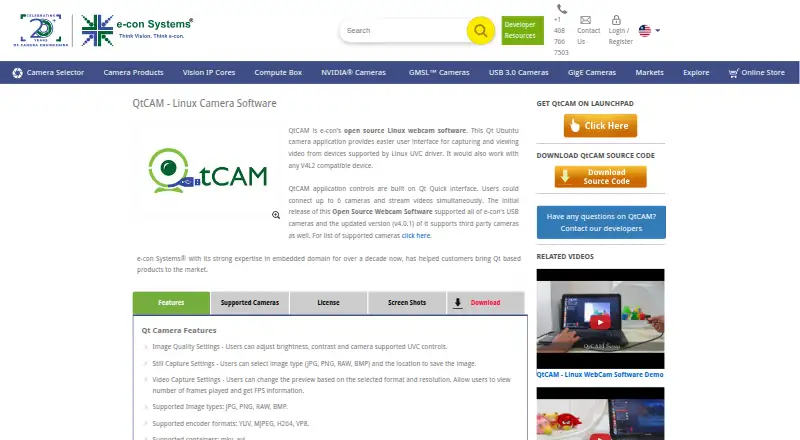
QtCAM is an open-source webcam application from e-con Systems for Linux users working with USB webcams and compatible embedded or industrial cameras. Its Qt-based interface captures and displays video from Linux UVC and V4L2-compatible devices, with support for simultaneous streaming from up to six cameras. That makes it a focused option for multi-camera capture and monitoring rather than a general-purpose video production suite.
The open-source model keeps QtCAM outside a conventional tiered pricing structure. Its feature set centers on direct camera access and capture: users can adjust brightness, contrast, and supported UVC controls; configure preview format and resolution; and view frame count and FPS information. Still-image capture supports JPG, PNG, RAW, and BMP, while video workflows support YUV, MJPEG, H264, and VP8 encoders with MKV and AVI containers. Selected e-con camera extensions add further device-specific settings.
QtCAM fits Linux-based setups that need several compatible cameras, low-level controls, and format flexibility in one application. Its narrow focus is also the main boundary: it does not provide virtual camera output, background or video effects, or integrations. Choose it for straightforward capture and monitoring across Linux UVC/V4L2 devices, especially when multi-camera support matters. Choose an alternative if your workflow depends on broadcasting into other applications, creative effects, or a broader software ecosystem.
Your product? Our editors can test QtCAM in depth and publish a review, labelled as paid · from $149/mo →
QtCAM pricing
QtCAM fact sheet
| Free plan | Not verified |
|---|---|
| Paid from | Free |
| Virtual camera | Not verified |
| Background tools | Not verified |
| Video effects | Not verified |
| Camera controls | Yes |
| Webcam recording | Yes |
| Supported platforms | linux |
| Deployment | Desktop |
| Platforms | Linux |
| Built for | Solo, Small business (editorial estimate) |
| Pricing | Open source |
| Website | e-consystems.com |
| Facts checked | 20 Sep 2026 |
Alternatives to QtCAM
- NVIDIA BroadcastA free Windows tool for RTX users who want AI audio cleanup and webcam effects.9.2
- SplitCam MultistreamA free encoder for scene-based production, virtual cameras, audio mixing and multistreaming.8.8
- ManyCamA flexible webcam studio for layered scenes, streaming, audio routing, and video calls.8.5



Used QtCAM? Be the first to review it
The editor score above is our own research. What this page doesn't have yet is a reader's view — what you used QtCAM for, what worked and what didn't. No stars are seeded and no review is paid for; an editor reads every one before it appears.
Write a reviewTwo minutes · verified accounts only · read by an editor before it appears
Featured on iTechGuides

QtCAM is listed in our Webcam Software directory. Add the badge to your site — it links back to this page.
<a href="https://www.itechguides.com/products/qtcam/"><img src="https://www.itechguides.com/best/badge/qtcam.svg" alt="Featured on iTechGuides" width="230" height="46"></a>
Reviewed by iTechGuides Editors · Editorial team · Updated Oct 2026
Advertiser disclosure: iTechGuides is reader-supported. Vendors can pay for top positions in our rankings and for a place on other products' pages, and we may earn a commission when you click some links. Bought places stand at the number bought; this page and our disclosure say so. Paying vendors may get a fuller, more detailed review from our editors, and that review can change their score. How we rank.
Last updated · How we research and update