qmux
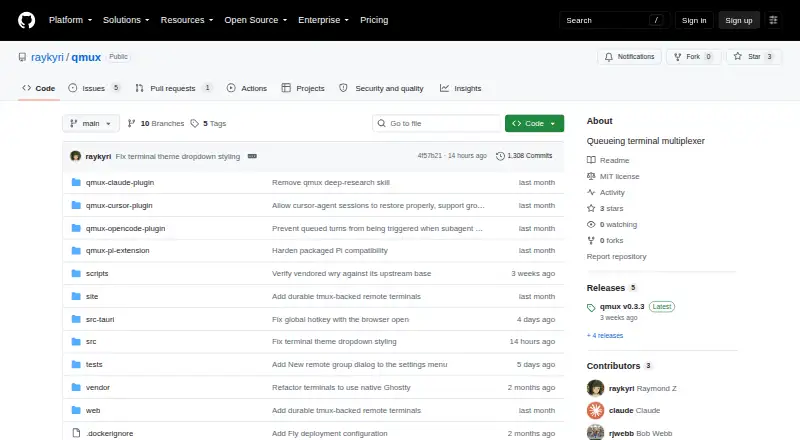
qmux: A focused macOS workspace for running, recovering, and organizing coding-agent sessions. Ranked #28 of 29 in Terminal Multiplexers by our editors (6.3/10); pricing: Free plan; best for macOS AI-agent terminal workflows.
At a glance
- Editor score6.3 / 10
- PricingFree plan
- Best formacOS AI-agent terminal workflows
- Free planYes
- Paid fromFree
- Persistence scopeLocal
- Facts checked20 Sep 2026
Where it wins
- Native Ghostty panes with adapters for multiple CLI agents
- Recovery, transcript views, queued prompts, and turn reordering
- Forking, Git worktrees, browser access, and SSH/tmux groups
Where it doesn't
- Currently limited to macOS 13 or later
- No session sync across devices
- No collaboration features
Our verdict on qmux
qmux is an open-source desktop terminal multiplexer for coding-agent workflows on macOS. It combines native Ghostty terminal panes with adapters for Claude Code, Codex, OpenCode, Grok, Muse, Pi, Cursor Agent, and Devin CLI. The product is aimed at developers who run several agent sessions, need to inspect their transcripts, and want a dedicated desktop workspace rather than a collection of separate terminal windows. GitHub integration, local shells, and remote SSH/tmux groups extend the workflow beyond a single local session.
Its strongest distinction is the depth of its session workflow. Users can queue follow-up prompts, reorder turns, tail transcripts, open native transcript views, recover sessions after a restart, and fork sessions for alternate directions. qmux also supports project- and global-scope prompt libraries, Git worktree creation for launched agents, and an embedded browser panel. These features make it a fit for agent-heavy development where continuity, parallel branches, and context management matter more than a minimal terminal interface.
The trade-off is scope. The current release is macOS-only and requires macOS 13 or later, while Linux support is planned. Persistence is local, with no session sync, and collaboration is not included, so teams needing shared workspaces or cross-device continuity should choose a different tool. qmux is free and open source, with no paid tiers described. It suits individual developers who want structured macOS agent sessions, especially those already working with Ghostty, Git worktrees, SSH, or tmux. It is less suitable for mixed-platform teams, collaborative operations, or users who need synchronized sessions across devices.
Your product? Our editors can test qmux in depth and publish a review, labelled as paid · from $149/mo →
qmux pricing
qmux fact sheet
| Free plan | Yes |
|---|---|
| Paid from | Free |
| Persistence scope | Local |
| Session synchronization | No |
| Collaboration features | No |
| Custom pane layouts | Yes |
| Plugins or extensions | Yes |
| Access platforms | macOS desktop app; local shells; remote SSH/tmux groups |
| Maximum sessions | Not verified |
| Deployment | Desktop |
| Platforms | macOS |
| Built for | Solo, Small business, Mid-market (editorial estimate) |
| Integrations | 9 integrations: Claude Code, Codex, OpenCode, Grok, Muse, Pi … |
| Pricing | Free plan |
| Website | github.com |
| Facts checked | 20 Sep 2026 |
qmux integrations
qmux lists 9 integrations on its own site.
- Claude Code
- Codex
- OpenCode
- Grok
- Muse
- Pi
- Cursor Agent
- Devin CLI
- GitHub
Alternatives to qmux
- ZellijA free, open-source multiplexer with layouts, plugins, persistence, and collaboration.9.4
- tmuxA free, scriptable way to manage persistent local terminal sessions across Unix platforms.9.2
- muxelA free, open-source workspace for managing multiple local and remote coding sessions.9.0


Used qmux? Be the first to review it
The editor score above is our own research. What this page doesn't have yet is a reader's view — what you used qmux for, what worked and what didn't. No stars are seeded and no review is paid for; an editor reads every one before it appears.
Write a reviewTwo minutes · verified accounts only · read by an editor before it appears
Featured on iTechGuides

qmux is listed in our Terminal Multiplexers directory. Add the badge to your site — it links back to this page.
<a href="https://www.itechguides.com/products/qmux/"><img src="https://www.itechguides.com/best/badge/qmux.svg" alt="Featured on iTechGuides" width="230" height="46"></a>
Reviewed by iTechGuides Editors · Editorial team · Updated Oct 2026
Advertiser disclosure: iTechGuides is reader-supported. Vendors can pay for top positions in our rankings and for a place on other products' pages, and we may earn a commission when you click some links. Bought places stand at the number bought; this page and our disclosure say so. Paying vendors may get a fuller, more detailed review from our editors, and that review can change their score. How we rank.
Last updated · How we research and update