QField
QField: A free, open-source QGIS field editor with offline capture, GNSS, media, and sync. Ranked #34 of 52 in Mobile Forms Software by our editors (5.6/10); pricing: Free plan; best for QGIS users collecting and editing field features.
At a glance
- Editor score5.6 / 10
- PricingFree plan
- Best forQGIS users collecting and editing field features
- Free planYes
- Paid fromFree
- Offline data collectionYes
- Founded2011
- Facts checked24 Sep 2026
Where it wins
- Free, open-source app for mobile and desktop GIS editing
- Offline project edits synchronize through QFieldCloud
- Supports forms, media attachments, GNSS, and major GIS formats
Where it doesn't
- Focused on GIS projects rather than general-purpose forms
- Workflow handoffs are not provided
- QFieldCloud is a separate hosted service with its own plans
Our verdict on QField
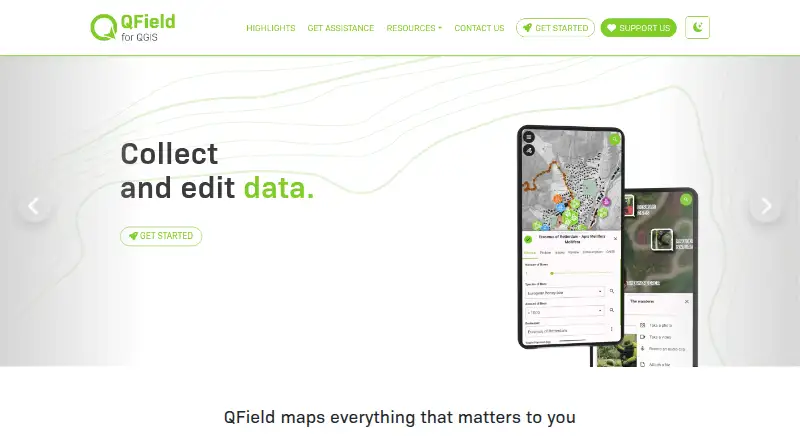
QField is a free, open-source mobile GIS application for field teams that need to view and edit QGIS projects while collecting geospatial data. It runs on Android, iOS, Windows, macOS, and Linux, making it suitable for organizations that move between mobile devices and desktop workstations. QGIS users can configure project attribute forms, including guided multi-page wizards, before sending projects into the field. The app also supports local projects and projects downloaded from QFieldCloud.
The core product is free, while QFieldCloud is an optional hosted service with separate paid plans. QFieldCloud provides a path for synchronizing edits made offline on local project copies, which suits teams working beyond reliable connectivity. Integration is centered on QGIS and QFieldCloud rather than a broad business-app ecosystem. Supported GIS data formats include GeoPackage and PostGIS, helping teams keep projects within established geospatial workflows. Deployment options span cloud, self-hosted, desktop, and mobile environments.
Field collection features cover photo and other media attachments, built-in or external GNSS receivers, and storage of positioning coordinates in form attributes. These capabilities make QField a focused choice for mapping, inspection, and geospatial data maintenance where location accuracy and project structure matter. It is less suitable for teams seeking a general form builder, workflow automation, or handoffs between non-GIS business systems. Choose QField when your work is organized around QGIS projects and offline field editing; consider a broader forms platform when GIS project compatibility is not central.
Your product? Our editors can test QField in depth and publish a review, labelled as paid · from $149/mo →
QField pricing
QField fact sheet
| Free plan | Yes |
|---|---|
| Paid from | Free |
| Offline data collection | Yes |
| Signature capture | Not verified |
| Photo capture | Yes |
| GPS capture | Yes |
| Workflow handoffs | None |
| Mobile platforms | Both |
| Deployment | Cloud, Self-hosted, Desktop, Mobile |
| Platforms | Android, iOS, Windows, macOS, Linux |
| Support | Tickets, Community |
| Built for | Solo, Small business, Mid-market, Enterprise (editorial estimate) |
| Integrations | 2 integrations: QGIS, QFieldCloud |
| Pricing | Free plan (source) |
| Website | qfield.org |
| Facts checked | 24 Sep 2026 |
QField integrations
QField lists 2 integrations on its own site.
- QGIS
- QFieldCloud
Alternatives to QField
- ArcGIS Survey123A GIS-focused survey tool for offline field collection and ArcGIS workflows.9.3
- JotformA flexible form builder with offline mobile collection and an ongoing free tier.9.1
- CommCareA strong fit for field programs needing offline forms, case management, and referrals.8.8


Used QField? Be the first to review it
The editor score above is our own research. What this page doesn't have yet is a reader's view — what you used QField for, what worked and what didn't. No stars are seeded and no review is paid for; an editor reads every one before it appears.
Write a reviewTwo minutes · verified accounts only · read by an editor before it appears
Featured on iTechGuides

QField is listed in our Mobile Forms Software directory. Add the badge to your site — it links back to this page.
<a href="https://www.itechguides.com/products/qfield/"><img src="https://www.itechguides.com/best/badge/qfield.svg" alt="Featured on iTechGuides" width="230" height="46"></a>
Reviewed by iTechGuides Editors · Editorial team · Updated Oct 2026
Advertiser disclosure: iTechGuides is reader-supported. Vendors can pay for top positions in our rankings and for a place on other products' pages, and we may earn a commission when you click some links. Bought places stand at the number bought; this page and our disclosure say so. Paying vendors may get a fuller, more detailed review from our editors, and that review can change their score. How we rank.
Last updated · How we research and update