
PyBox
PyBox: A focused open-source workspace for running Python in the browser or self-hosted. Ranked #17 of 25 in Python IDEs by our editors (6.4/10); pricing: Open source; best for self-hosted browser Python workspaces.
At a glance
- Editor score6.4 / 10
- PricingOpen source
- Best forSelf-hosted browser Python workspaces
- Paid fromFree
- Facts checked20 Sep 2026
Where it wins
- Browser editor with syntax highlighting and autocompletion
- Built-in packages, Bash terminal, and interactive Python REPL
- Matplotlib, HTML, image, SVG, and styled-text visualizations
Where it doesn't
- Debugging workflows are outside the documented feature set
- Testing workflows are outside the documented feature set
- Environment management and product maturity are not established
Our verdict on PyBox
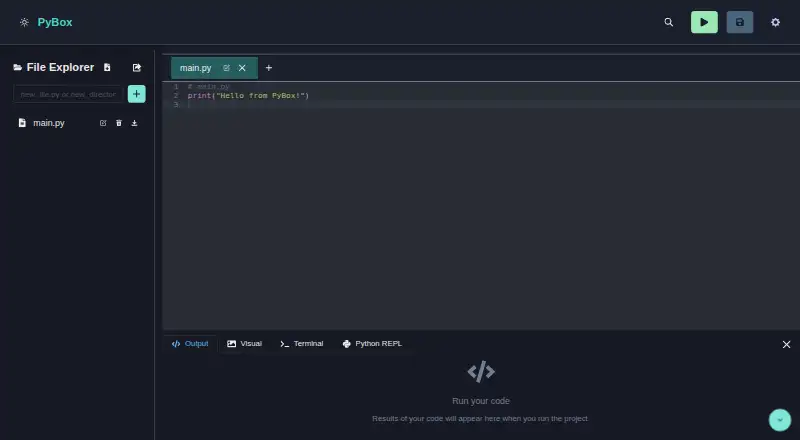
PyBox is an open-source, browser-based Python development environment for writing, running, and managing projects without installing a desktop IDE. It is aimed at users who want a browser workspace for Python experimentation or who prefer to deploy the application themselves. The interface combines a code editor, file explorer, package installation and package-list management, an integrated Bash terminal, and an interactive Python REPL with history and autocompletion. Project export as a ZIP archive gives users a direct way to take a project elsewhere.
Its strongest fit is a lightweight browser and self-hosted workflow. PyBox supports web and self-hosted deployment, while its documented ecosystem connections include Matplotlib, Pyodide, and Wasmer. Visualization is broader than basic plotting: the feature set includes Matplotlib rendering plus HTML, image, SVG, and styled-text support. The MIT license also suits teams and individuals evaluating an open-source option they can deploy and adapt. Buyers should expect a focused Python workspace rather than a broad development suite spanning every stage of software delivery.
PyBox is a good choice for learners, experimenters, and teams that value browser access, package handling, terminal access, and visible outputs in one place. It is less suitable for projects that depend on documented debugging, testing, or environment-management workflows, or for users seeking a mature desktop-style IDE experience. Choose it when self-hosting and in-browser execution are central requirements; consider an alternative when formal development lifecycle tooling matters more than a compact Python workspace.
Your product? Our editors can test PyBox in depth and publish a review, labelled as paid · from $149/mo →
PyBox pricing
PyBox fact sheet
| Free plan | Not verified |
|---|---|
| Paid from | Free |
| Integrated debugger | Not verified |
| Integrated test runner | Not verified |
| Code intelligence | Advanced |
| Remote development | Not verified |
| Integrated profiler | Not verified |
| Supported platforms | web |
| Python environment tools | Not verified |
| Deployment | Cloud, Self-hosted |
| Platforms | Web |
| Support | Community |
| Built for | Solo, Small business (editorial estimate) |
| Integrations | 3 integrations: Matplotlib, Pyodide, Wasmer |
| Pricing | Open source |
| Website | py-box.netlify.app |
| Facts checked | 20 Sep 2026 |
PyBox integrations
PyBox lists 3 integrations on its own site.
- Matplotlib
- Pyodide
- Wasmer
Alternatives to PyBox
- PyCharmA full-featured, cross-platform Python IDE with a capable free tier.9.4
- Wing Python IDEA feature-rich Python IDE for teams willing to pay for an integrated workflow.9.0
- SpyderA broad, free Python IDE with strong data inspection, debugging, testing, and remote-development tools.8.8



Used PyBox? Be the first to review it
The editor score above is our own research. What this page doesn't have yet is a reader's view — what you used PyBox for, what worked and what didn't. No stars are seeded and no review is paid for; an editor reads every one before it appears.
Write a reviewTwo minutes · verified accounts only · read by an editor before it appears
Featured on iTechGuides

PyBox is listed in our Python IDEs directory. Add the badge to your site — it links back to this page.
<a href="https://www.itechguides.com/products/pybox/"><img src="https://www.itechguides.com/best/badge/pybox.svg" alt="Featured on iTechGuides" width="230" height="46"></a>
Reviewed by iTechGuides Editors · Editorial team · Updated Oct 2026
Advertiser disclosure: iTechGuides is reader-supported. Vendors can pay for top positions in our rankings and for a place on other products' pages, and we may earn a commission when you click some links. Bought places stand at the number bought; this page and our disclosure say so. Paying vendors may get a fuller, more detailed review from our editors, and that review can change their score. How we rank.
Last updated · How we research and update