
Project Plan 365
Project Plan 365: A capable Microsoft Project-compatible planner for teams working across devices. Ranked #11 of 46 in Gantt Chart Software by our editors (6.7/10); pricing: Free plan · paid from $9.99/user/mo (annual) · 14-day trial; best for microsoft Project-compatible teams across devices.
At a glance
- Editor score6.7 / 10
- PricingFree plan · paid from $9.99/user/mo (annual) · 14-day trial
- Best forMicrosoft Project-compatible teams across devices
- Free planYes
- Paid from$9.99/user/mo
- Founded2001
- Facts checked23 Sep 2026
Where it wins
- Creates, edits, saves, and shares Microsoft Project MPP files
- Combines critical-path, resource, cost, and Agile scheduling
- Runs on web, Windows, macOS, iOS, and Android
Where it doesn't
- There is no free editor plan
- Standard includes up to five read-only users
- Real-time collaboration starts with the Business plan
Our verdict on Project Plan 365
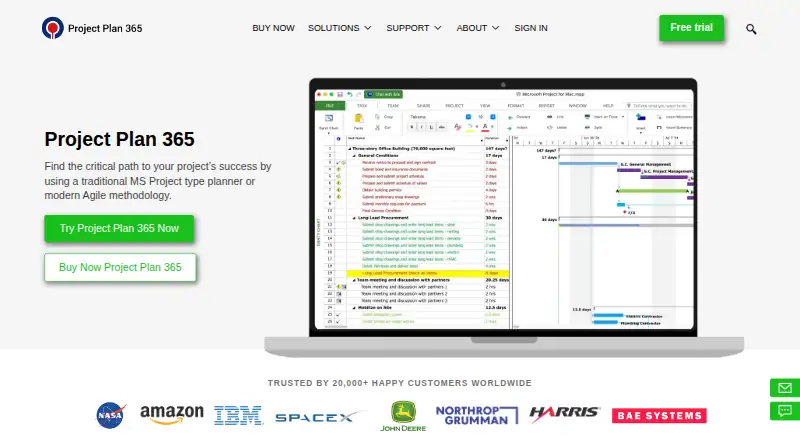
Project Plan 365 is project management and scheduling software for individual project managers, teams, and enterprises. Its core focus is Microsoft Project compatibility: users can create, edit, save, and share MPP files across web browsers, Windows, macOS, iOS, and Android. The product also covers Gantt, Calendar, Timeline, and Network Diagram views, along with resource assignment, cost tracking, critical-path analysis, Agile scheduling, reporting, and time entries. It fits organizations that need Microsoft Project workflows without limiting access to one device platform.
According to the vendor’s pricing page, the Standard plan costs $9.99 per user per month with annual billing and includes traditional Gantt planning, Agile scheduling, advanced reporting, critical-path management, Microsoft Project MPP compatibility, and up to five read-only users per subscription. Business costs $16.19 per user per month with annual billing and adds up to 10 read-only users, master projects and subprojects, real-time collaboration, risk management, and visual reports. Enterprise provides volume licensing, centralized user and license management, cross-platform deployment, dedicated onboarding and migration assistance, and priority enterprise support. A 14-day trial is available, while read-only access does not require an editor subscription.
Platform and ecosystem coverage are central strengths. Project Plan 365 connects with Google Drive, Dropbox, Box, OneDrive, iCloud, SharePoint Online, Microsoft Project Server, Project Online, and BaseCamp. It also supports import and export for Excel, CSV, XML, Smartsheet, MindManager, and XMind. Shared plans can include resource leveling, dashboards, scheduled reports, risk management, and real-time collaboration, giving the product room to support both detailed scheduling and broader project oversight. Choose it for cross-device Microsoft Project compatibility and structured project controls. Teams seeking a free editor plan or collaboration included at the Standard level should consider another option.
Project Plan 365 pricing
All 2 Project Plan 365 plans and prices →
Project Plan 365 fact sheet
| Free plan | Yes |
|---|---|
| Paid from | $9.99/user/mo |
| Task dependencies | Not verified |
| Milestones | Not verified |
| Critical path | Not verified |
| Baseline tracking | Not verified |
| Resource management | Not verified |
| Workload view | Not verified |
| Free trial | 14 days · card required |
| Deployment | Cloud, Desktop, Mobile |
| Platforms | Web, Windows, macOS, iOS, Android |
| Support | Docs |
| Built for | Solo, Small business, Mid-market, Enterprise (editorial estimate) |
| Integrations | 7 integrations: Google Drive, OneDrive, Box, Dropbox, SharePoint, Microsoft Project Server … |
| Pricing | Free plan · paid from $9.99/user/mo (annual) · 14-day trial (source) |
| Website | projectplan365.com |
| Facts checked | 23 Sep 2026 |
Project Plan 365 integrations
Project Plan 365 lists 7 integrations on its own site.
- Google Drive
- OneDrive
- Box
- Dropbox
- SharePoint
- Microsoft Project Server
- BaseCamp
Alternatives to Project Plan 365
- Oracle Primavera CloudA broad planning suite for capital programs that need scheduling, risk, resources, and portfolios.9.0
- Primavera P6 ProfessionalCPM scheduling and multi-project controls for teams that can work within a Windows desktop setup.7.9
- Autodesk Forma ScheduleConstruction scheduling with Gantt views, version comparisons, and weekly work plans.7.7



See all Project Plan 365 alternatives →
Also listed in
Used Project Plan 365? Be the first to review it
The editor score above is our own research. What this page doesn't have yet is a reader's view — what you used Project Plan 365 for, what worked and what didn't. No stars are seeded and no review is paid for; an editor reads every one before it appears.
Write a reviewTwo minutes · verified accounts only · read by an editor before it appears
Featured on iTechGuides

Project Plan 365 is listed in our Gantt Chart Software directory. Add the badge to your site — it links back to this page.
<a href="https://www.itechguides.com/products/project-plan-365/"><img src="https://www.itechguides.com/best/badge/project-plan-365.svg" alt="Featured on iTechGuides" width="230" height="46"></a>
Guides on gantt chart software
- Top 5 Best Gantt Chart Software in 2026Aug 2026
- Top 4 Gantt Chart Solutions for React: Features, Licensing, and FitAug 2026
Reviewed by iTechGuides Editors · Editorial team · Updated Sep 2026
Advertiser disclosure: iTechGuides is reader-supported. We may earn a commission when you click some links. How we rank.
Last updated · How we research and update