PostgreSQL Maestro
PostgreSQL Maestro: A feature-rich Windows GUI for PostgreSQL administration, development, and debugging. Ranked #21 of 33 in Database Administration Tools by our editors (7.2/10); pricing: 30-day trial; best for postgreSQL teams wanting a feature-rich Windows GUI.
At a glance
- Editor score7.2 / 10
- Pricing30-day trial
- Best forPostgreSQL teams wanting a feature-rich Windows GUI
- Free planNo
- Deployment modelSelf-hosted
- Founded2002 · New York City, New York, United States
- Facts checked20 Sep 2026
Where it wins
- Role, privilege, object, schema, and data administration in one client
- Visual designer, query builder, SQL editor, and PL/pgSQL debugger
- Imports, exports, BLOB editing, dumps, scripts, and tunneled connections
Where it doesn't
- Windows-only deployment limits cross-platform use
- Supports PostgreSQL rather than multiple database engines
- No automated provisioning or verified high-availability management
Our verdict on PostgreSQL Maestro
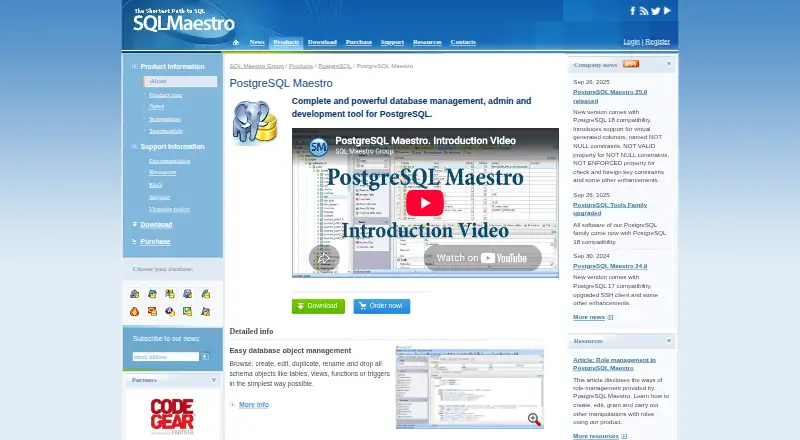
PostgreSQL Maestro is a self-hosted Windows GUI for PostgreSQL administration and development. It is aimed at database administrators and developers who need to manage objects, schemas, roles, privileges, SQL, data, and PL/pgSQL functions from a desktop client. The application connects to PostgreSQL servers, including remote servers through SSH or HTTP tunneling, and supports SSL connections, tablespaces, partitions, extensions, and role management.
Its feature depth is the main reason to consider it. Database objects can be created, edited, duplicated, renamed, and deleted, while the visual database designer supports reverse engineering. The SQL editor includes syntax highlighting, code completion, and concurrent query execution; a visual query builder provides a separate way to construct queries. PostgreSQL-specific administration extends to role and privilege management, data import and export in multiple formats, BLOB viewing and editing, SQL dump generation, and script execution. The PL/pgSQL debugger adds breakpoints and call-stack inspection for function development. Teams that want a focused PostgreSQL workstation rather than a broad multi-engine tool get a substantial set of administration and development functions.
Pricing is license-based rather than subscription-based. The single non-commercial license costs $99, while the single business license costs $199. Versions with three years of upgrades cost $139 and $259 respectively. Site licenses provide unlimited installations and users within one organization: non-commercial pricing is $699, or $899 with three years of upgrades; business pricing is $1,299, or $1,699 with upgrades. A fully functional 30-day trial is available. PostgreSQL Maestro suits PostgreSQL teams comfortable with Windows and desktop licensing; teams needing automated provisioning, verified high-availability management, or a non-Windows client should choose another tool.
Your product? Our editors can test PostgreSQL Maestro in depth and publish a review, labelled as paid · from $149/mo →
PostgreSQL Maestro pricing
All 8 PostgreSQL Maestro plans and prices →
PostgreSQL Maestro fact sheet
| Free plan | No |
|---|---|
| Paid from | Not verified |
| Deployment model | Self-hosted |
| Supported database engines | PostgreSQL |
| Automated provisioning | No |
| High availability management | Not verified |
| Roles and permissions | Yes |
| Audit logging | Not verified |
| Free trial | 30 days |
| Deployment | Desktop |
| Platforms | Windows |
| Pricing | 30-day trial (source) |
| Website | sqlmaestro.com |
| Facts checked | 20 Sep 2026 |
Alternatives to PostgreSQL Maestro
- ClusterControlA broad operations platform for teams automating multi-database infrastructure.9.4
- OpenEverestA broad, self-hosted control plane for teams managing multiple database engines.9.2
- Oracle Enterprise ManagerA broad administration suite for complex Oracle, hybrid, and multicloud database estates.9.0



See all PostgreSQL Maestro alternatives →
Used PostgreSQL Maestro? Be the first to review it
The editor score above is our own research. What this page doesn't have yet is a reader's view — what you used PostgreSQL Maestro for, what worked and what didn't. No stars are seeded and no review is paid for; an editor reads every one before it appears.
Write a reviewTwo minutes · verified accounts only · read by an editor before it appears
Featured on iTechGuides

PostgreSQL Maestro is listed in our Database Administration Tools directory. Add the badge to your site — it links back to this page.
<a href="https://www.itechguides.com/products/postgresql-maestro/"><img src="https://www.itechguides.com/best/badge/postgresql-maestro.svg" alt="Featured on iTechGuides" width="230" height="46"></a>
Reviewed by iTechGuides Editors · Editorial team · Updated Oct 2026
Advertiser disclosure: iTechGuides is reader-supported. Vendors can pay for top positions in our rankings and for a place on other products' pages, and we may earn a commission when you click some links. Bought places stand at the number bought; this page and our disclosure say so. Paying vendors may get a fuller, more detailed review from our editors, and that review can change their score. How we rank.
Last updated · How we research and update