
Portals: Desktop Organization
Portals: Desktop Organization: A free Windows utility for arranging folder contents in visual desktop portals. Ranked #9 of 47 in Desktop Organization Software by our editors (8.6/10); pricing: Free plan; best for windows users organizing folder contents visually.
At a glance
- Editor score8.6 / 10
- PricingFree plan
- Best forWindows users organizing folder contents visually
- Free planYes
- Paid fromFree
- Platform supportWindows_only
- Facts checked20 Sep 2026
Where it wins
- Custom portals support sizing, styling, tabs, sorting and folder navigation.
- Saved layouts, profiles and automatic display-aware application support repeatable setups.
- Free licensing, multi-monitor support and command-line controls add flexibility.
Where it doesn't
- Windows-only support limits use across other desktop platforms.
- Its organization model centers on virtual containers rather than a broader workspace.
- The visual setup may be more involved than a simple folder-listing approach.
Our verdict on Portals: Desktop Organization
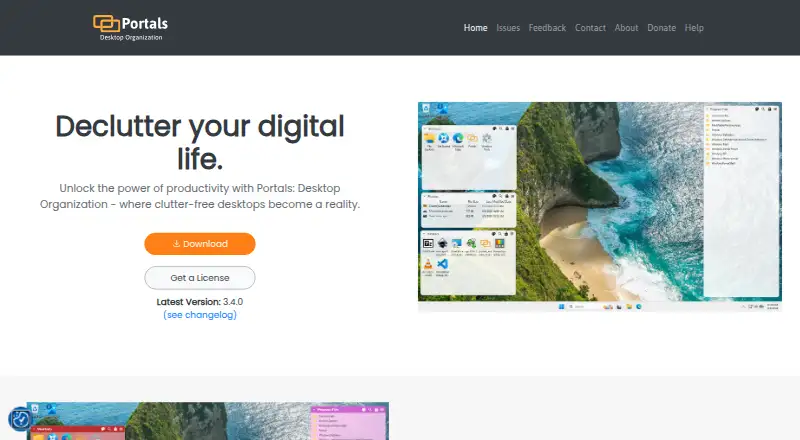
Portals: Desktop Organization is a Windows utility that displays selected folder contents directly on the desktop through configurable portals. It is aimed at users who want folder contents arranged visually rather than managed only through standard folder windows. Each portal can be customized with its own size, position, colors, transparency, fonts and icons. Users can also navigate subfolders, search portal contents, create multiple folder tabs and apply predefined or custom sorting.
Its strongest fit is repeatable desktop organization across changing display setups. Saved layouts preserve portal positions, sizes and styling, while settings profiles store reusable customizations. Automatic layout application can apply a saved arrangement when display configurations change, which suits users who frequently switch between monitor arrangements. Multi-monitor support adds to that focus, and command-line controls allow portals to be created and layouts to be applied through commands. Together, these features make Portals more suitable for structured visual workspaces than for a basic one-off folder arrangement.
The product is free to obtain, with pay-what-you-want licensing. That gives Windows users a low-cost way to try a portal-based organization model without a fixed paid tier. The trade-off is platform scope: Portals supports Windows only, so it is not a cross-platform choice. It also focuses specifically on presenting selected folder contents in virtual containers, with layout and display organization as its central strengths. Choose it if you want customizable desktop portals, saved arrangements and display-aware automation; choose another category option if you need a non-Windows solution or a broader workspace model.
Your product? Our editors can test Portals: Desktop Organization in depth and publish a review, labelled as paid · from $149/mo →
Portals: Desktop Organization pricing
Portals: Desktop Organization fact sheet
| Free plan | Yes |
|---|---|
| Paid from | Free |
| Platform support | Windows_only |
| Organization model | Virtual_containers |
| Automatic sorting | Yes |
| Maximum containers | Not verified |
| Saved layouts | Yes |
| Multi-monitor support | Yes |
| Deployment | Desktop |
| Platforms | Windows |
| Support | Email, Tickets, Docs |
| Built for | Solo, Small business (editorial estimate) |
| Pricing | Free plan |
| Website | portals-app.com |
| Facts checked | 20 Sep 2026 |
Alternatives to Portals: Desktop Organization
- AutoShelfDeep automated file sorting for Mac users who want precise control.9.4
- Desktop Frames+A flexible Windows desktop organizer with frames, profiles, rules, and search.9.3
- DeskBoxDeskBox combines automatic desktop organization with search, widgets, todos, and recovery tools.9.2


See all Portals: Desktop Organization alternatives →
Used Portals: Desktop Organization? Be the first to review it
The editor score above is our own research. What this page doesn't have yet is a reader's view — what you used Portals: Desktop Organization for, what worked and what didn't. No stars are seeded and no review is paid for; an editor reads every one before it appears.
Write a reviewTwo minutes · verified accounts only · read by an editor before it appears
Featured on iTechGuides

Portals: Desktop Organization is listed in our Desktop Organization Software directory. Add the badge to your site — it links back to this page.
<a href="https://www.itechguides.com/products/portals-desktop-organization/"><img src="https://www.itechguides.com/best/badge/portals-desktop-organization.svg" alt="Featured on iTechGuides" width="230" height="46"></a>
Reviewed by iTechGuides Editors · Editorial team · Updated Oct 2026
Advertiser disclosure: iTechGuides is reader-supported. Vendors can pay for top positions in our rankings and for a place on other products' pages, and we may earn a commission when you click some links. Bought places stand at the number bought; this page and our disclosure say so. Paying vendors may get a fuller, more detailed review from our editors, and that review can change their score. How we rank.
Last updated · How we research and update