
PolyMC
PolyMC: A flexible free launcher for players who want isolated instances and broad modpack support. Ranked #12 of 74 in Minecraft Launchers by our editors (6.1/10); pricing: Free plan; best for users preferring a familiar open-source launcher.
At a glance
- Editor score6.1 / 10
- PricingFree plan
- Best forUsers preferring a familiar open-source launcher
- Free planYes
- Paid fromNone
- Facts checked22 Sep 2026
Where it wins
- Free and open-source on Windows, macOS, and Linux
- Supports six modpack services plus Modrinth and CurseForge mods
- Offers isolated instances, multiple loaders, and Java detection
Where it doesn't
- Modpack updating is still forthcoming
- The launcher does not install Java runtimes
- Desktop-only deployment with community and documentation support
Our verdict on PolyMC
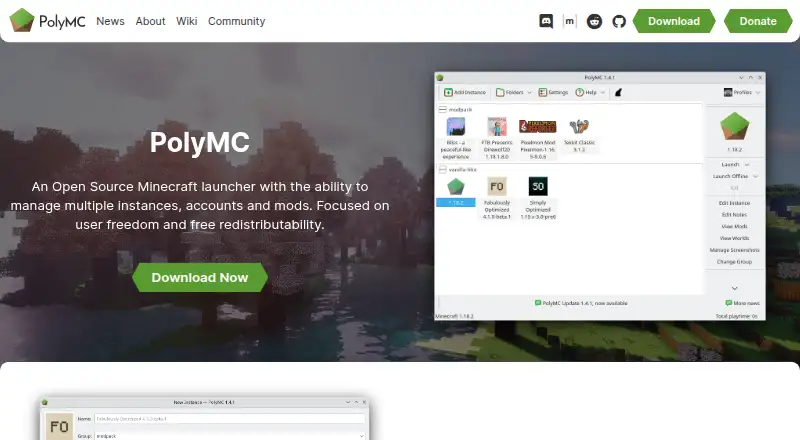
PolyMC is a free, open-source Minecraft launcher for solo players and small groups who want control over separate game setups. Its central feature is isolated instance management: each instance can have its own mods, resource packs, settings, and other files. Multiple Minecraft accounts are supported, and the desktop launcher runs on Windows, macOS, and Linux. Portable installations, legacy builds for selected platforms, customizable themes, and adjustable instance windows add flexibility for users who prefer a lightweight, configurable setup.
Mod support is PolyMC’s strongest practical advantage. It can install modpacks from ATLauncher, CurseForge, FTB, FTB Legacy, Technic, and Modrinth, while compatible ZIP files can be imported. Players can also browse and download individual mods from Modrinth and CurseForge. Forge, Fabric, LiteLoader, and Quilt loaders can be installed and managed within the launcher, giving users several ways to organize different Minecraft versions and mod configurations. Installed Java runtimes can be detected and selected, which helps manage environments across instances.
PolyMC is a good fit for players who want an open-source launcher with broad service integrations and detailed instance separation. It is less suitable for anyone expecting the launcher to install Java automatically or provide a finished modpack maintenance workflow, since modpack updating is still forthcoming. The desktop-only approach also keeps PolyMC focused on computer-based Minecraft rather than broader device coverage. Choose it for customization, portability, and multi-loader support; consider an alternative if automatic Java installation or established modpack updating is central to your workflow.
PolyMC pricing
PolyMC fact sheet
| Free plan | Yes |
|---|---|
| Paid from | None |
| Desktop OS support | Not verified |
| Separate instances | Yes |
| Modpack import | Both |
| Mod loader support | Multiple |
| Java runtime management | Yes |
| Built-in modpack catalog | Yes |
| Automatic updates | Not verified |
| Deployment | Desktop |
| Platforms | Windows, macOS, Linux |
| Support | Community, Docs |
| Built for | Solo, Small business (editorial estimate) |
| Integrations | 6 integrations: Modrinth, CurseForge, ATLauncher, FTB, FTB Legacy, Technic |
| Pricing | Free plan |
| Website | polymc.org |
| Facts checked | 22 Sep 2026 |
PolyMC integrations
PolyMC lists 6 integrations on its own site.
- Modrinth
- CurseForge
- ATLauncher
- FTB
- FTB Legacy
- Technic
Alternatives to PolyMC
- Prism LauncherA free, open-source launcher for organizing isolated Minecraft instances and modpacks.9.0
- RefractA broad, free launcher for players moving libraries and modpacks from other launchers.8.2
- Spectra LauncherA free, open-source launcher with strong instance, mod, and modpack workflows.7.7


Used PolyMC? Be the first to review it
The editor score above is our own research. What this page doesn't have yet is a reader's view — what you used PolyMC for, what worked and what didn't. No stars are seeded and no review is paid for; an editor reads every one before it appears.
Write a reviewTwo minutes · verified accounts only · read by an editor before it appears
Featured on iTechGuides

PolyMC is listed in our Minecraft Launchers directory. Add the badge to your site — it links back to this page.
<a href="https://www.itechguides.com/products/polymc/"><img src="https://www.itechguides.com/best/badge/polymc.svg" alt="Featured on iTechGuides" width="230" height="46"></a>
Guides on minecraft launchers
- Which Minecraft Launchers Are Safe? Official, Prism, Modrinth, and CurseForge ComparedAug 2026
- What Is the Best Minecraft Launcher for High FPS? Lunar vs. PrismAug 2026
- What Is the Safest Cracked Minecraft Launcher? None Is Safe Enough to RecommendAug 2026
Reviewed by iTechGuides Editors · Editorial team · Updated Sep 2026
Advertiser disclosure: iTechGuides is reader-supported. We may earn a commission when you click some links. How we rank.
Last updated · How we research and update