
PlanIQAI
PlanIQAI: Turns a plain-English brief into a structured project plan with multiple planning views. Ranked #12 of 26 in AI Project Management Software by our editors (8.2/10); pricing: Free plan; best for AI-first planners needing full project models.
At a glance
- Editor score8.2 / 10
- PricingFree plan
- Best forAI-first planners needing full project models
- Free planYes
- AI task breakdownYes
- Facts checked19 Sep 2026
Where it wins
- Generates scope, work breakdowns, estimates, and schedules from a plain-English brief
- Combines Gantt, Kanban, Burnup, and network-diagram views with dependencies
- Includes resource, budget, risk, and what-if scenario planning
Where it doesn't
- Free plan includes only 3 AI analyses for the lifetime of the account
- Starter limits AI analyses to 30 per month
- Web-only platform with no listed integrations
Our verdict on PlanIQAI
PlanIQAI turns a plain-English project brief into a structured plan for project managers, project leads, business owners, and IT teams. It supports Agile and Classical planning, producing scope, work breakdown structures or backlogs, estimates, schedules, resource plans, budgets, risks, and business cases. Its breadth is aimed at teams that want planning artifacts in one workspace; it is less suited to buyers looking primarily for a connected project hub, since the available platform is web and integrations are not part of its listed feature set.
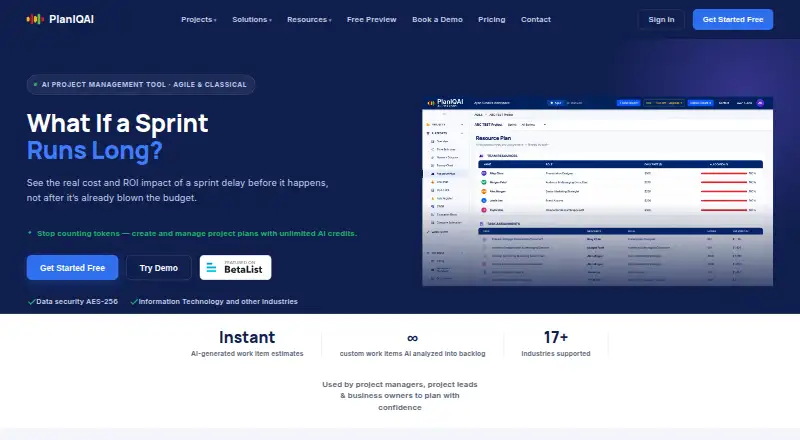
Planning depth is the main distinction. Teams can move between Gantt, Burnup, Kanban, and network-diagram views, while task dependencies, milestones, and critical-path planning help represent schedule logic. Resource planning includes roles, rates, and allocation percentages, alongside budget and cost breakdowns. Risk registers capture likelihood, impact, mitigations, and owners, and what-if scenario comparisons include AI recommendations. This makes PlanIQAI relevant when a project needs more than a task list, especially for comparing plans or making resource and budget assumptions visible. Time logging is available in Kanban views.
The free plan includes 3 AI analyses for the lifetime of the account, plus Agile and Classical planning, all planning views, and all reports. Starter is for 1–2 editor seats with 30 AI analyses per month and PDF export and saving; Team covers 3–9 editor seats, unlimited AI analyses, and PDF export and saving; Business covers 10–20 editor seats, unlimited AI analyses, and priority support. The published plan amounts show different monthly figures for Business and Team, with Business displayed below Team, and annual billing is stated to save 20%. Choose PlanIQAI if comprehensive AI-assisted project models and planning views are the priority; consider another option if integrations or a broader platform footprint are essential.
Your product? Our editors can test PlanIQAI in depth and publish a review, labelled as paid · from $149/mo →
PlanIQAI pricing
All 4 PlanIQAI plans and prices →
PlanIQAI fact sheet
| Free plan | Yes |
|---|---|
| Paid from | Not verified |
| AI task breakdown | Yes |
| AI priority recommendations | Not verified |
| Task dependencies | Yes |
| Gantt view | Yes |
| Resource management | Yes |
| Time tracking | Yes |
| Deployment | Cloud |
| Platforms | Web |
| Pricing | Free plan (source) |
| Website | planiqai.com |
| Facts checked | 19 Sep 2026 |
Alternatives to PlanIQAI
- AsanaBroad project planning and automation, with paid features scaling by plan.9.4
- ClickUpA broad project workspace with a free plan and paid tiers starting at $7 per user monthly, billed annually.9.3
- Zoho ProjectsA flexible project toolkit with useful controls, though advanced planning costs more.9.2


See all PlanIQAI alternatives →
Used PlanIQAI? Be the first to review it
The editor score above is our own research. What this page doesn't have yet is a reader's view — what you used PlanIQAI for, what worked and what didn't. No stars are seeded and no review is paid for; an editor reads every one before it appears.
Write a reviewTwo minutes · verified accounts only · read by an editor before it appears
Featured on iTechGuides

PlanIQAI is listed in our AI Project Management Software directory. Add the badge to your site — it links back to this page.
<a href="https://www.itechguides.com/products/planiqai/"><img src="https://www.itechguides.com/best/badge/planiqai.svg" alt="Featured on iTechGuides" width="230" height="46"></a>
Reviewed by iTechGuides Editors · Editorial team · Updated Oct 2026
Advertiser disclosure: iTechGuides is reader-supported. Vendors can pay for top positions in our rankings and for a place on other products' pages, and we may earn a commission when you click some links. Bought places stand at the number bought; this page and our disclosure say so. Paying vendors may get a fuller, more detailed review from our editors, and that review can change their score. How we rank.
Last updated · How we research and update