
Pixvael Minecraft Pixel Art Generator
Pixvael Minecraft Pixel Art Generator: A free browser tool for small Java and Bedrock pixel-art builds. Ranked #9 of 22 in Minecraft Pixel Art Generators by our editors (6.3/10); pricing: Free plan; best for small cross-edition projects.
At a glance
- Editor score6.3 / 10
- PricingFree plan
- Best forSmall cross-edition projects
- Free planYes
- Paid fromNone
- Minecraft editionsBoth
- Facts checked20 Sep 2026
Where it wins
- Converts JPG, PNG, and WebP images into block layouts
- Exports Litematica, mcstructure, schematic, and blueprint files
- Supports cell editing, material lists, and local browser storage
Where it doesn't
- Build widths are limited to 16–128 blocks
- No documented 3D preview
- Browser-only access limits it to web workflows
Our verdict on Pixvael Minecraft Pixel Art Generator
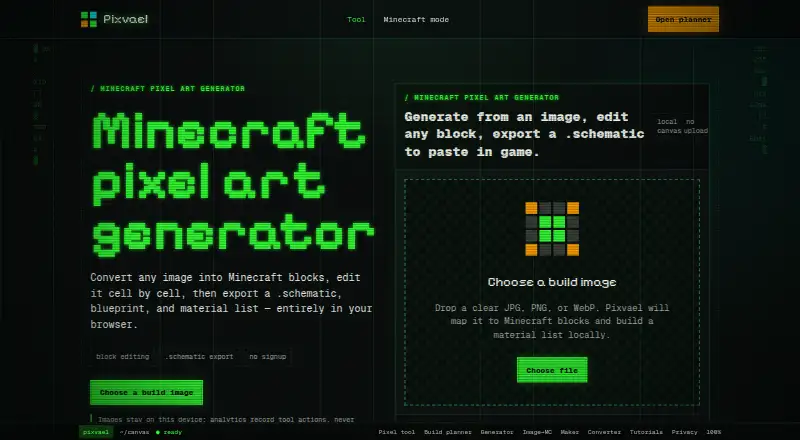
Pixvael Minecraft Pixel Art Generator converts JPG, PNG, and WebP images into Minecraft block layouts in a web browser. It is designed for builders working on small Java or Bedrock projects who want to turn an image into an editable plan rather than manually map every block. Users choose a build width from 16 to 128 blocks, map image cells to a palette of 52 buildable blocks, and refine the result before exporting it.
Its strongest workflow is the combination of conversion and block-level editing. Paint, pick, restore, undo, and redo tools let users adjust individual cells after the initial image conversion. A size comparison workflow covers 24-, 32-, 48-, and 64-block builds, while blueprint PNGs and material lists provide visual and planning references. Conversion and build-planner data is stored locally in the browser, and source images are processed locally without requiring an account or uploading them.
The export range makes Pixvael useful across Minecraft editions and build workflows. It produces Litematica, mcstructure, and schematic files, plus material CSVs and project files. The published free plan includes browser image conversion, block-by-block editing, and Minecraft build exports, with no signup or payment requirement. Its main boundary is scale: widths stop at 128 blocks, making it a better fit for compact projects than very large pixel art. Builders who need a focused, editable image-to-build workflow should consider it; those looking for a documented 3D preview or broader build dimensions should choose another tool.
Pixvael Minecraft Pixel Art Generator pricing
All 1 Pixvael Minecraft Pixel Art Generator plans and prices →
Pixvael Minecraft Pixel Art Generator fact sheet
| Free plan | Yes |
|---|---|
| Paid from | None |
| Input type | Image |
| Minecraft editions | Both |
| Output type | Schematic |
| Palette control | Both |
| Maximum resolution | Not verified |
| 3D build preview | Not verified |
| Export formats | litematic, mcstructure, schematic, blueprint PNG, material CSV, project file |
| Deployment | Cloud |
| Platforms | Web |
| Built for | Solo, Small business (editorial estimate) |
| Pricing | Free plan (source) |
| Website | pixvael.com |
| Facts checked | 20 Sep 2026 |
Alternatives to Pixvael Minecraft Pixel Art Generator
- Minecraft Pixel Art GeneratorA free browser tool that combines AI layouts, editing, guides, calculations, and exports.9.0
- MinecraftArtA free web converter with editing, 3D previews, and WorldEdit-friendly exports.8.2
- MC Build Tools Pixel Art GeneratorA free browser generator with deep editing and export support for Java and Bedrock.7.7



See all Pixvael Minecraft Pixel Art Generator alternatives →
Used Pixvael Minecraft Pixel Art Generator? Be the first to review it
The editor score above is our own research. What this page doesn't have yet is a reader's view — what you used Pixvael Minecraft Pixel Art Generator for, what worked and what didn't. No stars are seeded and no review is paid for; an editor reads every one before it appears.
Write a reviewTwo minutes · verified accounts only · read by an editor before it appears
Featured on iTechGuides

Pixvael Minecraft Pixel Art Generator is listed in our Minecraft Pixel Art Generators directory. Add the badge to your site — it links back to this page.
<a href="https://www.itechguides.com/products/pixvael-minecraft-pixel-art-generator/"><img src="https://www.itechguides.com/best/badge/pixvael-minecraft-pixel-art-generator.svg" alt="Featured on iTechGuides" width="230" height="46"></a>
Reviewed by iTechGuides Editors · Editorial team · Updated Sep 2026
Advertiser disclosure: iTechGuides is reader-supported. We may earn a commission when you click some links. How we rank.
Last updated · How we research and update