
PixGuard
PixGuard: A broad image-risk toolkit for creators, agencies, and website teams. Ranked #25 of 31 in AI Reverse Image Search Tools by our editors (5.6/10); pricing: Paid; best for image provenance and risk monitoring.
At a glance
- Editor score5.6 / 10
- PricingPaid
- Best forImage provenance and risk monitoring
- Free planNo
- Paid from$29/mo
- Search typeSource-finding
- Facts checked21 Sep 2026
Where it wins
- Combines reverse search, metadata, watermark, and AI-image checks
- Monitors websites and sends recurring email alerts
- Audits WordPress media libraries and scans from Chrome
Where it doesn't
- No free plan for ongoing use
- Daily monitoring and large-site scans require Business
- Deeper AI-vision analysis is limited to Business
Our verdict on PixGuard
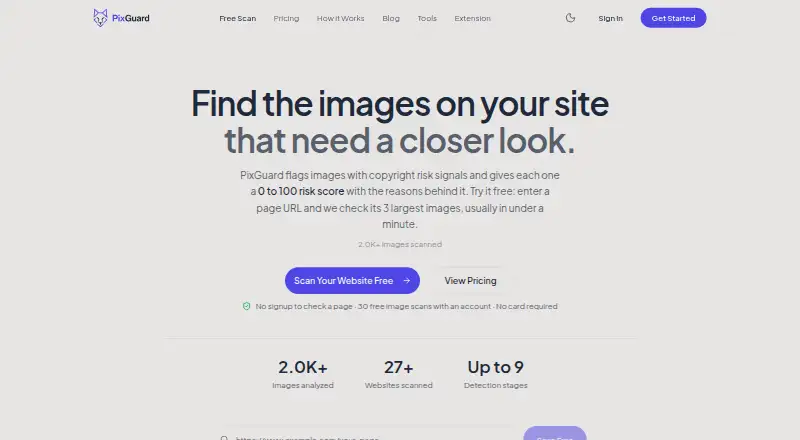
PixGuard is an AI reverse image search and copyright-risk monitoring tool for content creators, web designers, agencies, marketing teams, and organizations managing website images. It scans uploaded images and website media using reverse image search, source lookup, stock-image matching, watermark detection, AI-generated image detection, metadata analysis, and per-image risk scoring. The product supports JPG, PNG, and WebP files, with uploads of up to 250 images. It is available on the web and through a Chrome extension, with a free WordPress plugin for media-library auditing.
Pricing is structured around recurring plans and optional scan credits. Pro costs $29 per month and includes a 9-signal forensic scan, reverse image search, weekly site monitoring, email alerts, and full scan results. Business costs $79 per month and adds deeper AI-vision analysis, daily site monitoring, a priority queue, priority support, and large-site scans. Scan Packs work with any plan: the $20 pack includes approximately 80 image scans, the $60 pack approximately 270, the $150 pack approximately 750, and the $300 pack approximately 1,670. These one-time credits do not expire.
PixGuard’s main strength is breadth within image provenance and risk review. Its workflow brings together EXIF, XMP, IPTC, and C2PA metadata analysis with visual matching, hidden-watermark detection, copyright-risk scoring, and recurring monitoring. Google Lens, Yandex, Google OAuth, WordPress, and Chrome are supported in the product ecosystem, while Chrome enables right-click image scanning. Pro suits users who need regular source checks and weekly monitoring; Business is better for larger sites or teams that need daily coverage and priority handling. Buyers seeking a narrow reverse-search utility may find this broader monitoring and forensic feature set more than they need.
Your product? Our editors can test PixGuard in depth and publish a review, labelled as paid · from $149/mo →
PixGuard pricing
All 3 PixGuard plans and prices →
PixGuard fact sheet
| Free plan | No |
|---|---|
| Paid from | $29/mo |
| Search type | Source-finding |
| Image uploads | 250 /mo |
| Source index | Web |
| API access | Yes |
| Browser extension | Yes |
| Supported formats | JPG, PNG, WebP |
| Money-back guarantee | 14 days |
| Deployment | Cloud, Browser extension |
| Platforms | Web, Chrome extension |
| Compliance & security | GDPR |
| Support | |
| Built for | Solo, Small business, Mid-market, Enterprise (editorial estimate) |
| Integrations | 5 integrations: Google Lens, Yandex, Google OAuth, WordPress, Chrome |
| Pricing | Paid (source) |
| Website | pixguard.io |
| Facts checked | 21 Sep 2026 |
PixGuard integrations
PixGuard lists 5 integrations on its own site.
- Google Lens
- Yandex
- Google OAuth
- WordPress
- Chrome
Alternatives to PixGuard
- TinEyeA strong choice for professional image verification, with paid plans starting at $200 monthly.9.2
- Google LensA free visual search tool that combines similarity search, identification, OCR, and product lookup.8.8
- Google Cloud Vision API Product SearchA catalog-focused visual search API for ranked product matching, not web-wide image search.8.5


See all PixGuard alternatives →
Used PixGuard? Be the first to review it
The editor score above is our own research. What this page doesn't have yet is a reader's view — what you used PixGuard for, what worked and what didn't. No stars are seeded and no review is paid for; an editor reads every one before it appears.
Write a reviewTwo minutes · verified accounts only · read by an editor before it appears
Featured on iTechGuides

PixGuard is listed in our AI Reverse Image Search Tools directory. Add the badge to your site — it links back to this page.
<a href="https://www.itechguides.com/products/pixguard/"><img src="https://www.itechguides.com/best/badge/pixguard.svg" alt="Featured on iTechGuides" width="230" height="46"></a>
Reviewed by iTechGuides Editors · Editorial team · Updated Oct 2026
Advertiser disclosure: iTechGuides is reader-supported. Vendors can pay for top positions in our rankings and for a place on other products' pages, and we may earn a commission when you click some links. Bought places stand at the number bought; this page and our disclosure say so. Paying vendors may get a fuller, more detailed review from our editors, and that review can change their score. How we rank.
Last updated · How we research and update