
PixelZap
PixelZap: A private, mobile-focused editor for removing and replacing media backgrounds. Ranked #12 of 29 in AI Video Background Removers by our editors (8.0/10); pricing: Free plan; best for mobile users wanting private processing.
At a glance
- Editor score8.0 / 10
- PricingFree plan
- Best forMobile users wanting private processing
- Free planYes
- Facts checked20 Sep 2026
Where it wins
- On-device processing without required cloud uploads
- Removes and replaces backgrounds in video, photo, and GIF files
- Includes trimming, cropping, merging, compression, and format conversion
Where it doesn't
- Platform coverage is limited to macOS, iOS, and Android
- Paid plans list Pro features without detailing what each tier adds
- No API is included in the listed product capabilities
Our verdict on PixelZap
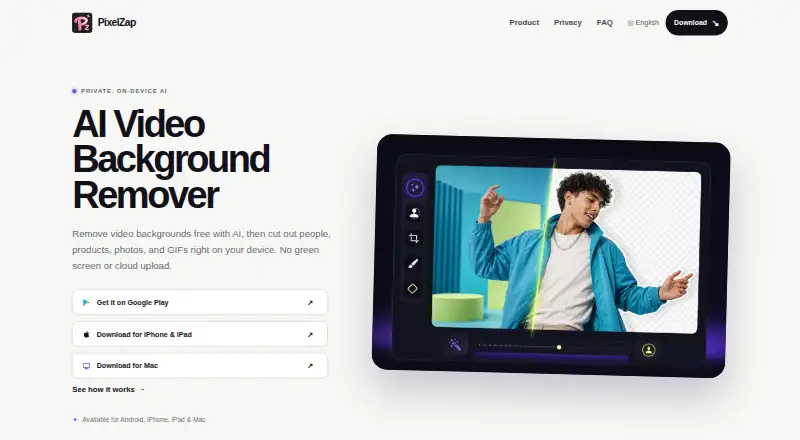
PixelZap is an on-device media editor for removing and replacing backgrounds in videos, photos, and animated GIFs. It is aimed at content creators, online sellers, designers, marketers, and social media users who need subject isolation without a physical green screen or required cloud upload. The app supports video background replacement with a color, image, video, or gradient, along with transparent photo cutouts and effects such as outlines, strokes, neon borders, and glows.
Its strongest distinction is local processing across macOS, iOS, and Android. That makes PixelZap a practical fit for mobile-oriented workflows where keeping media on the device matters. The editor also covers several adjacent tasks: video trimming, cropping, merging, compression, format conversion, and audio extraction. Supported video inputs include MP4, MOV, AVI, and MKV. GIF background removal and editing extend the tool beyond standard video use, while photo removal and transparent PNG output support product images and design work.
The Free plan includes video, photo, and GIF background removal. Paid access is offered through Pro Monthly, Pro Yearly, and Pro One-time plans, each described as providing Pro features. The product is a good choice for individuals who want background removal and lightweight editing in a device-based app. It is less suitable for organizations that need broader platform coverage, an API-centered workflow, or detailed tier-by-tier feature documentation. Users needing a focused background-removal tool with mobile support should find its scope appropriate; teams building automated or deeply integrated production pipelines should consider alternatives.
Your product? Our editors can test PixelZap in depth and publish a review, labelled as paid · from $149/mo →
PixelZap pricing
All 4 PixelZap plans and prices →
PixelZap fact sheet
| Free plan | Yes |
|---|---|
| Paid from | Not verified |
| Background replacement | Yes |
| Background blur | Not verified |
| Foreground isolation | Yes |
| Max export resolution | Not verified |
| Maximum clip length | Not verified |
| Video input formats | MP4, MOV, AVI, MKV |
| Deployment | Desktop, Mobile |
| Platforms | macOS, iOS, Android |
| Support | |
| Built for | Solo, Small business (editorial estimate) |
| Pricing | Free plan (source) |
| Website | pixelzapapp.com |
| Facts checked | 20 Sep 2026 |
Alternatives to PixelZap
- VideoBGRemoverA usage-priced remover for high-volume video workflows, with 4K export and API access.9.4
- unscreen.ioA flexible remover for creators and teams that need affordable desktop, web, or API access.9.2
- BGRemove.videoA free browser tool for transparent video backgrounds without watermarks.9.0



See all PixelZap alternatives →
Used PixelZap? Be the first to review it
The editor score above is our own research. What this page doesn't have yet is a reader's view — what you used PixelZap for, what worked and what didn't. No stars are seeded and no review is paid for; an editor reads every one before it appears.
Write a reviewTwo minutes · verified accounts only · read by an editor before it appears
Featured on iTechGuides

PixelZap is listed in our AI Video Background Removers directory. Add the badge to your site — it links back to this page.
<a href="https://www.itechguides.com/products/pixelzap/"><img src="https://www.itechguides.com/best/badge/pixelzap.svg" alt="Featured on iTechGuides" width="230" height="46"></a>
Reviewed by iTechGuides Editors · Editorial team · Updated Oct 2026
Advertiser disclosure: iTechGuides is reader-supported. Vendors can pay for top positions in our rankings and for a place on other products' pages, and we may earn a commission when you click some links. Bought places stand at the number bought; this page and our disclosure say so. Paying vendors may get a fuller, more detailed review from our editors, and that review can change their score. How we rank.
Last updated · How we research and update