
BGRemove.video
BGRemove.video: A free browser tool for removing video backgrounds and exporting transparent WebM clips. Ranked #2 of 24 in Video Background Removal Software by our editors (9.2/10); pricing: Free plan; best for free browser-based removal up to 60 seconds.
At a glance
- Editor score9.2 / 10
- PricingFree plan
- Best forFree browser-based removal up to 60 seconds
- Free planYes
- Paid fromFree
- Facts checked20 Sep 2026
Where it wins
- Temporal tracking follows subjects across video frames
- Per-pixel alpha preserves hair, blur, and semi-transparent fabric
- No-watermark transparent WebM export with VP9 alpha
Where it doesn't
- Free Access allows up to 3 successful jobs per 24-hour window
- Requires Google sign-in and a job-status workflow
- Transparent output is WebM; composited output is MP4
Our verdict on BGRemove.video
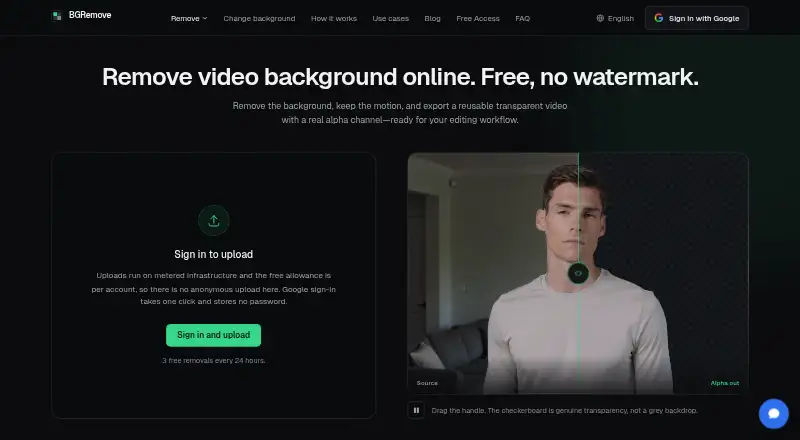
BGRemove.video is a web-based video background removal tool for creators, editors, product-video teams, social-content producers, and agencies. Its AI subject detection includes person optimization and object fallback, while temporal tracking follows subjects across frames. The tool accepts MP4, MOV, WebM, M4V, and GIF inputs, with clips up to 60 seconds. It can remove a background, replace it with a color, blur, image, or video, or prepare a transparent result for later editing.
The strongest part of the workflow is its handling of transparent video. Per-pixel alpha is designed to preserve detail around hair, motion blur, and semi-transparent fabric, and the service exports transparent WebM using VP9 alpha. That makes BGRemove.video a practical fit for reusable overlays and compositing workflows. For projects that need a finished background rather than transparency, the same workflow supports MP4 export with a composited background. Google sign-in and job-status tracking are part of the browser experience.
Free Access includes transparent WebM with VP9 alpha, no watermark, up to 3 successful jobs per 24-hour allowance window, and free, unlimited background changes. There are no paid plans, subscriptions, credit packs, or paid upgrades. BGRemove.video suits users who want a browser-based workflow for short clips and need transparent output without a watermark. It is less suitable for work that requires more than 3 successful jobs within a 24-hour window, clips longer than 60 seconds, or a transparent format other than WebM.
Your product? Our editors can test BGRemove.video in depth and publish a review, labelled as paid · from $149/mo →
BGRemove.video pricing
All 1 BGRemove.video plans and prices →
BGRemove.video fact sheet
| Free plan | Yes |
|---|---|
| Paid from | Free |
| Background replacement | Yes |
| Background blur | Yes |
| Transparent video export | Yes |
| Maximum resolution | Not verified |
| Maximum clip length | 60 min |
| Supported input formats | MP4, MOV, WebM, M4V, GIF |
| Batch processing | Not verified |
| Deployment | Cloud |
| Platforms | Web |
| Support | |
| Built for | Solo, Small business, Mid-market (editorial estimate) |
| Pricing | Free plan (source) |
| Website | bgremove.video |
| Facts checked | 20 Sep 2026 |
Alternatives to BGRemove.video
- AlphaCutA capable open-source choice for local, batch, and command-line background removal.9.4
- EZ-CorridorKeyA free local matte-generation tool for filmmakers, editors, and visual-effects artists.9.0
- FuzzPuppy Video Background RemoverA private, free browser tool for AI removal, chroma keying, and transparent video export.8.9


See all BGRemove.video alternatives →
BGRemove.video vs the competition
- BGRemove.video vs AlphaCut
- BGRemove.video vs EZ-CorridorKey
- BGRemove.video vs FuzzPuppy Video Background Remover
- BGRemove.video vs BackgroundRemover.video
- BGRemove.video vs Bria Video Background Removal
- BGRemove.video vs Knockout API



Compare BGRemove.video with any tool side by side →
Also Ranked In
BGRemove.video is ranked in 3 of our directories.
Used BGRemove.video? Be the first to review it
The editor score above is our own research. What this page doesn't have yet is a reader's view — what you used BGRemove.video for, what worked and what didn't. No stars are seeded and no review is paid for; an editor reads every one before it appears.
Write a reviewTwo minutes · verified accounts only · read by an editor before it appears
Featured on iTechGuides

BGRemove.video is listed in our Video Background Removal Software directory. Add the badge to your site — it links back to this page.
<a href="https://www.itechguides.com/products/bgremove-video/"><img src="https://www.itechguides.com/best/badge/bgremove-video.svg" alt="Featured on iTechGuides" width="230" height="46"></a>
Reviewed by iTechGuides Editors · Editorial team · Updated Oct 2026
Advertiser disclosure: iTechGuides is reader-supported. Vendors can pay for top positions in our rankings and for a place on other products' pages, and we may earn a commission when you click some links. Bought places stand at the number bought; this page and our disclosure say so. Paying vendors may get a fuller, more detailed review from our editors, and that review can change their score. How we rank.
Last updated · How we research and update