
PipZ
PipZ: A focused macOS tool for keeping browser content visible in floating PiP windows. Ranked #53 of 65 in Window Management Software by our editors (4.0/10); pricing: Paid; best for picture-in-picture browser workflows.
At a glance
- Editor score4.0 / 10
- PricingPaid
- Best forPicture-in-picture browser workflows
- Free planNo
- Paid from$14/device one-time
- Layout presetsYes
- Facts checked20 Sep 2026
Where it wins
- Unlimited floating PiP windows across every plan
- Opacity, click-through, refresh, and layout controls
- Works with major browsers and AI tools
Where it doesn't
- macOS-only desktop app
- Paid plans start at $14
- Focused on PiP rather than general window management
Our verdict on PipZ
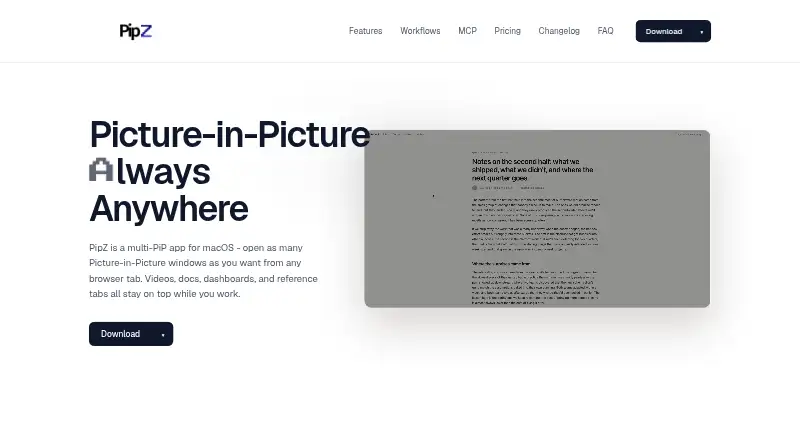
PipZ is a macOS desktop app for keeping multiple browser tabs and selected page elements visible in floating, always-on-top Picture-in-Picture windows. It is designed for people who monitor videos, documentation, dashboards, slides, reference pages, or AI tools while working in another application. Its feature set is centered on persistent browser visibility rather than broad desktop window organization.
Pricing is structured across three paid plans. Solo costs $14 one-time with monthly billing and includes unlimited floating PiP windows, all controls and arrangements, and free lifetime updates. Plus costs $24 one-time with monthly billing and adds the ability to move a license between Macs anytime. Team costs $42 one-time with monthly billing and adds a single invoice for the whole pack. Across the plans, PipZ includes opacity controls, click-through mode, edge-based window arrangements, reusable layout presets, automatic page refresh, and customizable global keyboard shortcuts.
Browser coverage is a notable part of the product: PipZ supports Chrome, Safari, Firefox, Microsoft Edge, Brave, Arc, Vivaldi, Opera, Naver Whale, and Comet. It also supports Claude, Cursor, Cline, MCP clients, and optional MCP control from compatible AI clients. The app suits macOS users who want several browser-based references visible at once, especially when repeatable layouts and refresh intervals matter. It is less appropriate for someone seeking a general-purpose window manager with broader desktop organization capabilities, or for users on another operating system. The official site recommends macOS 13 or later.
Your product? Our editors can test PipZ in depth and publish a review, labelled as paid · from $149/mo →
PipZ pricing
PipZ fact sheet
| Free plan | No |
|---|---|
| Paid from | $14/device one-time |
| Platforms | macos |
| Maximum displays | Not verified |
| Layout presets | Yes |
| Application rules | Not verified |
| Window grouping | Not verified |
| Virtual desktop controls | Not verified |
| Money-back guarantee | 14 days |
| Deployment | Desktop |
| Platforms | macOS |
| Support | |
| Built for | Solo, Small business (editorial estimate) |
| Integrations | 14 integrations: Claude, Cursor, Cline, MCP clients, Chrome, Safari … |
| Pricing | Paid (source) |
| Website | getpipz.com |
| Facts checked | 20 Sep 2026 |
PipZ integrations
PipZ lists 14 integrations on its own site.
- Claude
- Cursor
- Cline
- MCP clients
- Chrome
- Safari
- Firefox
- Microsoft Edge
- Brave
- Arc
- Vivaldi
- Opera
- Naver Whale
- Comet
Alternatives to PipZ
- i3A configurable X11 window manager for Linux users who want precise tiling and workspace control.9.4
- SwayA free, open-source Wayland compositor for configurable window layouts and i3 users.9.3
- HyprlandA flexible Linux building block for users who want to configure their own desktop.9.2



Used PipZ? Be the first to review it
The editor score above is our own research. What this page doesn't have yet is a reader's view — what you used PipZ for, what worked and what didn't. No stars are seeded and no review is paid for; an editor reads every one before it appears.
Write a reviewTwo minutes · verified accounts only · read by an editor before it appears
Featured on iTechGuides

PipZ is listed in our Window Management Software directory. Add the badge to your site — it links back to this page.
<a href="https://www.itechguides.com/products/pipz/"><img src="https://www.itechguides.com/best/badge/pipz.svg" alt="Featured on iTechGuides" width="230" height="46"></a>
Reviewed by iTechGuides Editors · Editorial team · Updated Oct 2026
Advertiser disclosure: iTechGuides is reader-supported. Vendors can pay for top positions in our rankings and for a place on other products' pages, and we may earn a commission when you click some links. Bought places stand at the number bought; this page and our disclosure say so. Paying vendors may get a fuller, more detailed review from our editors, and that review can change their score. How we rank.
Last updated · How we research and update