
Pingbreak
Pingbreak: A focused free option for simple URL uptime checks and flexible alerts. Ranked #47 of 48 in Uptime Monitoring Software by our editors (6.0/10); pricing: Free plan; best for free testers needing simple URL checks.
At a glance
- Editor score6.0 / 10
- PricingFree plan
- Best forFree testers needing simple URL checks
- Free planYes
- Paid fromNone
- Check interval1 minute
- Facts checked21 Sep 2026
Where it wins
- Free service with one-minute URL monitoring
- Unlimited URL monitoring for beta testers
- Alerts through Slack, Discord, email, and webhooks
Where it doesn't
- Requires a Twitter account during the open beta
- Web-only service with a narrow monitoring focus
- No broader infrastructure monitoring capabilities
Our verdict on Pingbreak
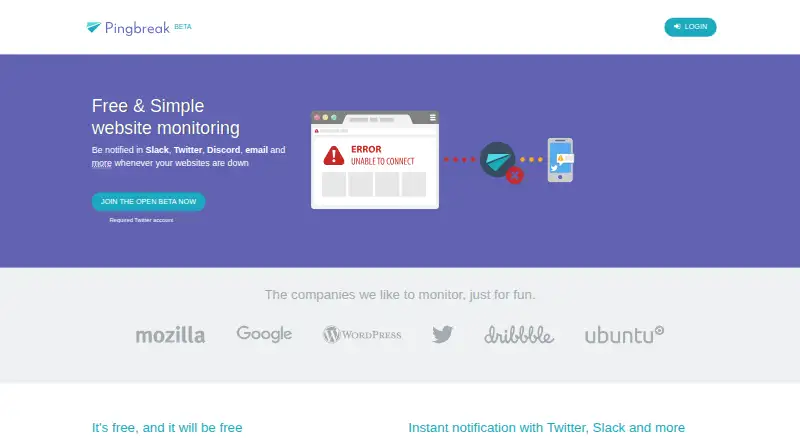
Pingbreak is a web-based website monitoring service for individuals and small teams. It checks monitored URLs every minute and sends downtime notifications through Twitter direct messages, Slack, Discord, Mattermost, email, or custom webhooks. The product is designed for straightforward website and URL uptime monitoring rather than broad infrastructure observability, making it a fit for users who want a simple way to watch accessible web addresses.
The current offering is free, and the open beta advertises unlimited URL monitoring for beta testers. There are no paid tiers to compare, so the main value comes from the included monitoring interval and alert channels. Pingbreak connects with Twitter, Slack, Discord, Mattermost, email, and custom webhooks, giving individuals and small teams several ways to receive downtime notifications. The channel mix is practical for teams already working in chat tools or maintaining their own notification workflow.
Pingbreak’s focus is narrow by design: website and URL availability checks at one-minute intervals. It is not positioned as a complete monitoring suite for infrastructure, servers, geographic checks, SSL status, content changes, or API behavior. Joining the open beta also requires a Twitter account, which adds a condition to onboarding. Choose Pingbreak if free URL monitoring, frequent checks, and varied alerts are the priorities. Choose a broader monitoring product if your work requires deeper service, infrastructure, or application-level coverage.
Pingbreak pricing
Pingbreak fact sheet
| Free plan | Yes |
|---|---|
| Paid from | None |
| Monitor limit | Not verified |
| Check interval | 1 minute |
| Monitoring locations | Not verified |
| SSL expiry alerts | Not verified |
| Keyword monitoring | Not verified |
| Server monitoring | Not verified |
| Alert channels | Twitter, Slack, Discord, Mattermost, email, custom webhook |
| Deployment | Cloud |
| Platforms | Web |
| Built for | Solo, Small business (editorial estimate) |
| Integrations | 6 integrations: Twitter, Slack, Discord, Mattermost, email, custom webhook |
| Pricing | Free plan |
| Website | pingbreak.com |
| Facts checked | 21 Sep 2026 |
Pingbreak integrations
Pingbreak lists 6 integrations on its own site.
- Slack
- Discord
- Mattermost
- custom webhook
Alternatives to Pingbreak
- SolidPingBroad protocol coverage, status pages, and on-call tools, with hosted plans from €5 per month.9.4
- HyperpingBroad hosted checks and response workflows, with paid plans starting at $24 per month billed annually.9.3
- UptimiaBroad monitoring coverage with selectable global checkpoints and plans for different check volumes.9.2



See all Pingbreak alternatives →
Used Pingbreak? Be the first to review it
The editor score above is our own research. What this page doesn't have yet is a reader's view — what you used Pingbreak for, what worked and what didn't. No stars are seeded and no review is paid for; an editor reads every one before it appears.
Write a reviewTwo minutes · verified accounts only · read by an editor before it appears
Featured on iTechGuides

Pingbreak is listed in our Uptime Monitoring Software directory. Add the badge to your site — it links back to this page.
<a href="https://www.itechguides.com/products/pingbreak/"><img src="https://www.itechguides.com/best/badge/pingbreak.svg" alt="Featured on iTechGuides" width="230" height="46"></a>
Reviewed by iTechGuides Editors · Editorial team · Updated Oct 2026
Advertiser disclosure: iTechGuides is reader-supported. We may earn a commission when you click some links. How we rank.
Last updated · How we research and update