
PhotoQuill
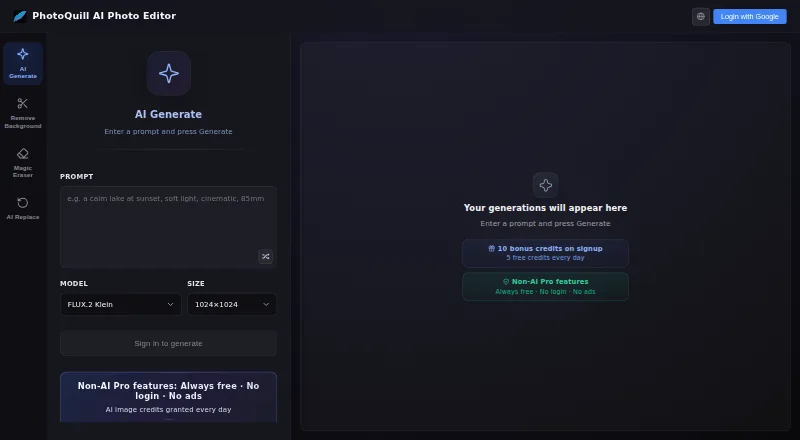
PhotoQuill: A capable browser editor for layered AI image work, with credit-based plans and a solo-focused workflow. Ranked #41 of 97 in AI Photo Editors by our editors (6.6/10); pricing: Free plan; best for browser users wanting a Photoshop-like AI editor.
At a glance
- Editor score6.6 / 10
- PricingFree plan
- Best forBrowser users wanting a Photoshop-like AI editor
- Free planYes
- Paid from$9.90/mo
- Generative editingYes
- Facts checked22 Sep 2026
Where it wins
- PSD layers, masks, blending modes, and RAW photo support
- AI generation, object removal, background replacement, and generative fill
- Local browser processing with extensive manual editing tools
Where it doesn't
- AI usage is governed by monthly or one-time credit limits
- Web-only platform with email support
- Not suited to integration-led or batch production workflows
Our verdict on PhotoQuill
PhotoQuill is a browser-based photo and image editor for designers, photographers, students, and digital creators. It combines PSD opening, editing, and export with preserved layers and masks, plus brushes, filters, sharpening, noise reduction, smart adjustments, text tools, format conversion, and RAW photo support. Its AI features cover image generation, object removal, background replacement, and generative fill. Core image work runs locally in the browser using WebGPU and WebAssembly, with support for desktop and mobile browsers.
The plan structure separates the editor from AI usage. Free includes 5 credits per day, 10 bonus credits on signup, standard models, and personal non-commercial use. Lite costs $9.90 per month for 2,000 credits, all AI creation and edit models, a standard generation queue, a commercial license, and 1024×1024 output. Pro is $24.90 per month with 5,000 credits, a priority queue, and high-resolution downloads. Premium costs $49.90 per month for 10,000 credits, early feature access, a top-priority queue, ultra-high-definition outputs, and full commercial rights. Annual VIP is $499.80 per year with 11,000 credits per month, maximum-resolution exports, and dedicated VIP support. A $9.90 one-time Credit Pack adds 1,000 credits that never expire.
Its strongest fit is for solo creators and small teams that want layered editing and generative tools without installing desktop software. PSD compatibility, masks, blending modes, healing, clone stamp, dodge, burn, custom fonts, and curved text give it more manual depth than a narrow AI generator. The tradeoff is a web-only workflow with email support and no batch-oriented or integration-led feature set. Choose PhotoQuill for browser-based image creation and detailed individual edits; choose another tool if connected production workflows or large-scale batch processing are central requirements.
Your product? Our editors can test PhotoQuill in depth and publish a review, labelled as paid · from $149/mo →
PhotoQuill pricing
All 6 PhotoQuill plans and prices →
PhotoQuill fact sheet
| Free plan | Yes |
|---|---|
| Paid from | $9.90/mo |
| Generative editing | Yes |
| RAW photo support | Yes |
| Layers and masks | Yes |
| Batch editing | Not verified |
| Batch limit | Not verified |
| Supported platforms | Web browser on Windows, macOS, Linux, ChromeOS, tablet, and mobile devices |
| Mobile app | Not verified |
| Deployment | Cloud |
| Platforms | Web |
| Support | |
| Built for | Solo, Small business (editorial estimate) |
| Pricing | Free plan (source) |
| Website | photoquill.com |
| Facts checked | 22 Sep 2026 |
Alternatives to PhotoQuill
- Adobe LightroomA broad Lightroom workflow for RAW editing, AI masking, organization, and synced photo libraries.9.4
- Adobe PhotoshopA deep compositing and generative editing suite for creative professionals.9.2
- Capture OneA deep RAW, tethered, and AI editing suite for professional photography workflows.8.9



See all PhotoQuill alternatives →
Used PhotoQuill? Be the first to review it
The editor score above is our own research. What this page doesn't have yet is a reader's view — what you used PhotoQuill for, what worked and what didn't. No stars are seeded and no review is paid for; an editor reads every one before it appears.
Write a reviewTwo minutes · verified accounts only · read by an editor before it appears
Featured on iTechGuides

PhotoQuill is listed in our AI Photo Editors directory. Add the badge to your site — it links back to this page.
<a href="https://www.itechguides.com/products/photoquill/"><img src="https://www.itechguides.com/best/badge/photoquill.svg" alt="Featured on iTechGuides" width="230" height="46"></a>
Reviewed by iTechGuides Editors · Editorial team · Updated Oct 2026
Advertiser disclosure: iTechGuides is reader-supported. Vendors can pay for top positions in our rankings and for a place on other products' pages, and we may earn a commission when you click some links. Bought places stand at the number bought; this page and our disclosure say so. Paying vendors may get a fuller, more detailed review from our editors, and that review can change their score. How we rank.
Last updated · How we research and update