PeekShot
PeekShot: A practical choice for scheduled captures, bulk exports, and page-change monitoring. Ranked #12 of 29 in Screenshot APIs by our editors (6.5/10); pricing: From $29/mo; best for scheduled monitoring and bulk screenshot exports.
At a glance
- Editor score6.5 / 10
- PricingFrom $29/mo
- Best forScheduled monitoring and bulk screenshot exports
- Free planNo
- Paid from$29/mo
- Facts checked29 Sep 2026
Where it wins
- Full-page URL and raw HTML captures with custom viewports and delays
- Daily, weekly, and monthly schedules with CSV import and ZIP/CSV export
- API, webhooks, monitoring, and Slack, Drive, Dropbox, and S3 integrations
Where it doesn't
- No unlimited free plan; access starts with 100 credits
- API and webhooks begin on the $79-per-month Advance plan
- Visual, content, and SEO monitoring requires the separate Pro add-on or Premium
Our verdict on PeekShot
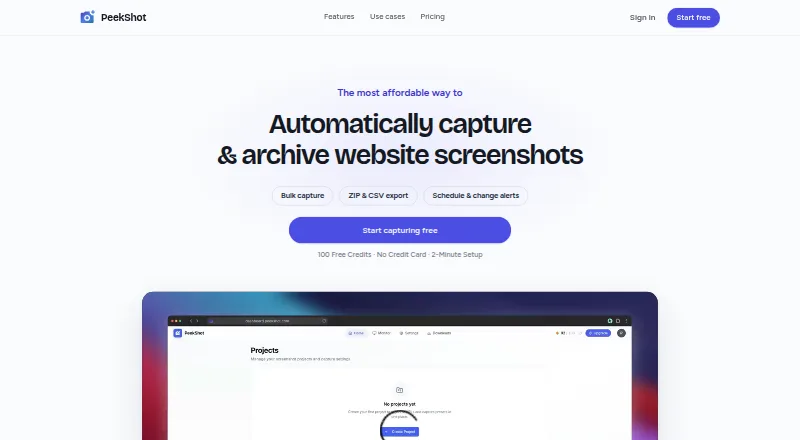
PeekShot is a cloud screenshot service for developers, marketers, and teams that need repeatable image captures from websites or supplied HTML. Its web dashboard handles projects, bulk URL imports, scheduled jobs, and downloadable archives, while the API supports programmatic workflows. Capture controls include full-page rendering, custom viewport width and height, device presets, image formats, and configurable delays, making it suitable for documentation, campaign review, QA archives, and other recurring screenshot work.
Pricing is organized around monthly plans. Basic costs $29 per month and includes full-page captures, daily, weekly, and monthly scheduling, one-year data retention, ZIP and CSV downloads, and email support. Advance costs $79 per month and adds API and webhook access while including Basic features. Premium costs $149 per month, includes Advance features, adds the PeekShot Pro add-on, and provides priority support. PeekShot Pro is also available separately for $9 per month or $90 per year, with website change detection, timestamped screenshots, Slack integration, and Google Drive and Dropbox sync. A free account starts with 100 credits, rather than an unlimited free plan.
The product’s strongest fit is scheduled monitoring and bulk export. CSV imports, ZIP/CSV exports, webhooks, and storage connections to Google Drive, Dropbox, and Amazon S3 support workflows that move beyond one-off captures. Pro monitoring covers visual, content, and SEO changes, while the API is available through Advance or higher. Teams wanting recurring evidence and integrations should consider PeekShot; those seeking a permanently free service, built-in API access on the entry tier, or support beyond email may prefer an alternative.
PeekShot pricing
All 4 PeekShot plans and prices →
PeekShot fact sheet
| Free plan | No |
|---|---|
| Paid from | $29/mo |
| HTML input | Yes |
| PDF output | Not verified |
| Full-page capture | Yes |
| Custom viewport | Yes |
| Wait conditions | Yes |
| Geo-location | Not verified |
| Deployment | Cloud |
| Platforms | Web |
| Support | |
| Built for | Solo, Small business, Mid-market (editorial estimate) |
| Integrations | 4 integrations: Slack, Google Drive, Dropbox, Amazon S3 |
| Pricing | From $29/mo (source) |
| Website | peekshot.com |
| Facts checked | 29 Sep 2026 |
PeekShot integrations
PeekShot lists 4 integrations on its own site.
- Slack
- Google Drive
- Dropbox
- Amazon S3
Alternatives to PeekShot
- UrlboxA configurable rendering API with full-page capture, varied outputs, and storage integrations.9.0
- ScrapingBeeA broad scraping API that adds screenshots to browser rendering and extraction tools.8.0
- AddScreenshotsBroad screenshot automation and delivery options with a free starting tier.7.9


See all PeekShot alternatives →
Used PeekShot? Be the first to review it
The editor score above is our own research. What this page doesn't have yet is a reader's view — what you used PeekShot for, what worked and what didn't. No stars are seeded and no review is paid for; an editor reads every one before it appears.
Write a reviewTwo minutes · verified accounts only · read by an editor before it appears
Featured on iTechGuides

PeekShot is listed in our Screenshot APIs directory. Add the badge to your site — it links back to this page.
<a href="https://www.itechguides.com/products/peekshot/"><img src="https://www.itechguides.com/best/badge/peekshot.svg" alt="Featured on iTechGuides" width="230" height="46"></a>
Reviewed by iTechGuides Editors · Editorial team · Updated Sep 2026
Advertiser disclosure: iTechGuides is reader-supported. We may earn a commission when you click some links. It never changes a score or a verdict. How we rank.
Last updated · How we research and update