PeaZip
PeaZip: A capable free archive manager for desktop users who need broad format coverage and file utilities. Ranked #2 of 36 in File Compression Software by our editors (9.2/10); pricing: Free plan; best for broad, free desktop archiving.
At a glance
- Editor score9.2 / 10
- PricingFree plan
- Best forBroad, free desktop archiving
- Free planYes
- Paid fromFree
- Archive encryptionYes
- Facts checked20 Sep 2026
Where it wins
- Opens and extracts more than 200 archive types
- Includes encryption, splitting, repair, hashing, and secure deletion
- Portable packages and command-line script export support flexible workflows
Where it doesn't
- The interface includes more file-management tools than some users need
- RAR creation is conditional rather than broadly supported
- There are no AI features
Our verdict on PeaZip
PeaZip is a free, open-source file and archive manager for desktop users who need to create, convert, browse, test, split, join, and extract compressed files. It creates archives in formats including 7Z, ARC, BZ2, GZ, PEA, TAR, WIM, and ZIP, while opening and extracting more than 200 archive types. Its free and open-source plan is LGPLv3 licensed and available for personal, professional, and commercial use. Official packages support BSD, Linux, macOS, and Windows, with portable packages that do not require installation.
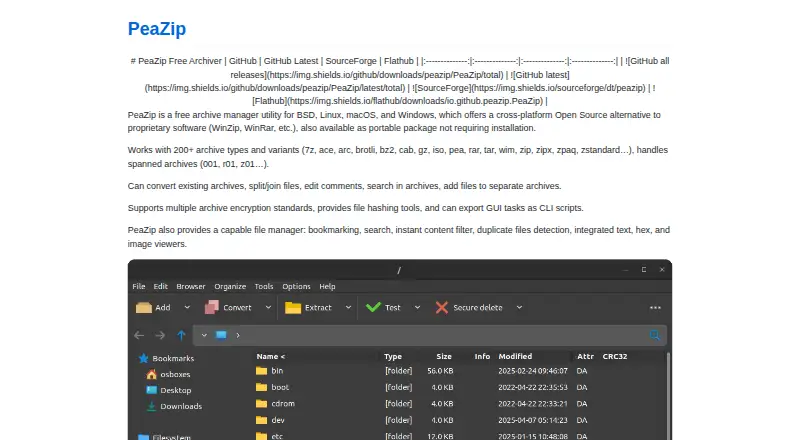
Its strongest fit is breadth combined with practical archive controls. PeaZip supports password-based encryption using standards including AES, Serpent, and Twofish, with optional keyfiles. Users can split and join files, create spanned archives, and use recovery records for archive repair in supported formats. File hashing, checksum verification, secure deletion, and a file manager with search, bookmarks, filters, and viewers extend it beyond basic compression. These capabilities suit users handling varied archive formats, transfer-sized files, or workflows that need verification and recovery options.
PeaZip also connects graphical work with automation by exporting GUI archive tasks as command-line scripts. That makes it a useful choice for repeatable desktop or scripted workflows, while portable packages can simplify use on systems where installation is not preferred. Its main trade-off is scope: users seeking only a minimal archive utility may find the file-management and security tools unnecessary. RAR creation is conditional, so users whose workflow depends on creating RAR archives should compare alternatives. Choose PeaZip for free, broad desktop archiving with encryption and file utilities; choose another tool if a narrower interface or RAR creation is the priority.
Your product? Our editors can test PeaZip in depth and publish a review, labelled as paid · from $149/mo →
PeaZip pricing
All 1 PeaZip plans and prices →
PeaZip fact sheet
| Free plan | Yes |
|---|---|
| Paid from | Free |
| Archive formats | Creates 7Z, ARC, BZ2, GZ, PAQ/LPAQ/ZPAQ, PEA, QUAD/BALZ/BCM, RAR conditionally, TAR, UPX, WIM, and ZIP/ZIPX; extracts 200+ types |
| Archive encryption | Yes |
| Split archives | Yes |
| Command-line tools | Yes |
| Portable version | Yes |
| Archive repair | Yes |
| Supported platforms | BSD, Linux, macOS, Windows |
| Deployment | Desktop |
| Platforms | Linux, macOS, Windows |
| Pricing | Free plan (source) |
| Website | peazip.github.io |
| Facts checked | 20 Sep 2026 |
Alternatives to PeaZip
- 7-ZipA free, open-source archiver with broad formats, encryption, recovery tools, and cross-platform support.9.4
- PowerArchiverA format-rich archive tool for business workflows, automation, and secure file handling.9.0
- BandizipA capable cross-platform archiver with encryption, splitting, and a free edition.8.8


PeaZip vs the competition
- PeaZip vs 7-Zip
- PeaZip vs PowerArchiver
- PeaZip vs Bandizip
- PeaZip vs Keka
- PeaZip vs Ark
- PeaZip vs File Roller


Compare PeaZip with any tool side by side →
Used PeaZip? Be the first to review it
The editor score above is our own research. What this page doesn't have yet is a reader's view — what you used PeaZip for, what worked and what didn't. No stars are seeded and no review is paid for; an editor reads every one before it appears.
Write a reviewTwo minutes · verified accounts only · read by an editor before it appears
Featured on iTechGuides

PeaZip is listed in our File Compression Software directory. Add the badge to your site — it links back to this page.
<a href="https://www.itechguides.com/products/peazip/"><img src="https://www.itechguides.com/best/badge/peazip.svg" alt="Featured on iTechGuides" width="230" height="46"></a>
Reviewed by iTechGuides Editors · Editorial team · Updated Oct 2026
Advertiser disclosure: iTechGuides is reader-supported. Vendors can pay for top positions in our rankings and for a place on other products' pages, and we may earn a commission when you click some links. Bought places stand at the number bought; this page and our disclosure say so. Paying vendors may get a fuller, more detailed review from our editors, and that review can change their score. How we rank.
Last updated · How we research and update