PE-bear
PE-bear: A focused desktop tool for inspecting and editing Windows PE files. Ranked #63 of 72 in Reverse Engineering Tools by our editors (3.0/10); pricing: Free plan; best for quick inspection and editing of Windows PE files.
At a glance
- Editor score3.0 / 10
- PricingFree plan
- Best forQuick inspection and editing of Windows PE files
- Free planYes
- Paid fromFree
- DecompilerNo
- Facts checked23 Sep 2026
Where it wins
- Graphically inspects PE file structures, headers, and metadata
- Allows editing of PE file data
- Open-source and available at no cost
Where it doesn't
- Limited to Windows PE files rather than broader reverse engineering
- Does not provide decompilation or firmware analysis
- Community support may not suit teams needing dedicated assistance
Our verdict on PE-bear
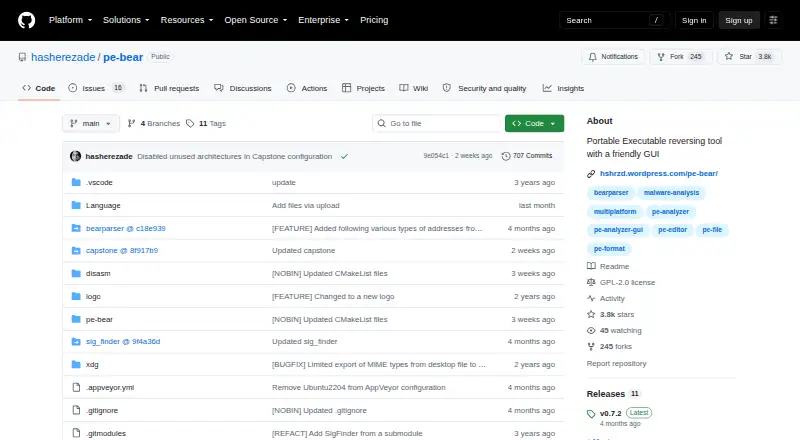
PE-bear is an open-source desktop tool for graphically inspecting and editing Windows Portable Executable (PE) files. It is aimed at reverse engineers and analysts who need to examine Windows executables through static analysis, with a particular fit for solo users and small teams. The interface presents PE structures, headers, and metadata, while also allowing changes to PE file data. That narrow purpose is its clearest appeal: it puts structure inspection and editing in one focused tool rather than trying to cover every reverse-engineering workflow.
For a task centered on PE files, the combination of graphical structure inspection, header and metadata viewing, and data editing gives PE-bear a practical scope. It runs on Windows and is deployed as a desktop application. The project is open source, with its source code and releases published on GitHub. That makes it a reasonable option for users who want a focused, freely available tool and are comfortable with a community-supported project. Its static-analysis orientation is also worth keeping in view: this is for examining file contents, not a general environment for broader analysis workflows.
The limits matter if your work extends beyond Windows executables. PE-bear is PE-specific, has no decompiler or firmware-analysis capability, and is not positioned for dynamic analysis. Community support may also be less suitable than a vendor-backed support arrangement for organizations that need formal assistance. Choose it when graphical PE inspection and editing are the main job; look elsewhere if you need a wider reverse-engineering toolkit, firmware workflows, or support beyond the community. Its strengths are concentrated in a clearly defined file format and task, rather than breadth.
Your product? Our editors can test PE-bear in depth and publish a review, labelled as paid · from $149/mo →
PE-bear pricing
PE-bear fact sheet
| Free plan | Yes |
|---|---|
| Paid from | Free |
| Decompiler | No |
| Firmware analysis | No |
| Analysis mode | Static |
| Plugin API | Not verified |
| Supported platforms | Windows |
| Supported architectures | Not verified |
| Deployment | Desktop |
| Platforms | Windows |
| Support | Community |
| Built for | Solo, Small business (editorial estimate) |
| Pricing | Free plan |
| Website | github.com |
| Facts checked | 23 Sep 2026 |
Alternatives to PE-bear
- GhidraA broad, free toolkit for native-code and bytecode reverse engineering.9.4
- IDA ProA comprehensive native reverse-engineering suite with substantial annual licensing costs.9.2
- ImHexA desktop binary inspection workbench with editing, patterns, comparison, and disassembly.8.7


See all PE-bear alternatives →
Used PE-bear? Be the first to review it
The editor score above is our own research. What this page doesn't have yet is a reader's view — what you used PE-bear for, what worked and what didn't. No stars are seeded and no review is paid for; an editor reads every one before it appears.
Write a reviewTwo minutes · verified accounts only · read by an editor before it appears
Featured on iTechGuides

PE-bear is listed in our Reverse Engineering Tools directory. Add the badge to your site — it links back to this page.
<a href="https://www.itechguides.com/products/pe-bear/"><img src="https://www.itechguides.com/best/badge/pe-bear.svg" alt="Featured on iTechGuides" width="230" height="46"></a>
Reviewed by iTechGuides Editors · Editorial team · Updated Oct 2026
Advertiser disclosure: iTechGuides is reader-supported. Vendors can pay for top positions in our rankings and for a place on other products' pages, and we may earn a commission when you click some links. Bought places stand at the number bought; this page and our disclosure say so. Paying vendors may get a fuller, more detailed review from our editors, and that review can change their score. How we rank.
Last updated · How we research and update