PDFRedaction
PDFRedaction: A free, browser-based redaction tool with local processing and OCR. Ranked #6 of 27 in Document Redaction Software by our editors (7.6/10); pricing: Free plan; best for private, free PDF redaction.
At a glance
- Editor score7.6 / 10
- PricingFree plan
- Best forPrivate, free PDF redaction
- Free planYes
- Paid fromFree
- Facts checked21 Sep 2026
Where it wins
- Local browser processing keeps documents off upload servers
- Detects 50+ PII types with AI and OCR
- Adds permanent redaction, cyber cleaning, and audit certificates
Where it doesn't
- Web-only access limits platform coverage
- Professional and Enterprise plans are coming soon
- Advanced tiers have no published prices
Our verdict on PDFRedaction
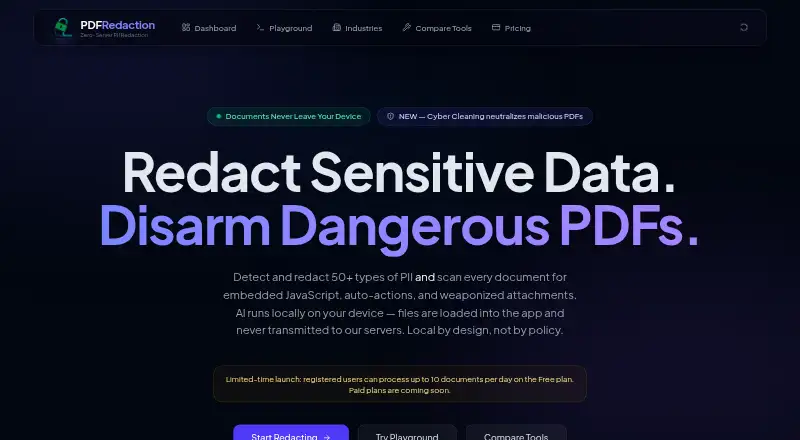
PDFRedaction is a browser-based document redaction tool from Anonyflow for organizations that need to identify and permanently remove personally identifiable information. It supports PDFs, scanned documents, images, and text-based files, making it relevant to legal, healthcare, government, and financial workflows. Users can review detected matches, apply black-box redactions, remove metadata, sign and stamp PDFs, and process regulated information in the browser. Documents are processed locally on the user's device, while account and usage management are handled separately.
The Free plan provides 50+ PII types detected, AI detection, OCR processing, image redaction, permanent black-box redaction, and 100% local processing. Professional is listed as coming soon and adds processing for up to 400 documents per month, compliance audit logs, custom detection rules, and priority support. Enterprise is also listed as coming soon, with high-volume processing, compliance audit logs, a HIPAA-eligible configuration, SSO, custom detection rules, and a BAA available. This gives buyers a clear progression from private individual redaction to managed compliance workflows.
PDFRedaction's standout capability is its combination of local processing and document cleanup. Alongside text, image, table, form, comment, annotation, and metadata redaction, it offers OCR for scanned PDFs and image-based documents, PDF cyber cleaning for embedded scripts and dangerous attachments, batch processing, local audit trails, and redaction certificates. That breadth suits privacy-sensitive PDF work, especially when avoiding document uploads is important. The trade-off is its web-only platform coverage, so teams needing a native desktop or broader application ecosystem should choose another tool. Pick PDFRedaction for private, free PDF redaction; consider alternatives if integrations or wider platform support are central requirements.
Your product? Our editors can test PDFRedaction in depth and publish a review, labelled as paid · from $149/mo →
PDFRedaction pricing
All 3 PDFRedaction plans and prices →
PDFRedaction fact sheet
| Free plan | Yes |
|---|---|
| Paid from | Free |
| Deployment | Not verified |
| OCR redaction | Yes |
| Automated detection | Yes |
| Batch processing | Yes |
| Audit trail | Yes |
| Input formats | PDF, JPG, JPEG, PNG, WEBP, TIFF, BMP, TXT, CSV, JSON, XML, HTML, Markdown |
| Maximum file size | Not verified |
| Deployment | Cloud |
| Platforms | Web |
| Compliance & security | GDPR, HIPAA, PCI DSS |
| Support | Email, Docs |
| Built for | Small business, Mid-market, Enterprise (editorial estimate) |
| Pricing | Free plan (source) |
| Website | pdfredaction.com |
| Facts checked | 21 Sep 2026 |
Alternatives to PDFRedaction
- PhilterFlexible redaction with OCR, policy controls, batch workflows, and auditable self-hosting.8.8
- CaseGuardA broad Windows redaction suite for teams processing sensitive documents and media.8.4
- RedactLawA legal-focused redaction tool with strong review, audit, and workflow controls.7.9


See all PDFRedaction alternatives →
PDFRedaction vs the competition
- PDFRedaction vs Philter
- PDFRedaction vs CaseGuard
- PDFRedaction vs RedactLaw
- PDFRedaction vs Redactable
- PDFRedaction vs AnteRedact
- PDFRedaction vs Document Redactor


Compare PDFRedaction with any tool side by side →
Used PDFRedaction? Be the first to review it
The editor score above is our own research. What this page doesn't have yet is a reader's view — what you used PDFRedaction for, what worked and what didn't. No stars are seeded and no review is paid for; an editor reads every one before it appears.
Write a reviewTwo minutes · verified accounts only · read by an editor before it appears
Featured on iTechGuides

PDFRedaction is listed in our Document Redaction Software directory. Add the badge to your site — it links back to this page.
<a href="https://www.itechguides.com/products/pdfredaction/"><img src="https://www.itechguides.com/best/badge/pdfredaction.svg" alt="Featured on iTechGuides" width="230" height="46"></a>
Reviewed by iTechGuides Editors · Editorial team · Updated Oct 2026
Advertiser disclosure: iTechGuides is reader-supported. Vendors can pay for top positions in our rankings and for a place on other products' pages, and we may earn a commission when you click some links. Bought places stand at the number bought; this page and our disclosure say so. Paying vendors may get a fuller, more detailed review from our editors, and that review can change their score. How we rank.
Last updated · How we research and update