PDFill PDF Tools
PDFill PDF Tools: A free Windows utility for managing PDF files, pages, and existing form fields. Ranked #22 of 26 in PDF Form Software by our editors (6.8/10); pricing: Free plan; best for free Windows PDF utility operations.
At a glance
- Editor score6.8 / 10
- PricingFree plan
- Best forFree Windows PDF utility operations
- Free planYes
- Paid fromFree
- Facts checked20 Sep 2026
Where it wins
- Free for personal or commercial use without added watermarks
- Handles merging, splitting, conversion, security, and page formatting
- Lists, deletes, and flattens existing PDF form fields
Where it doesn't
- Does not create PDF forms
- Does not provide text editing or OCR
- Windows-only desktop software
Our verdict on PDFill PDF Tools
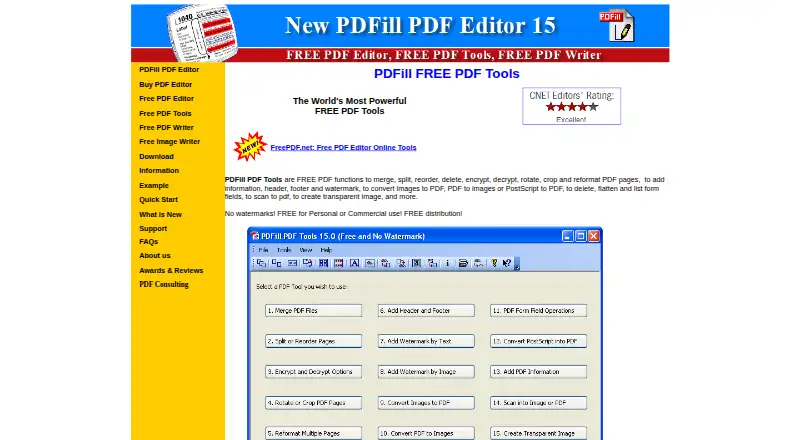
PDFill PDF Tools is a free Windows desktop utility for routine PDF file and page operations. It is suited to people who need to merge multiple PDFs, split or reorder pages, apply encryption, rotate or crop documents, add metadata or watermarks, and convert between PDF, image, and PostScript formats. It also scans paper documents to PDF or image files and can list, delete, or flatten existing form fields. The tool is aimed at practical document handling rather than full PDF authoring.
The pricing is straightforward: PDFill PDF Tools is free for personal or commercial use, and the product does not add watermarks. Its feature breadth covers many common utility tasks in one Windows application, including page management, document security, formatting, metadata, headers, footers, image conversion, and scanning. Existing form-field management adds useful support for working with forms that already exist, but it remains an operational feature rather than a form-design workflow. The paid prices associated with PDFill PDF Editor Professional and Enterprise are separate from PDFill PDF Tools.
Its main boundary is authoring depth. The published specifications show no form creation, text editing, or OCR, so users who need to build interactive forms, revise PDF text, or recognize text in scanned documents should choose a different product. The Windows-only platform also limits it to that environment. Choose PDFill PDF Tools for free, broad PDF utility operations on Windows, especially when page manipulation, conversion, document protection, and basic existing-form management are the priority. Choose an alternative when editing, OCR, or new form creation is central to the workflow.
Your product? Our editors can test PDFill PDF Tools in depth and publish a review, labelled as paid · from $149/mo →
PDFill PDF Tools pricing
PDFill PDF Tools fact sheet
| Free plan | Yes |
|---|---|
| Paid from | Free |
| Import existing PDFs | Not verified |
| Field validation | Not verified |
| Conditional logic | Not verified |
| Data export | Not verified |
| API access | Not verified |
| Bulk PDF processing | Not verified |
| Signature fields | Not verified |
| Deployment | Desktop |
| Platforms | Windows |
| Support | Email, Tickets, Docs |
| Built for | Solo, Small business (editorial estimate) |
| Pricing | Free plan (source) |
| Website | pdfill.com |
| Facts checked | 20 Sep 2026 |
Alternatives to PDFill PDF Tools
- FormForgeA free, local-first PDF form editor with field detection, validation, and AcroForm export.9.4
- FillableA practical PDF workflow tool for conditional forms, signatures, OCR, and API automation.9.2
- PDF StudioA one-time-license PDF editor for advanced forms across Windows, macOS, and Linux.8.9



See all PDFill PDF Tools alternatives →
Also Ranked In
PDFill PDF Tools is ranked in 2 of our directories.
Used PDFill PDF Tools? Be the first to review it
The editor score above is our own research. What this page doesn't have yet is a reader's view — what you used PDFill PDF Tools for, what worked and what didn't. No stars are seeded and no review is paid for; an editor reads every one before it appears.
Write a reviewTwo minutes · verified accounts only · read by an editor before it appears
Featured on iTechGuides

PDFill PDF Tools is listed in our PDF Form Software directory. Add the badge to your site — it links back to this page.
<a href="https://www.itechguides.com/products/pdfill-pdf-tools/"><img src="https://www.itechguides.com/best/badge/pdfill-pdf-tools.svg" alt="Featured on iTechGuides" width="230" height="46"></a>
Reviewed by iTechGuides Editors · Editorial team · Updated Oct 2026
Advertiser disclosure: iTechGuides is reader-supported. Vendors can pay for top positions in our rankings and for a place on other products' pages, and we may earn a commission when you click some links. Bought places stand at the number bought; this page and our disclosure say so. Paying vendors may get a fuller, more detailed review from our editors, and that review can change their score. How we rank.
Last updated · How we research and update