
PDFCreator
PDFCreator: A Windows-focused PDF converter for batch processing, automation, and controlled output. Ranked #3 of 45 in PDF Creation Software by our editors (9.1/10); pricing: Free plan · 30-day trial; best for windows batch PDF conversion.
At a glance
- Editor score9.1 / 10
- PricingFree plan · 30-day trial
- Best forWindows batch PDF conversion
- Free planYes
- Facts checked21 Sep 2026
Where it wins
- Batch and command-line conversion support
- PDF, PDF/A, PDF/X, image, and TXT output
- Profiles, encryption, signatures, and cloud transfers
Where it doesn't
- Free edition is limited to personal use
- Business deployments require a business edition
- Less focused on data-driven PDF creation
Our verdict on PDFCreator
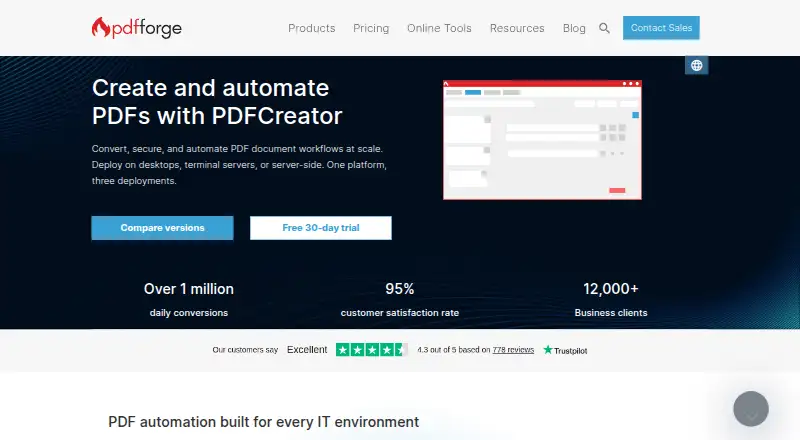
PDFCreator is Windows software that converts printable documents through a virtual printer into PDF, PDF/A, PDF/X, PNG, JPEG, TIFF, and TXT files. It is aimed at individuals, teams, and managed IT environments that need repeatable document conversion rather than a data-driven PDF creation platform. The product supports Windows desktop and Windows Server environments, with command-line and COM interfaces for programmatic workflows.
Its strongest fit is batch processing and workflow control. Users can combine and rearrange documents, apply watermarks and stamps, protect files with passwords and AES encryption, add digital signatures, and save output automatically through configurable profiles. Command-line conversion, batch file processing, and the COM interface extend those capabilities into automated jobs. Output can also be uploaded through Dropbox, Microsoft OneDrive, Microsoft SharePoint, FTP, SFTP, HTTP, or SMTP connections, which suits organizations with established file-transfer and email workflows.
PDFCreator includes a free edition for personal use, while business and managed IT environments require a business edition. PDFCreator Professional adds ad-free use, 256-bit encryption, user tokens, custom scripts, group policies, and priority support. That tier is more relevant for centralized administration and controlled deployment than for occasional home conversion. Choose PDFCreator when Windows compatibility, batch conversion, format control, and automation are central requirements. Choose another category fit when the priority is data-driven PDF creation or a broader authoring workflow rather than converting printable documents.
Your product? Our editors can test PDFCreator in depth and publish a review, labelled as paid · from $149/mo →
PDFCreator pricing
All 1 PDFCreator plans and prices →
PDFCreator fact sheet
| Free plan | Yes |
|---|---|
| Paid from | Not verified |
| Data merge | Not verified |
| Bulk PDF generation | Not verified |
| API access | Yes |
| Maximum pages | Not verified |
| Input sources | Not verified |
| Fillable form creation | Not verified |
| Deployment | Not verified |
| Free trial | 30 days |
| Deployment | Desktop, Self-hosted |
| Platforms | Windows |
| Support | Email, Community, Docs |
| Built for | Solo, Small business, Mid-market, Enterprise (editorial estimate) |
| Integrations | 8 integrations: Dropbox, Microsoft OneDrive, Microsoft SharePoint, Outlook Web Access, FTP, SFTP … |
| Pricing | Free plan · 30-day trial (source) |
| Website | pdfforge.org |
| Facts checked | 21 Sep 2026 |
PDFCreator integrations
PDFCreator lists 8 integrations on its own site.
- Dropbox
- Microsoft OneDrive
- Microsoft SharePoint
- Outlook Web Access
- FTP
- SFTP
- HTTP
- SMTP
Alternatives to PDFCreator
- Wondershare PDFelementA broad PDF toolkit covering editing, OCR, forms, conversion, signatures, and AI workflows.9.3
- Adobe PDF Services APIA broad PDF automation API for enterprise document workflows and integrations.9.2
- iText CoreA focused, self-hosted PDF library for teams that need code-level control.8.9


See all PDFCreator alternatives →
PDFCreator vs the competition
- PDFCreator vs Wondershare PDFelement
- PDFCreator vs Adobe PDF Services API
- PDFCreator vs iText Core
- PDFCreator vs PDF24 Creator
- PDFCreator vs Conga Composer
- PDFCreator vs Formstack Documents



Compare PDFCreator with any tool side by side →
Also Ranked In
PDFCreator is ranked in 2 of our directories.
Used PDFCreator? Be the first to review it
The editor score above is our own research. What this page doesn't have yet is a reader's view — what you used PDFCreator for, what worked and what didn't. No stars are seeded and no review is paid for; an editor reads every one before it appears.
Write a reviewTwo minutes · verified accounts only · read by an editor before it appears
Featured on iTechGuides

PDFCreator is listed in our PDF Creation Software directory. Add the badge to your site — it links back to this page.
<a href="https://www.itechguides.com/products/pdfcreator/"><img src="https://www.itechguides.com/best/badge/pdfcreator.svg" alt="Featured on iTechGuides" width="230" height="46"></a>
Reviewed by iTechGuides Editors · Editorial team · Updated Oct 2026
Advertiser disclosure: iTechGuides is reader-supported. Vendors can pay for top positions in our rankings and for a place on other products' pages, and we may earn a commission when you click some links. Bought places stand at the number bought; this page and our disclosure say so. Paying vendors may get a fuller, more detailed review from our editors, and that review can change their score. How we rank.
Last updated · How we research and update