
PassMark DiskCheckup
PassMark DiskCheckup: A focused free tool for Windows SMART monitoring, tests, alerts, and drive activity. Ranked #10 of 30 in Disk Health Monitoring Software by our editors (8.2/10); pricing: Free plan; best for free personal-use Windows monitoring.
At a glance
- Editor score8.2 / 10
- PricingFree plan
- Best forFree personal-use Windows monitoring
- Free planYes
- Paid fromFree
- SMART monitoringYes
- Facts checked23 Sep 2026
Where it wins
- SMART thresholds, temperature, and reliability indicators
- Short and extended disk self-tests with email notifications
- Real-time activity plus detailed drive identification data
Where it doesn't
- Windows-only platform support
- No remote monitoring capability
- No explicit SSD-wear indicator reporting
Our verdict on PassMark DiskCheckup
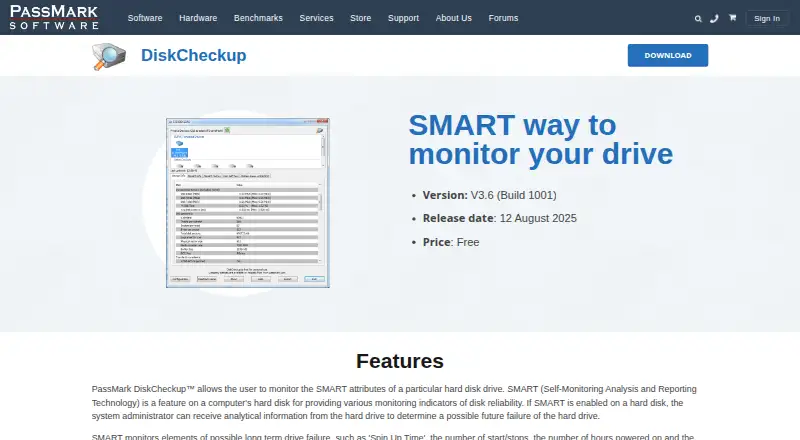
PassMark DiskCheckup is a free Windows utility for personal use that reads and displays SMART attributes from supported hard disk drives and SSDs. It is aimed at individuals who want local visibility into drive health, including temperature, reliability indicators, power-on time, start/stop counts, and attribute thresholds. The interface also presents drive geometry, serial number, model, rotation rate, and real-time disk activity, making it useful for checking both health signals and basic hardware information in one place.
The pricing structure is straightforward: the Free for personal use plan costs $0 as a one-time price. It includes SMART attribute monitoring, SMART threshold display, drive temperature and reliability indicators, and short and extended disk self-tests. Email notifications can be sent when SMART thresholds are exceeded. DiskCheckup also provides Threshold Exceed Condition prediction, but those predictions are intended only as guides. For a personal Windows computer, this combination covers the core local monitoring needs without a paid tier or subscription structure.
Its focus is local drive inspection rather than fleet or cloud monitoring. DiskCheckup does not provide remote monitoring, integrations, or an explicit SSD-wear indicator report, and it supports Windows only. That makes it a practical choice for personal users who want SMART data, self-tests, temperature reporting, and threshold alerts on a Windows machine. Users needing cross-platform coverage, remote oversight, or more specific SSD-wear visibility should choose a tool designed around those requirements instead.
Your product? Our editors can test PassMark DiskCheckup in depth and publish a review, labelled as paid · from $149/mo →
PassMark DiskCheckup pricing
All 1 PassMark DiskCheckup plans and prices →
PassMark DiskCheckup fact sheet
| Free plan | Yes |
|---|---|
| Paid from | Free |
| SMART monitoring | Yes |
| SSD wear tracking | Not verified |
| Temperature alerts | Yes |
| Failure warnings | Yes |
| Remote monitoring | No |
| Drives on cheapest plan | Not verified |
| Supported platforms | Windows; SMART-compatible SATA, USB, FireWire and PCIe M.2 NVMe drives |
| Deployment | Desktop |
| Platforms | Windows |
| Built for | Solo, Small business (editorial estimate) |
| Pricing | Free plan (source) |
| Website | passmark.com |
| Facts checked | 23 Sep 2026 |
Alternatives to PassMark DiskCheckup
- Hard Disk SentinelA full-featured Windows and Linux monitor with diagnostics, alerts, backups, and remote management.9.4
- smartmontoolsBroad, free disk-health monitoring for technical users comfortable with command-line tools.9.2
- DA Drive AnalyzerA low-cost, cross-platform drive monitor with AI predictions and NAS coverage.9.0


See all PassMark DiskCheckup alternatives →
Also Ranked In
PassMark DiskCheckup is ranked in 3 of our directories.
Used PassMark DiskCheckup? Be the first to review it
The editor score above is our own research. What this page doesn't have yet is a reader's view — what you used PassMark DiskCheckup for, what worked and what didn't. No stars are seeded and no review is paid for; an editor reads every one before it appears.
Write a reviewTwo minutes · verified accounts only · read by an editor before it appears
Featured on iTechGuides

PassMark DiskCheckup is listed in our Disk Health Monitoring Software directory. Add the badge to your site — it links back to this page.
<a href="https://www.itechguides.com/products/passmark-diskcheckup/"><img src="https://www.itechguides.com/best/badge/passmark-diskcheckup.svg" alt="Featured on iTechGuides" width="230" height="46"></a>
Reviewed by iTechGuides Editors · Editorial team · Updated Oct 2026
Advertiser disclosure: iTechGuides is reader-supported. Vendors can pay for top positions in our rankings and for a place on other products' pages, and we may earn a commission when you click some links. Bought places stand at the number bought; this page and our disclosure say so. Paying vendors may get a fuller, more detailed review from our editors, and that review can change their score. How we rank.
Last updated · How we research and update