
OWLGrEd
OWLGrEd: Free OWL editing and diagram tools for ontology work centered on visual structure. Ranked #28 of 33 in Knowledge Graph Software by our editors (6.3/10); pricing: Free plan; best for users who mainly need visual OWL editing.
At a glance
- Editor score6.3 / 10
- PricingFree plan
- Best forUsers who mainly need visual OWL editing
- Free planYes
- Paid fromFree
- Facts checked24 Sep 2026
Where it wins
- Create, edit, and visualize OWL ontologies in a graphical editor
- Customize diagram layout, shapes, colors, line routing, and fonts
- Save .owl files and export diagrams to SVG and picture formats
Where it doesn't
- Import is centered on .owl files
- Documented features focus on visual ontology work
- The online tool is for viewing and sharing visualizations
Our verdict on OWLGrEd
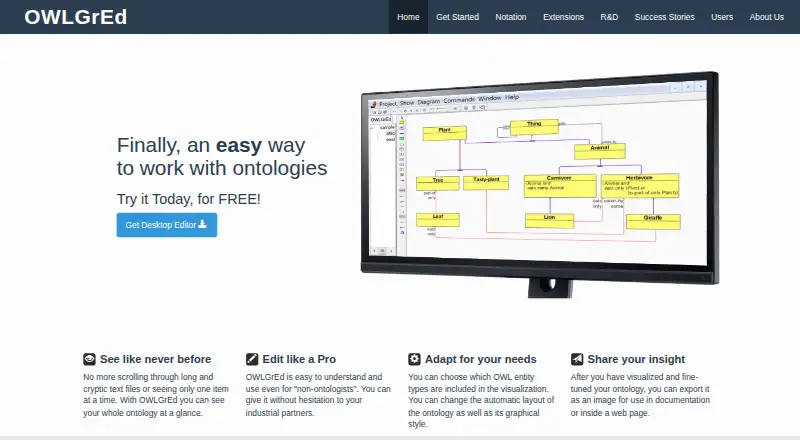
OWLGrEd is a graphical editor for creating, editing, and visualizing OWL ontologies. It suits ontology designers and other users who need to inspect or present ontology structures as diagrams. The downloadable desktop editor is free for any use, and an online tool lets users view and share ontology visualizations. Its emphasis is visual modeling rather than a broad set of documented graph operations, making it a better fit for diagram-centered OWL work than for teams seeking a wider knowledge graph environment.
The diagram editor provides control over how ontology structures appear: users can change automatic layout and customize element shapes, colors, line routing, visible fields, and fonts. Existing ontologies can be visualized from .owl files, and the editor can save ontologies to .owl files. Diagrams can be exported to SVG and picture formats. Downloadable plugins offer a way to extend the editor, though the product description does not specify plugin functions. These capabilities make OWLGrEd useful when the task is to create or present ontology diagrams, rather than to rely on documented query or reasoning workflows.
The product is available as a desktop editor for Windows and as a separate web-based visualization tool. That distinction matters: the online option is described for viewing and sharing, not as a browser-based editing equivalent. Support is listed by email. Choose OWLGrEd if free OWL editing, layout control, and diagram export are the priorities. Consider another product if your work depends on documented SPARQL, reasoning, or broader graph operations; those are not part of OWLGrEd's described feature set.
Your product? Our editors can test OWLGrEd in depth and publish a review, labelled as paid · from $149/mo →
OWLGrEd pricing
All 1 OWLGrEd plans and prices →
OWLGrEd fact sheet
| Free plan | Yes |
|---|---|
| Paid from | Free |
| Ontology modeling | Yes |
| Semantic reasoning | Not verified |
| RDF/SPARQL support | Not verified |
| Graph visualization | Yes |
| Import formats | .owl |
| Deployment | Both |
| Query languages | Not verified |
| Deployment | Desktop, Cloud |
| Platforms | Web, Windows |
| Support | |
| Built for | Solo, Small business, Mid-market, Enterprise (editorial estimate) |
| Pricing | Free plan (source) |
| Website | owlgred.lumii.lv |
| Facts checked | 24 Sep 2026 |
Alternatives to OWLGrEd
- Neo4jA developer-focused property graph with broad tooling, cloud options, and AI-ready search.9.3
- ProtégéA strong free choice for OWL ontology work, with collaboration and reasoning options.9.1
- Progress SemaphoreA mature platform for ontology management, semantic enrichment, and enterprise knowledge graphs.9.0



See all OWLGrEd alternatives →
Used OWLGrEd? Be the first to review it
The editor score above is our own research. What this page doesn't have yet is a reader's view — what you used OWLGrEd for, what worked and what didn't. No stars are seeded and no review is paid for; an editor reads every one before it appears.
Write a reviewTwo minutes · verified accounts only · read by an editor before it appears
Featured on iTechGuides

OWLGrEd is listed in our Knowledge Graph Software directory. Add the badge to your site — it links back to this page.
<a href="https://www.itechguides.com/products/owlgred/"><img src="https://www.itechguides.com/best/badge/owlgred.svg" alt="Featured on iTechGuides" width="230" height="46"></a>
Reviewed by iTechGuides Editors · Editorial team · Updated Oct 2026
Advertiser disclosure: iTechGuides is reader-supported. Vendors can pay for top positions in our rankings and for a place on other products' pages, and we may earn a commission when you click some links. Bought places stand at the number bought; this page and our disclosure say so. Paying vendors may get a fuller, more detailed review from our editors, and that review can change their score. How we rank.
Last updated · How we research and update