
Overwrite
Overwrite: A focused macOS wiper with affordable certificates and clear pass-level controls. Ranked #21 of 28 in Disk Wiping Software by our editors (7.2/10); pricing: Free plan; best for mac users wanting inexpensive certificates.
At a glance
- Editor score7.2 / 10
- PricingFree plan
- Best forMac users wanting inexpensive certificates
- Free planYes
- Paid from$12.99/yr
- Wipe scopeDisk
- Facts checked20 Sep 2026
Where it wins
- Signed PDF certificates and CSV wipe-history exports
- One-, three-, seven-, and 35-pass overwrite protocols
- APFS safeguards, automatic unmounting, and live wipe progress
Where it doesn't
- Runs only on macOS
- Non-bootable, limiting system-drive workflows
- Advanced verification features require the Elite plan
Our verdict on Overwrite
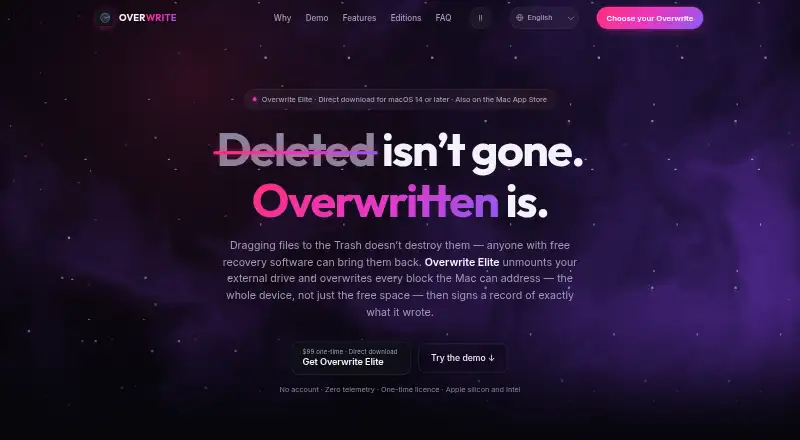
Overwrite is a native macOS disk-sanitization utility for securely erasing external drives, USB flash drives, SD cards, and external SSDs or HDDs. It supports both free-space and full-disk wiping, making it relevant to individuals, IT asset disposal professionals, forensic examiners, laboratories, and organizations that need documented external-media sanitization. Sector mapping, drive-health views, and automatic unmounting before wiping add useful operational context, while APFS read-only partition and hidden-snapshot safeguards address common Mac storage considerations.
The plan structure starts with Preview, a free option for scanning and inspecting external drives, viewing sector maps and drive health, and previewing features without secure wiping. Annual Pro costs $12.99 per year and adds unlimited secure wipes, four wipe protocols, signed erasure certificates, wipe history, and CSV export. Lifetime Pro costs $24.99 one time and includes Annual Pro features without a recurring subscription, with use on every Mac you own. Elite costs $99 one time and adds raw whole-device access, a cryptographically signed certificate, a standalone certificate verifier, and read-back verification. Lab Pack costs $399 one time for professional lab licensing, while Site License costs $2,999 one time. Enterprise adds site-wide licensing, organization branding on certificates, consolidated erasure records, and purchase order, W-9, and invoice support.
For routine external-media sanitization, the combination of selectable overwrite levels, locally signed PDF certificates, CSV history, and live progress gives Overwrite a clear focus on documented erasure. The one-, three-, seven-, and 35-pass choices suit workflows with different wiping requirements, while SSD, removable-media, and disk-wiping support broaden its practical scope. Its main boundary is platform and workflow: Overwrite runs on macOS and is non-bootable. Mac users seeking affordable certificates should consider Lifetime Pro or Annual Pro; laboratories and professional deployments have higher-tier licensing, while teams needing bootable or non-macOS wiping should choose an alternative.
Your product? Our editors can test Overwrite in depth and publish a review, labelled as paid · from $149/mo →
Overwrite pricing
All 7 Overwrite plans and prices →
Overwrite fact sheet
| Free plan | Yes |
|---|---|
| Paid from | $12.99/yr |
| Wipe scope | Disk |
| Bootable media | No |
| SSD support | Yes |
| Removable media | Yes |
| Erasure reports | Yes |
| Verification mode | Certificate |
| Deployment | Desktop |
| Platforms | macOS |
| Support | |
| Built for | Solo, Small business, Mid-market, Enterprise (editorial estimate) |
| Pricing | Free plan (source) |
| Website | getoverwrite.com |
| Facts checked | 20 Sep 2026 |
Alternatives to Overwrite
- DriveWipeA broad open-source toolkit for verified disk wiping across major desktop platforms.9.4
- WipeOSA broad enterprise erasure platform with cryptographic reporting and cloud oversight.9.2
- Blancco Drive EraserA standards-focused erasure platform with certificates, automation, and enterprise integrations.9.0

See all Overwrite alternatives →
Used Overwrite? Be the first to review it
The editor score above is our own research. What this page doesn't have yet is a reader's view — what you used Overwrite for, what worked and what didn't. No stars are seeded and no review is paid for; an editor reads every one before it appears.
Write a reviewTwo minutes · verified accounts only · read by an editor before it appears
Featured on iTechGuides

Overwrite is listed in our Disk Wiping Software directory. Add the badge to your site — it links back to this page.
<a href="https://www.itechguides.com/products/overwrite/"><img src="https://www.itechguides.com/best/badge/overwrite.svg" alt="Featured on iTechGuides" width="230" height="46"></a>
Reviewed by iTechGuides Editors · Editorial team · Updated Oct 2026
Advertiser disclosure: iTechGuides is reader-supported. Vendors can pay for top positions in our rankings and for a place on other products' pages, and we may earn a commission when you click some links. Bought places stand at the number bought; this page and our disclosure say so. Paying vendors may get a fuller, more detailed review from our editors, and that review can change their score. How we rank.
Last updated · How we research and update